On Sale: GamesAssetsToolsTabletopComics
Indie game storeFree gamesFun gamesHorror games
Game developmentAssetsComics
SalesBundles
Jobs
TagsGame Engines

pixelomer

48
Posts
3
Topics
35
Followers
1
Following
A member registered Mar 06, 2022 · View creator page →

Creator of
Recent community posts

Most shimeji are made by downloading an existing shimeji and replacing its images (and sometimes adding custom actions). Also, shimeji are generally made using Shimeji-ee, for Shimeji-ee, which you can find here: https://kilkakon.com/. It is therefore better to first make and test your shimeji with Shimeji-ee, and only try using it with Shijima once you've confirmed that it works as expected.

If you need help with making your own shimeji or if you're having trouble using Shimeji-ee, you can join Kilkakon's Discord server. There's a channel dedicated to shimeji discussion and the people there are generally very helpful.

(2 edits)

(EDIT: Both files are safe, but the 32-bit version has many false-positive detections. I've now added a 64-bit version of the same program which you can use if you're having issues with the 32-bit version.)

It is a false positive (i.e. the file is safe). The program is compiled with GitHub Actions and uploaded to itch.io as-is. All of the effects in the program are purely visual and do not affect your computer in any way. You can see the scan results for the program here: https://www.virustotal.com/gui/file/493d800bdc755d74ed4c8daacbbcaf0be92d92b23b9b...

You'll see that while some AVs detected the file as malicious, they're a small portion of the AVs used by VirusTotal. Many other well-known AVs concluded that the file is safe. Furthermore, among the AVs that did detect the file as malicious, it seems like they all detected something different, implying that these are all false-positives for other unrelated malware signatures.

(Assuming you are referring to macOS 10.13, not macOS 13,) I don't think Qt 6 supports that version, so it might not be possible to use Shijima-Qt on macOS 10.13. The automated builds also only support arm64 Macs and I am unable to test compatibility with Intel Macs, so I can't easily add support for older macOS versions. Sorry about that.

On Windows 10/11, it should just work. On macOS, it should work once you enable the Accessibility permission. On Linux, it should work on GNOME and KDE Plasma, but make sure you are using the AppImage version and not the Flathub version.

It looks like your desktop environment may not be fully supported. You should still be able to launch shijima-qt (the binary) with the following environment variables:

SHIJIMA_NO_WINDOW_TRACKING=1 LD_LIBRARY_PATH=/home/foolishmachine/.config/itch/apps/shijima

What shimeji are you having problems with? Could you share its link?

It's probably a better idea to first make your shimeji for Shimeji-ee and only import it to Shijima once it works with Shimeji-ee. If you need assistance, people in the Kilkakon Discord server could help you with getting Shimeji-ee up and running.

You can easily find many shimeji on the internet on websites like X, DeviantArt and Pixiv. You can also look them up on Google with a query like "<character name> shimeji". They're usually distributed as archives (i.e zip/rar/7z files). You can import them directly into Shijima without extracting them yourself.

Can you explain what happens instead? Do you get an error message? Which operating system are you using?

You download it, run shijima-qt.exe, import your shimeji and spawn as many of them as you want.

You can easily find many shimeji on the internet on websites like X, DeviantArt and Pixiv. You can also look them up on Google with a query like "<character name> shimeji". They're usually distributed as archives (i.e zip/rar/7z files). You can import them directly into Shijima without extracting them yourself.

(1 edit)

Hey there,

Thank you for making this, it looks great! I know this is for Windows only but I'm mainly a Linux user, so I wanted to make a version of it that works with Shimeji-ee and Shijima. This way, it'll also work on macOS, Linux and iOS (and potentially Android but I'm not familiar with Android too much). Would it be okay for me to use the frames in this program to make a new shimeji desktop pet?

Edit: I published the shimeji version on itch.io and included a link to this page. I hope that's okay: https://pixelomer.itch.io/shimeji-chan-shimeji

what if it was a square with a tilted square covering half of it, making a triangle

Since the code is constantly changing, I didn't upload a compiled binary to itch.io. You need a working C++ compiler to use the tool anyway, so I thought it made more sense to let the users compile the tool. You can find build instructions on sb2cpp's GitHub page.

I made this tool solely because it seemed like a fun project to work on. Small Basic is a very simple language mainly made as a way to get children interested in programming, so this tool doesn't really solve any real world problem. Furthermore, although I have never used Visual Basic myself, I assume Small Basic is nowhere near as powerful or complex as Visual Basic. However, Visual Basic does seem to be supported by Mono, a widely used cross platform implementation of the .NET framework. You should check it out if you want to port your Visual Basic games to other platforms.

(1 edit)

sb2cpp is the tool I made for Tool Jam 3. It is a compiler for Microsoft's Small Basic programming language and it works on Windows, macOS and Linux. However, it is still most likely full of inconsistencies and bugs. If you have the time, please give it a try and let me know if you find something that doesn't quite match the behaviour on the the official Small Basic documentation. While doing so, you could also make a small game with it! If you do so, please share its code here. I'm sure everyone would love to see it :)

(Although it would be great if your game worked with sb2cpp, you can also share a game you made with the official IDE.)

I've never seen anything like this before, very cool!

I like the idea of the tool but I think there are some areas where it could be improved.

  • Storing the key as a filename at any point doesn't seem like a good idea. Maybe you could use an environment variable instead?
  • This probably only affected me but in Turkish, i and ı are different letters. When I saw the Alt-I shortcut, I assumed it expected me to press Alt+i since that's what lowercase of I is in English but it actually expected me to press Alt+ı. Therefore, I think it might be better to use a letter other than i.
  • There is no obvious way to navigate older entries. It seems like the correct way to access older entries is starting the program as "jern.exe <path/to/file.se>" but this is never mentioned anywhere and there doesn't appear to be a help command either (I tried /?, --help and -h, none of them worked). It would be nice to have a way to navigate to older entries within the terminal interface itself.

I am looking forward to future versions of Jern!

Not that it is a bad tool (I think it's nice), I feel like this tool goes against that philosophy since it handles both journaling and encryption. I think it would have either offloaded encryption to a different utility or left it up to the user if it followed that philosophy.

This is the most useful tool in the jam in my opinion, so much banana knowledge! However, it seems like the user interface goes black except for the text slightly before the banana reaches "very sweet". Still, I might actually use this in the future.

Cute graphics but it is so hard! I knew I was bad at drawing but failing to paint a hat properly after 20 tries is just embarrassing.

The concept is interesting and... questionable. I think the game would have been much more enjoyable if it was presented better. The player is hard to control and this makes it difficult to aim. The bullet is also too fast. Maybe it is fast simply because "it is a bullet" but the speed makes it really hard to plan where to shoot next. Also, I feel like I beat some of the levels through unintended methods. The level design could have been cleaner.

(1 edit)

I like the concept and the level design is interesting! I just think a better tile could have been chosen. The current one is a bit hard to look at.

(1 edit)

The idea of making art with snake is... interesting, that's for sure. I like it! I just wish the game didn't let the player do a 180 degree turn though, I died twice because of that. (For example, down + right very quickly while going left)

Since others are putting up challenges as well, here is mine. In the game Loose Bits, beat my high score of 6300 points.
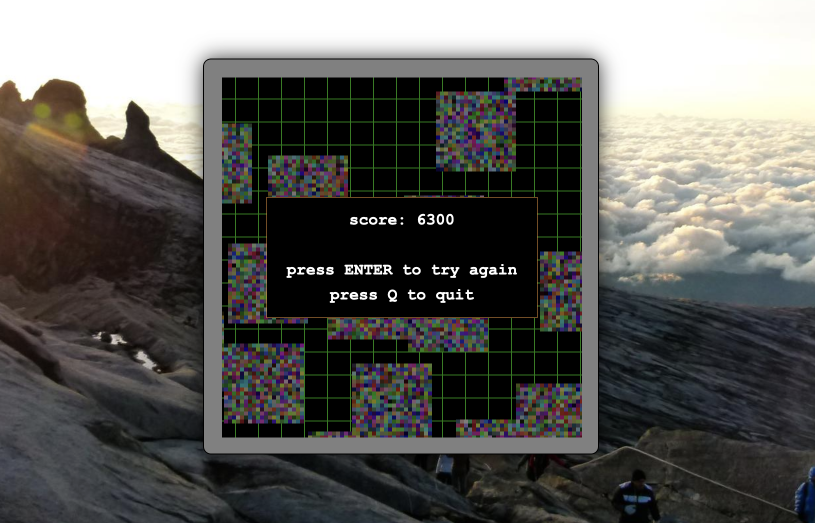

Here are some tips:

  • Shooting corrupts the game area and costs you 10 points. Don't shoot unless you know it is going to hit.
  • Try hitting two or more bugs at a time. Hitting one bug earns you only 100 points. Hitting two at a time earns you 400 points and hitting three at a time earns you as many as 900 points.
  • Kill the fast bugs early so that they don't cause you trouble later on.

I like it!

Here is my game: Mini Jam 111: Colors² - Loose Bits

Well... that was an experience

Nice game!

Rated and left a reply!

Here is my game: Mini Jam 111: Colors² - Loose Bits

I like the art and the music. The concept is also interesting but I feel like some things could have been better gameplay wise. The player is hard to control at times and the platforms turn gray even if you only touch them from the side. Apart from that, nice game!

I rated your game yesterday, it was fun!

Here is my game: Mini Jam 111: Colors² - Loose Bits

Rated and left a comment!

Here's my game: Mini Jam 111: Colors² - Loose Bits

The visuals are great and the concept is interesting but there seems to be a few issues with the game.

  • In the main menu, the transparent black background doesn't cover the entire screen (maybe because my display is 16:10 ?)
  • The game doesn't stop when the player dies, so it is theoretically possible to achieve an infinite score by continuing the game after dying.
  • The player can fall off the game area, effectively soft locking the game.

I love this game! Simple and addictive.

My high score is 6725.

I had planned to add all of the things you mentioned and even more but I only managed to get started on the game in the last day and I just didn't have the time for it. I might continue working on it after Mini Jam.

Mini Jam 111: Colors² - Loose Bits

I like the concept. A tutorial would be nice though. If it weren't for some of the comments in this page, I wouldn't have been able to figure out how to play the game.

I like it! (Didn't know just how much alternate universe me hated me)

Here's my game: Mini Jam 111: Colors² - Loose Bits

I really like this game, especially the graphics! And it's quite challenging! My best time is 54 seconds.

I like it! I left a comment on the rating page.

Here's my game: Mini Jam 111: Colors² - Loose Bits

I don't really play tower defense games but I liked this game! The graphics are nice, the gameplay is simple and overall I enjoyed it. I also really like the color changing mechanic.

During my first game, I was completely caught off guard by the purple one and I think I lost around 40 HP because of it. I was going to keep playing after that but when I tried to place a cannon the game stopped registering mouse clicks because of some kind of glitch so I had to reset the game...

Mini Jam 111: Colors² - Loose Bits

Gameplay wise, there are a lot of blind jumps and I think that makes some parts of the game more frustrating than fun. Spike collision feels too big, especially on short platforms that have spikes, making it very hard to land on them without dying. In the level before the last, the speed of the horizontal moving platforms is very close to the player speed, making it seem like you aren't moving. Also when standing on moving platforms, the player doesn't move with the platform which might have been an intentional decision but it doesn't feel right.

As for audio, a slower and less distracting sound could have been chosen for the ticking of the level timer in my opinion.