I'm glad the new interface looks good for you! Thanks for playing TaiFab! :D
objetdiscret
Creator of
Recent community posts
lol 😄
It's not, but that does remind me of a post from an amazing pixel artist: https://bsky.app/profile/rappenem.bsky.social/post/3kqldsxhprs23
No, the six extra puzzles in the Plus version are acailable AFTER you summon Chad. Have you checked your puzzle albums for missing puzzles? :) If you need further hints, please lwt us know!
Thank you for your enthusiastic comment! I'm really glad you've enjoyed the game, and I hope you'll look forward to Taiyaki Fabulous Test Kitchen!
Thank you so much for supporting TaiFab! In TaiFabPlus, there should be light lines for most of the grid, but dark lines every four squares:
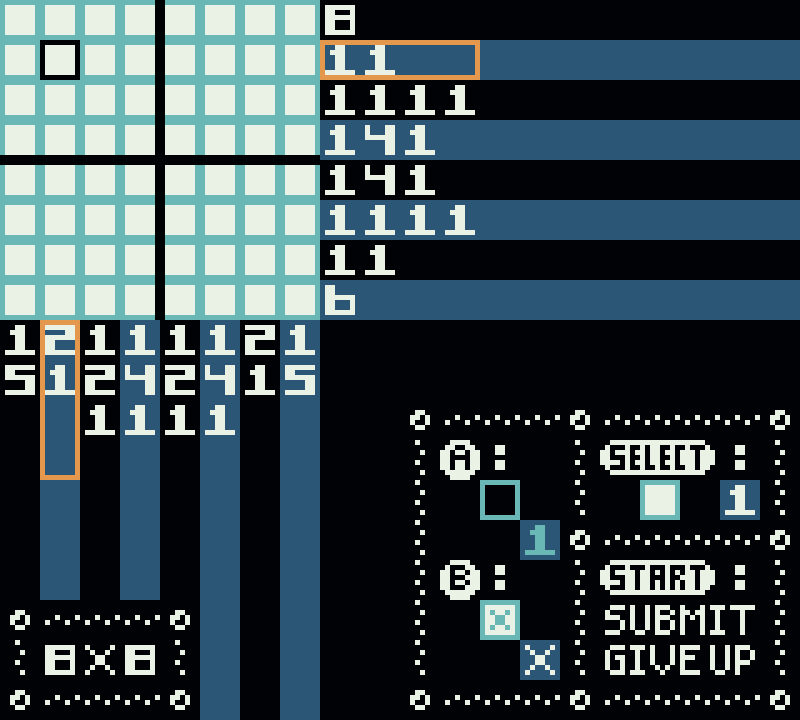
There isn't a special option to enable--it should just look like that. I'm not sure why the grid is hard to see on your particular device. Maybe you can check emulator options for color adjustment?
Thanks so much for playing and commenting! I hope these hints will help:
SPOILER
.
.
.
.
.
Missing puzzles hint: Have you tried sleeping in empty beds? There is more than one to sleep in. 🙂
Missing ducks hint: You can find four ducks before the ending and four more after the ending in the post-game area. 😄
Thank you so much for your support and I'm glad you enjoyed TaiFab!
The ability to run with the B-button is standard in the Plus version, so it doesn't need the debug boots. 😄 The run function in TaiFabPlus works exactly the same as the debug boots in the original release. I didn't make running the standard for the original TaiFab because it made the sprites shudder, but it doesn't do that on the GBC! Better processing power, I suppose. 🙂