On Sale: GamesAssetsToolsTabletopComics
Indie game storeFree gamesFun gamesHorror games
Game developmentAssetsComics
SalesBundles
Jobs
TagsGame Engines

no, not that one

17
Posts
A member registered May 10, 2024 · View creator page →

Recent community posts

(4 edits)

Here is an idea for a QoL feature … or rather an improvement of an already existing one:

Make a loop of 2 or more different actions/blocks!

This could be an upgrade of the Shadow Slave.

Since it can be quite powerful in terms of automation, it should probably cost more than the Shadow Slave itself. At least if it is the advanced version (see (far) below) and not just the simple one.

Abbeviations:
[LMB], [MMB], [RMB] … left/middle/right mouse button

0. (Already existing) Basic Loops

This feature would be a generalisation of something that already exists:
[Shift] + [LMB] on an action to loop it (as part of the Shadow Slave's queue).

In pseudo code this simple loop would look something like this:

UNTIL <EXIT_CONDITION> is fulfilled do:
    complete action once

With <EXIT_CONDITION> being something like:

  • maximum completions reached
  • OR requirement(s) not fulfilled


1. Simple Extended Loops

Based on the pseudo code above it would look something like this:

UNTIL <EXIT_CONDITION> is fulfilled do:
    try to complete 1st action once
    try to complete 2nd action once
    try to complete 3rd action once
    …
    try to complete n-th action once

To find a useful <EXIT_CONDITION> let us first consider some applications of such a loop.

Possible use cases

  1. Gather resource(s) and then immediatly use it/them if possible. Otherwise gather more and try again.
    Here this feature prevents wasting time on gathering more resources than needed without requiring you to think too much about how much exactly you will need. Well not in every case, but more on that later …
    Examples:
    • Generate Mana + Buff Physical Strength 2
    • Harness Crystal + Evolve
    • Kill <someone> + Refine Dark Magic
    • Dig + Absorb Mana + Raise <minion>
    • A more complex example:
      Learn Physical Buff Skill + all actions to its right
      + Devour Fairy + all actions to its right
  2. Split some already obtained resources (and your time) between several actions without using [RMB] a bunch. (If you don't have enough resources/time to max them all.)
    • So far the only real example available would be to split Essence between Essence Conversion Rate and Accelerate World Time (if both work as intended … some comments imply they don't) since both have decreasing cost-benefit efficiency (due to linear growth) and since both effects are being multiplied (essence/run x runs/time) a somewhat balanced combination of both should yield more Essence per minute than putting all Essence into only one of them.
    • In general actions with a multiplicative effect would benefit from being completed alternatingly like some action that increases a base Stat and another that increases a Multiplier of that same Stat. E.g. one increases Power and another increases Power Multiplier (which currently does not exist in the game).

Thoughts regarding <EXIT_CONDITION>

  • With these use cases in mind the loop should obviously not just end as soon as one of the actions can't be completed because of unfulfilled requirements.
  • But if during one cycle of the loop none of the actions could be completed, then this wouldn't change in the following cycles since no time has passed.
    • While the loop could be paused to wait for the player to do something (e.g. gather some resources manually) it might be better to simply end it and let the Shadow Slave continue with its remaining queue.
  • What about an action reaching maximum completions?
    Since this feature is meant to actually be useful, the consequences should depend on the kind of action.
    • A maxed resource-gathering action should allow the rest of the loop to continue.
    • The same should be true for actions without any resource change.
    • In many cases actions that use resources could be considered the "actual goal" of loops containing them, so they should be treated differently. But what if the loop did not contain any of those at the start?

Trying to deal with every corner case is probably futile, so my suggestion is a compromise between usefulness and complexity:

  1. Loops without resource usage
    If at the time of definition/marking the loop contains NO action that uses resources, then <EXIT_CONDITION> is:
    • all actions have reached maximum completions
    • OR during the last cycle no action could be completed
    • [Edit: The condition on the first line is actually only a very special case of the one on the second line and therefore superfluous …]
  2. Loops with resource usage
    If at the time of definition/marking the loop contained at least one action that uses resources, then <EXIT_CONDITION> is:
    • all actions that use resources have reached maximum completions
    • OR during the last cycle no action could be completed

Controls

  • To mark actions as being part of such a loop the player could use something like [MMB] while holding [Shift].
    Using [LMB] or [RMB] on an action while holding [Shift] would then end the loop and mark the first action after the loop.
    Letting go of [Shift] should probably also end the loop.
  • Being able to edit (or just expand) a loop after ending it would most likely entail too much work, but defining several separate loops as being part of the Shadow Slave's queue should be possible.

Limitations

While there are some use cases for this simple form of the QoL feature it is far from perfect.

  • It would not even be able to adequately deal with something as simple as "Harness Crystal" + "Grow Fangs" since the resource gain per loop would be wasteful.
    In general having more resource gain than use per cycle can lead to wasted time.
  • Putting "Talk to Villager" and "Invade Village" in such a Simple Extended Loop doesn't work properly either since the latter prevents more completions of the former.


2. Advanced Extended Loops

These examples hint at a useful generalisation of Simple Extended Loops:
The ability to let some actions be executed more than once per cycle of the loop. In some cases this might be a concrete number of executions, in others it might simply be "as often as possible".

So it would basically be nice to get the ordinary functionality of [LMB] and [RMB] inside of a loop, too …

Controls

The same button (e.g. [MMB]) could be used for both functionalities (number of clicks, long click or something like that) or two new buttons, but it would be more intuitive to use [LMB] and [RMB] directly.

This could be done by using a modifier key different from [Shift], e.g. [Ctrl]. This means:

  • While [Shift] is pressed:
    [LMB] and [RMB] add actions to the Shadow Slave's queue.
  • While [Ctrl] is pressed: A loop is defined.
    • [LMB] and [RMB] add actions to the loop's body (one cycle). (Without starting them directly since that would mess things up …)
    • When [Ctrl] is released the loop is added to the Shadow Slave's queue.
  • While both [Shift] and [Ctrl] are pressed the loop mode should probably have precedence.

The pseudo code would look something like this:

UNTIL <EXIT_CONDITION> is fulfilled do:
    try to complete 1st action X_1 times
    try to complete 2nd action X_2 times
    try to complete 3rd action X_3 times
    …
    try to complete n-th action X_n times

Where X_i is defined as number of [RMB] clicks on that action or infinity in case of [LMB] click.

The thoughts regarding <EXIT_CONDITION> for Simple Extended Loops should apply here, too.

Possible use cases

  • All examples for Simple Extended Loops work just as well or even better.
  • Splitting some already obtained resources (and your time) between several actions can now be tuned to achive different ratios between actions.
    • E.g. define a loop with 2 x "Essence Conversion Rate" and 5 x "Accelerate World Time" to split the Essence (more) evenly.
  • Harness Crystal (1 x [RMB]) + Grow Fangs ([LMB] or 5 x [RMB])
  • A more complex example: Define one big loop! (and nothing else)
    • Select all actions needed for the Evolve ending by using [LMB] for every action on the direct path to "Evolve" (mainly "Grow Fangs") and [RMB] for the rest.
    • Then your Shadow Slave should do all the work in "finding" a valid order of actually completing the actions … most cycles will consist of only 1 or 2 actions being completed.
    • Such a run should also get you close to a perfect time. (If you select the actions in the right order it might actually be the perfect time since no time is wasted on unnecessary resources.)
    • Note: Maybe this could also be done with one Simple Extended Loop since the Crystals not needed for "Grow Fangs" would be used for "Evolve".
  • The Dungeon ending can probably be reached with one big loop, too. But you would need to be very careful regarding the Village.
    • Note: With one big Simple Extended Loop this is not possible. So Advanced Extended Loops are truly more powerful … probably.


Closing remarks

  • The Simple Extended Loops would probably be a bit easier to implement (no additional modifier key), easier to understand/predict and less OP. But they also feel a bit too limiting compared to the Advanced Extended Loops.
    I would really like to see the Advanced Extended Loops in action. :-)
    Or maybe you could add SEL as an expensive upgrade and AEL as a much much more expensive one? (Then no [MMB] for SEL, though. Maybe only one mouse button works for simple adding/removing to/from loop until unlocking AEL, too?)
  • Regarding player interaction:
    The loops should pause just like the current Shadow Slave's queue whenever the player clicks an action and continue the current cycle when that clicked action is completed or can no longer be completed.
    (I didn't explicitly state it above since it seemed obvious …)
So far this game looks rather promissing.

At first it reminded me a lot of the beginning of Midnight Idle, but due to having an actual map where you can backtrack (or rather jump around) and no interactive combat it is obviously quite different … more like a Strategy Puzzle with Exploration elements.

Compared to The World Is Doomed Unless I Can Raise My Power Level to 1,000,000 and Confront the Demon Lord—which seems to be an inspiration of this game—it has a lot less content, yet, but the visual (dependency) map instead of text-only dependencies is already a notable improvement. (I only started playing that game to see what the differences might be …)
Seeing the maximum number of completions of an action directly without having to select it is also a nice change considering you have to plan a bit more ahead since there is no in-game speed bonus for reincarnations.
Having the prestige/reincarnation upgrades as nodes of the main map instead of in a separate menu is an interesting choice.


Simple ideas for little improvements:

  • A manual reincarnation (via [ESC]) should give some kind of "end of life" screen like after being slain.
    • Also please add another hotkey (e.g. [R]) for this since using [ESC] in browser messes with fullscreen mode.
  • Stats/Resources with too long names should have a tooltip with the complete name.
  • "Double Essence Conversion Rate …" should probably be renamed to "Increase Essence Conversion Rate …".
    Unless you want exponential instead of linear growth, but that would probably be a bad idea.


PS:

  • There is a typo in the "Buff Physical St[r]ength" actions.
  • In most actions "Mana" is written with a capital letter, but "Absorb mana" next to "Travel to Forest" as well as "Generate mana 2+3" ignore this rule.
  • In the sentences regarding wishlisting on Steam the "may be" should be "maybe".
(1 edit)

Another idea: Balls inside balls

You could use a smaller version of the first perimeter and all the balls inside as the new starting ball after prestige. (This was probably done somewhere before already.)

It could be fun to watch, but regarding graphical processing power and points generation this would get out of hand very quickly …
So you would have to limit it to maybe 1 or 2 "inception" levels and scale up the costs of upgrades and balls after every prestige or reduce the point generated by the smaller balls.

This would be even more interesting with more variety of "builds", i.e. more types of balls and upgrades that do not necessarily have to be maxed or bought at all.
For the player this could require a bit more planning ahead, which might lead to a more involved gaming experience—or frustration.

(1 edit)

The game is fun for a short time.
However … with the current prestige system the other balls apart from the starting ball become obsolete quite soon … as do the upgrades.

If you want to keep exponential growth, you might consider using a smaller base like 1.1 or 1.2 instead of 2.

Here are a few ideas for (prestige) upgrades—in case you find a good way to keep the other balls and upgrades interesting:

  • rotating perimeter (speed can be improved)
  • bouncing/shaking perimeter (for even more chaos)
  • free starting balls
  • free starting levels of upgrades
  • starting points > 0
  • automation for purchasing upgrades/balls
  • initial starting speed for newly bought balls

You could also add different perimeters. E.g. start with a triangle and after every prestige add another corner …

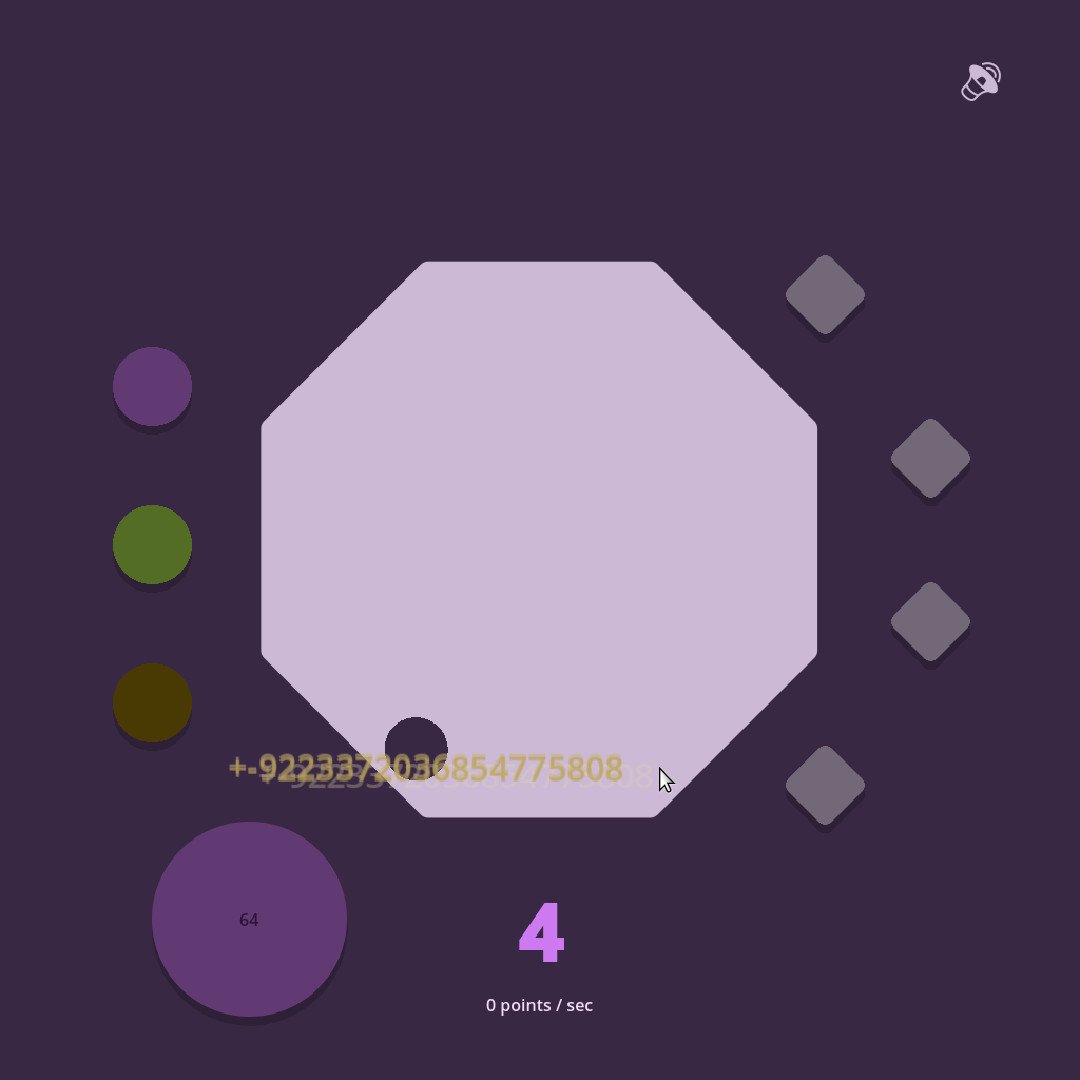
I somehow got to 64 …

Maybe using an autoclicker for the upgrades+prestige has something to do with not always starting at 0 after prestige.

An option for "buy max" or a "max all" button/key would be nice after a few prestiges.

(1 edit)


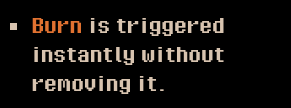
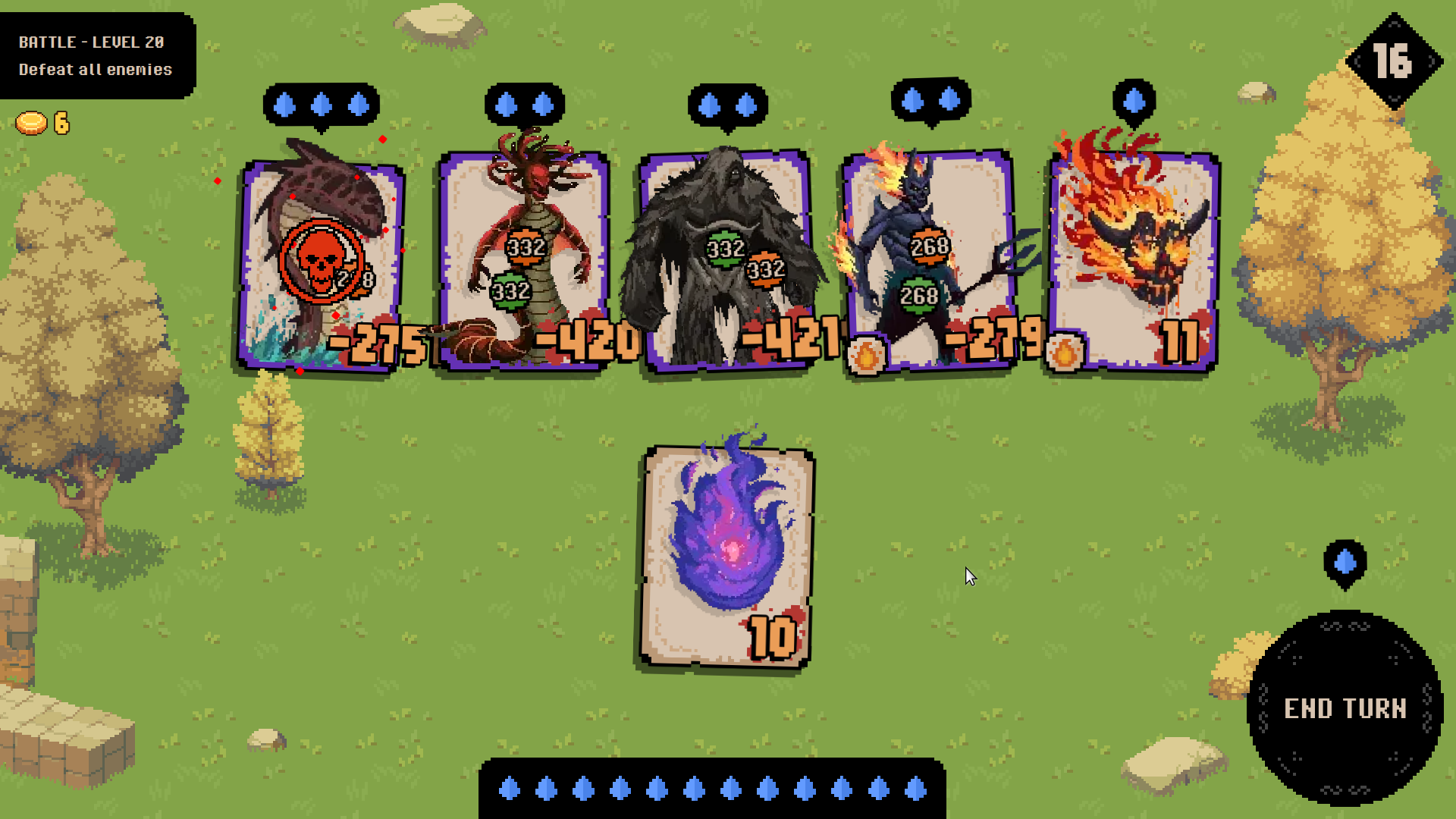
This legendary (?) upgrade makes the synergies (burn + poison + repeated triggering) go booooom!


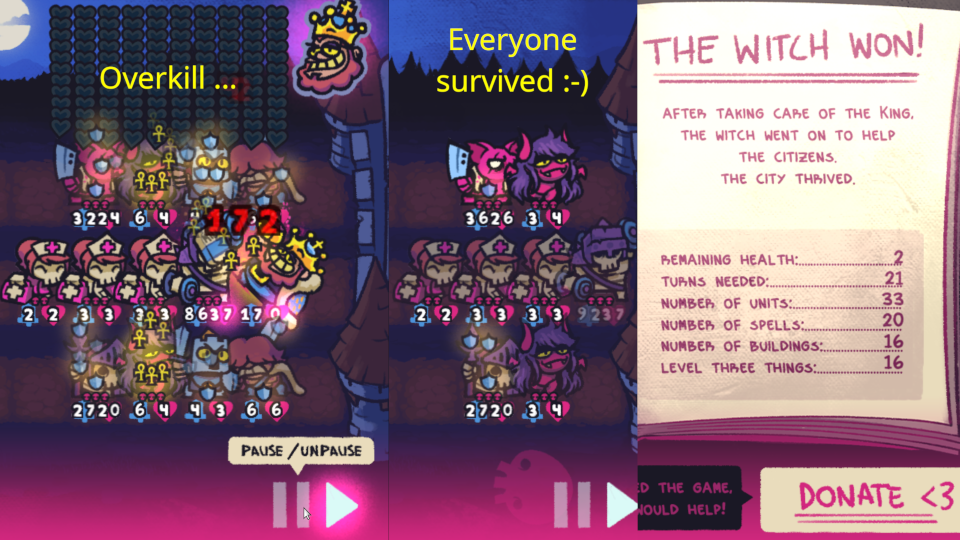
When attacking the enemy in the middle, the first 4 enemies were left with less than -2700 | -4200 | -4200 | -2700 health.

(Due to the varying digit width the last digit is barely visible for two of the numbers and completely hidden for the other two.)

If you copy the dancer ability to the support follower, it should no longer block your dancer chain.

(At least in a previous version. Haven't tested it in the most recent version.)

Here are a few confusing descriptions I stumbled upon.

I think I noticed a few more, but I forgot to take notes …

(a) "after surviving combat"

  • It could be debatable whether "being alive at the end of combat after being revived" should count as "surviving" since "survive" usually means "continue to live".
  • "when alive at end of combat" would be much clearer and seems to be what actually happens in the game.

(b) stat potions in shop

When selecting the item, next to the item's description the small description for "additional trait" is shown.
This can be confusing for beginners since it can be interpreted as "this potion will take/replace the additional trait slot" which would be really bad in most cases.

(c) swarming aspect

The trait's description is different from the description of the shop item.

  • Shop: something like "At the start of combat, gain +1 Faith for each follower that has the same name as this"
  • Trait: "At the start of combat, gain +1 Faith for each other duplicate follower"

Thoughts:

  • Changing the description like this is a bit confusing. They should match.
  • Also "each **other** duplicate" would mean that the follower does not count towards its own ability, i.e. it would gain 1 Faith less with the second description. This does not seem to be the case in the game.
  • Followers with the same base type but different aspects/traits do still count. I think this is a good decision.
  • Since the aspect/trait is added in front of the base name wherever the follower is mentioned by name, it seems to be a part of the name. So using "same name" feels very wrong.
  • The word "duplicate" usually means "identical copy", so that isn't quite correct either …
  • Maybe use "same **base** name"?
  • And if you want to stick with "duplicate", you should drop the "other" or replace "each other" with "every" or something similar.

Bug regarding "At the start of combat, Summon another identical hound" on non-hounds (Stranger, fractured aspect)

  • A hound is spawned.
  • But the combat log uses the name of the original follower for attacks and the deletion after combat ends.
  • So there is some kind of bug.

Tested example: Hound + Swarming Stranger (with hound trait)

  • This generates 1 faith while highlighting the Stranger and 3 faith while highlighting the Hounds.
  • (Both actions do not create a combat log entry for faith gained. So there might be another bug. But I checked that the displayed values for faith gained were actually added.)
  • With an Obelisk in the middle this is changed to 1+1 (Stranger) and 5+5 (two of the five Hounds).
  • So the name-specific mechanic seems to work correctly and the combat log is simply using the wrong name.

Thoughts:

  • Spawning an actual hound makes interactions with other abilities more interesting: "all followers unique", "followers with same name"
  • But then the ability's description is wrong and should be corrected:
    • "another" when it is the first … "identical" when it in fact has a different name …
    • However, a corrected description might be too long.
  • Changing the ability to create a copy instead of a hound could be a simplifying solution. But then this special ability would loose its uniqueness and simply become a variant of Mirroring Aspect.

Great game so far!

Here are a few suggestions. There is nothing really original, but perhaps it still helps.

QoL features

These are aimed mainly to make longer runs as well as finding/reporting/debugging bugs faster, easier and more fun.

1. Speedup: Options to skip animations (via buttons)

  •  (a) Skip to end of current combat round
    • summary for each follower/enemy (all at once): Show accumulated damage taken, stats + faith gained etc. and maybe some indicator for status change between alive/dead or getting newly summoned.
      • This summary should probably stay visible longer since there should be much more info available at once.
      • Perhaps this skip action automatically pauses the game and the summary stays visible while the game stays paused.
      • Or this skip action is only available, i.e. the button is clickable, while the game is paused. This could also prevent unwanted interactions and visual glitches.
    • This should scale much better than a flat speed factor and still give some idea of how well the build is doing.
    • Not sure whether skipping to right before or after revival actions would be better.
    • Filling the combat log with some kind of summary might be better than flooding it with the usual entries.
  • (b) Skip to end of combat
    • Only show the final state of the battle.
    • Not sure whether a summary like the one in the previous option would be needed.
  • (c) Skip transitions
  • Maybe unlock these features after defeating the dragon for the first time or only in endless mode.

2. Replay last combat (during normal run)

  • Note regarding RNG:
    • I hope the game uses some kind of software-only deterministic algorithm for pseudorandomness where the state can be represented and restored with very limited data like a random seed.
    • Otherwise this feature would probably take a lot more effort to implement and there could be no compact replay code.
  • Generation of compact replay code that encodes everything relevant: game build, RNG seed before start of combat, current enemies (including stats), current followers (including stats and modified abilities), reliquaries etc.
    • Used internally so not every combat action taken has to be saved.
      • This could also be a core functionality of a robust autosave feature, so it hopefully does not require much additional work.
    • Export for bug reports and/or for sharing with other players:
      • Display code in pop-up window or copy to clipboard or save to file.
      • Displaying it directly in the game interface is probably not a good idea since even a "compact" code can be quite long.
  • After starting the replay, the combat should simply work like it would normally do.
    • Obviously the outcome of combat and the contents of the next shop should not be affected to prevent abuse.
    • Hopefully this can reuse a lot of already existing code so the implementation does not require too much additional work.

3a. Replay mode (selected from main menu)

  • Implementation hopefully takes very little additional effort.
  • Replay one specific combat outside of an actual run.
  • Import/input previously generated replay code (your own or shared).

3b. Sandbox mode (selected from main menu)

  • Implementation probably takes a lot more effort than a simple replay mode.
  • Configure and simulate one specific combat outside of an actual run.
  • Try out extremely improbable builds.
  • Test synergies, bugs.
  • Import/export replay code or something similar.

4. Display more information during combat

  • Round counter
  • Combat time
  • Estimation of remaining combat time:
    • This requires the combat to be precalculated at the beginning—without any animation—to get the number of every kind of action that is going to take place.
    • This would probably require the RNG used to be as described in the note above (see 2nd feature requested).
  • etc.

5. Preview of modified stats/abilities in shop

  • It would be nice to see what you will actually get before recruiting a new follower.
  • As an addition or alternative: Some visually highlighted indication of pending "on recruitment" effects would be helpful.
    • This could be some highlighting effect on the not yet chosen follower and on the relevant already recruited followers.
    • Maybe even some kind of nice warning to prevent frustration: "If this follower is recruited, EffectXY will go to waste."
  • Motivation:
    • If no follower has been recruited for several encounters or you have to pause the game for a few hours, you might have forgotten about the last Prophecy or that there still is some Cleric/Artificer waiting to be useful.
    • The Artificer only seems to enhance values written as number symbols while ignoring values written as words like "one", "once", "twice". The resulting frustration could be prevented with a reliable preview.
    • With more followers, aspects and other stuff being added, having to keep track of everything yourself can reduce fun—especially for new players and people with bad short term memory.
  • This could be part of the tutorial. I.e. if you disable the tutorial when starting a run, you have to keep track of everything yourself. Or it could be disabled by a separate option.

6a. Visual stacking of (almost) identical followers

  • Here "(almost) identical" means only health+attack might be different.
  • Idea: Waste less horizontal space by stacking them similar to playing cards in Klondike (solitaire), i.e. only one copy is completely visible and the rest only show their health+attack—or a symbol for being dead.
  • The order should be intuitive and there probably should be a maximum stack size.
  • This should only be a visual change. It should **not** influence adjacency and order.
  • When one of the mostly hidden followers is part of a combat action, it should be temporarily displayed completely even if that means temporarily hiding some of the other followers completely.
    • This probably does not work well when two or more followers of the same stack are part of a combat action (e.g. stack of flagbearers when one of them gets killed), but in most of those cases there should be an intuitive (or least surprising) solution.

6b. Rearrange visual space

  • During combat there is a lot of unused visual space while builds with lots of summons are going far off screen. Some of that space could be made available and used to reduce this "overflow".
  • (i) The depth indicator could be changed from horizontal to vertical and moved to the left/right border to free up a bit more vertical space.
    • This would feel more intuitive for something called "depth".
    • If the dots are closer together, more could be displayed at the same time and the next hunt could simply be visually marked without needing a big countdown.
    • The dots for different event types (shop, encounter, hunt, prophecy etc.) could be distinguished visually (symbols, colors) to reduce further use of space for long words.
  • (ii) More rows for followers
    • During combat the followers could be displayed in two rows instead of only one.
    • This would require more vertical space (e.g. using (i)) or some resizing of the "cards".
    • This should only be a visual effect without changing adjacency and order.
    • With lots of summons and no stacking (see 6a) this could still require a lot of space off screen …
  • (iii) Zoom + more rows
    • With some kind of zoom there could also be 3+ rows of followers.
    • This zoom should probably be automatically and dynamically adjusted to the current number of followers during combat.

7. Visual indicator for state of "once per battle" abilities

  • Some indication of whether a followers "once per battle" ability was already triggered would be nice.
  • Maybe some kind of special border around the "card"?
  • Not sure how this should work for followers with two such abilities.
(2 edits)

Slowdown hypothesis:

The growing mass of glowing green auras is the main problem.

The green aura of zombies is a visually agreeable indicator of an active cure effect.

However, hundreds of (stacked) glowing effects at the same time can't be good for the game's performance.

Can you use some better way of handling this visual indicator for hordes?
Maybe a suitably composed glow effect for the entire group instead of individual effects? (You can not really target individuals in the center of a horde … so a less specific indicator should suffice here.)

For isolated zombies and small groups it should not be that much of a problem and those also benefit more from having an individual indicator.

Test run #1: "Lots of glow – lots of slow"

  • Strategy: Play the first few minutes trying to cure a growing horde without actuallly getting any cured people to the rescue places. You can still use the Elite Zombies for some upgrades.
  • This accumulates a large mass of zombies and (temporarily) cured really fast while keeping the onslaught reasonably managable.
  • There are loads of the glowing green auras since the closely grouped zombies keep infecting each other and turning the cured people into zombies again.
  • Result: The slowdown is noticable relatively soon after starting and gets worse quite fast. The sound becomes distorted.
  • Stacks of the advanced aura (super spreader) might make the slowdown even worse, but that was not part of this test.

After about 07:00 I led the horde to the shelter. This resulted in hundreds of cured people disappearing (and lots of level ups) in a really short time, but this did not improve the performance much.

The screenshot on the left shows the horde shortly before this "rescue" happened.
(The screenshot on the right shows the end of test run #2.)

Test run #2: "No glow – no slow"

  • Strategy: Do not use cure – not at all (!) … just try to survive as long as possible while the horde grows and gets buffed. :-(
  • The spawn rate seems similar to test run #1, so this should accumulate beings on the screen at a similar rate.
  • However, there are obviously no glowing green auras apart from the safe zone … EDIT: … and the highlighted border of your current cure target (as seen in the screenshot).
  • Result: There does not seem to be any slowdown nor any sound distortion.

Without any non-zombie upgrades nor (temporarily) cured people to occupy the horde this is quite difficult. Almost made it to 04:00 …

Conclusion

While this comparison is no irrefutable proof of the hypothesis, it should at least indicate a very promising "point of attack".

(7 edits)

Nice game! The gameplay is quite engaging while not being overly complicated.
Also thanks a lot for including a downloadable version that works for Linux!
And bonus thanks for succinct output of noteworthy events in the terminal.


After playing – with serious performance issues – I had an idea of what might cause the slowdown. The test runs seem to confirm my suspicion.
Maybe this helps you make the game even more enjoyable.
(See future comment below.)

(Long) Run with Browser Version

The first few runs were utter failures, but after getting accustomed to the – not overly complicated – game mechanics I had much more fun.

First I tried the browser version, but after a few minutes the game slowed down more and more. (Other comments already mention this.) And the sound became somewhat distorted.

The misconception that there are only a total of 1001 beings in this world (zombies/cured + 1 Ferret; not all inside the fence at once) kept me going past 500 rescued people since this should result in less performance issues, right?
Wrong. The horde kept growing … and the framerate decreasing.

This had one positive aspect: I had a bit more time to react to respawning masses of zombies and not get cornered – time dilation ;-)
After reaching the "Story End" the framerate was so low that I did not notice much of a difference going further. At 2000+ rescued people I quit.

(Even Longer) Run with Downloadable Version (Linux)

Then I tried the downloadable version in the hope of it having less performance issues.

The slowdown started later and was less severe but still quite noticeable.
It was more fun and I got much farther before making more and more mistakes and finally quitting at 5000+.

At the end some of the higher upgrades I had in the browser run were still missing, but with a lot more total upgrades the build was obviously really powerful none the less.


Notes

  • This first item is not really important, but might be nice to have:
    • I prefer [Tab] to pause the game since it is much closer to WASD. (This is also more convenient in the browser version due to fullscreen mode being terminated by [Esc].)
    • However opening the "Actions & Consequences" list with [Tab] is only possible after the first upgrade – from level up, item or zombie mutation.
    • At the start of a run this does not work and can cause Dr. Ferret serious bodily harm.
    • Could you perhaps also enable showing the empty list? (Maybe containing a hint like "no … yet[, do … to unlock them]".)
  • Getting the choice between 3 Syringe/Health packs can be quite beneficial at times, but with 25+ Syringes + Lucky Dice III + Dual Wield II and Personal Shield II + Death Defying III not so much. Grinding for the last few missing upgrades becomes a bit too tedious.
    • Maybe you could tweak the randomness a bit more for the endless stage of the game? (E.g. enforce getting a "real" choice between three distinct items/upgrades at least every few level ups … as long as there are still real upgrades missing.)

Weird observations regarding upgrades (these could be bugs)

  • In the browser run I unlocked Lucky Dice III before II. But I did not count the syringe reuses, so I'm not sure whether II overruled III.
  • In the downloadable version I somehow unlocked Rally II twice.

Final unlocked "Actions & Consequences"

  • All 6 Zombie buffs … only their unlock order can be influenced.
  • I + II + III of Lucky Dice, Bless You, Death Defying
  • I + II of Rule #1: Cardio, Zoomster Energy, Personal Shield, It's Spreading, Second Wind, Dual Wield, Portals
  • only I of Can't Touch This
  • Rally I + II + II – Yes, "II" twice.
  • Curenicorn – Is this upgradeable, too?
  • Bunker Key, Shed Key
  • Syringe Pack x 15, Health Pack x 14

Apart from the upgrades/items the terminal output also contained this:

  • Elite Zombie cured x 10
    • Just curious: Do they have a cured form? Or do they completely transform into a supply bag? I never saw them turn human … too many zombies with less cure resistance in the horde blocking the view.
  • Failed to find a position free of bounds x 104
    • Not sure whether this is a problem that needs fixing.
    • A few cured people got stuck "in" the lower fence … getting turned into zombies seemed to help – or maybe being teleported to safety? Is that related to the failure?
    • (This failure also seems to be possible without any use of the cure … but lots of zombies: Observed in test run #2.)

And some Warnings of Godot Engine:

  • Sometimes between runs there are multiple identical warnings. I counted 3, 10, 12 and 0 occurrences. (No idea, how I can reproduce this exactly.)
WARNING: Target object freed before starting, aborting Tweener.
     at: start (scene/animation/tween.cpp:548)
  • When closing the game:
WARNING: ObjectDB instances leaked at exit (run with --verbose for details).
     at: cleanup (core/object/object.cpp:2208)
(3 edits)

As noted: Constructive feedback is welcome!

  • If you find content-related mistakes or serious grammar/spelling errors, please leave them in a comment.
  • If you think of good reasons why certain images (or text) should be rearranged, share them. It should only take minor effort on my part. Hopefully …


Hmm… now there is much more text then originally planned and the beautiful artwork was a bit marginalised. :-(

  • EDIT: I changed the composed images from 9 sub-images per row to 6 – itch scales images to fill the horizontal space. IMO this looks better and the in-picture text is easier to read.

Spoiler tags for the sections of the collection would be nice, but this feature does not seem to be available.

Further idea: Overview table

  • text-only table with all the Things
  • ordered by tier they become available (lvl 3 things make this a bit messy interesting)
  • grouped into units, summons, spells, buildings etc.
(13 edits)

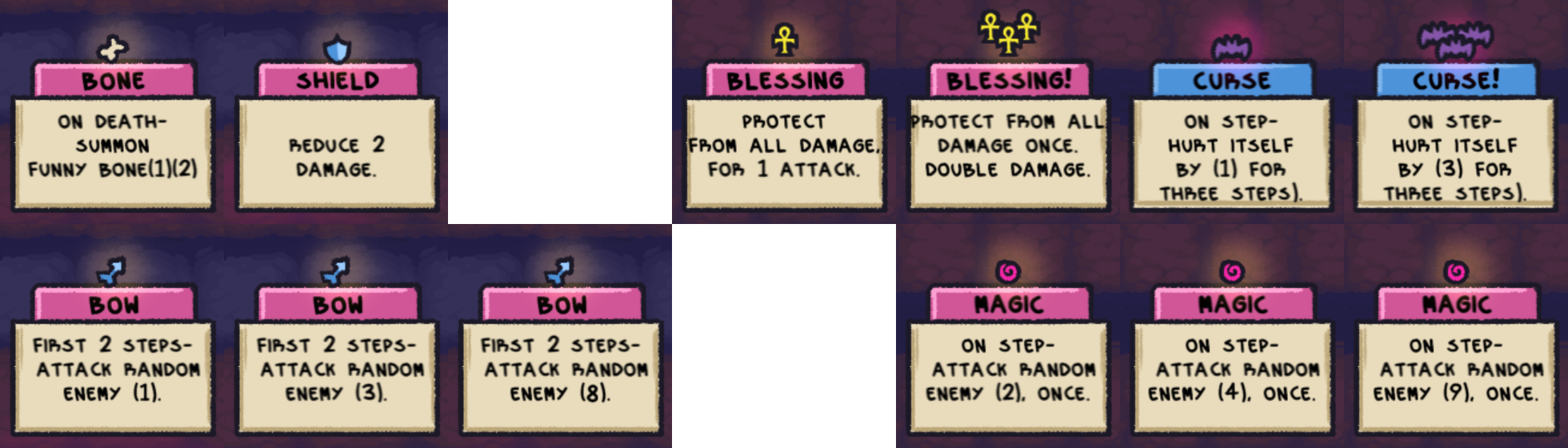
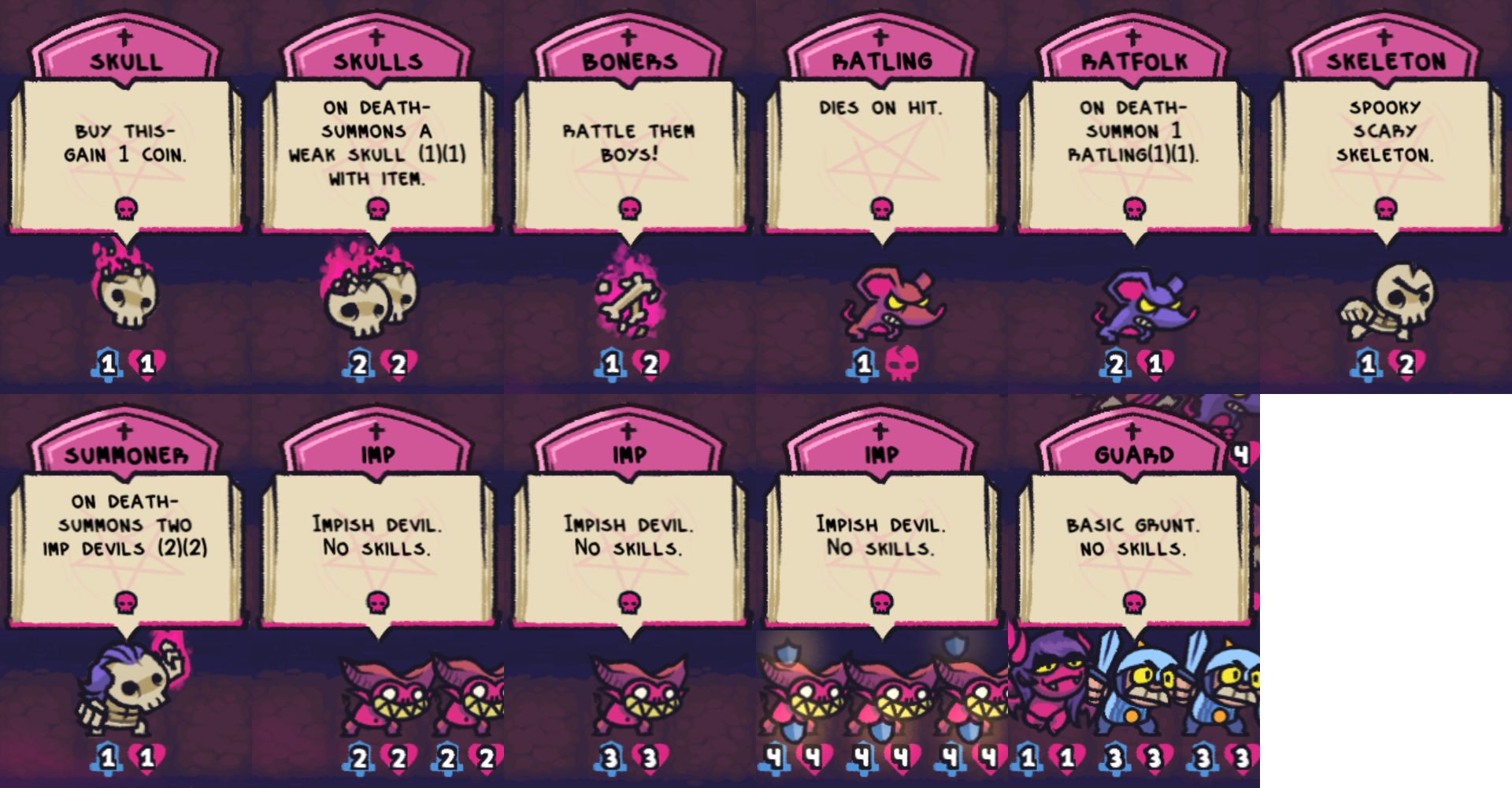
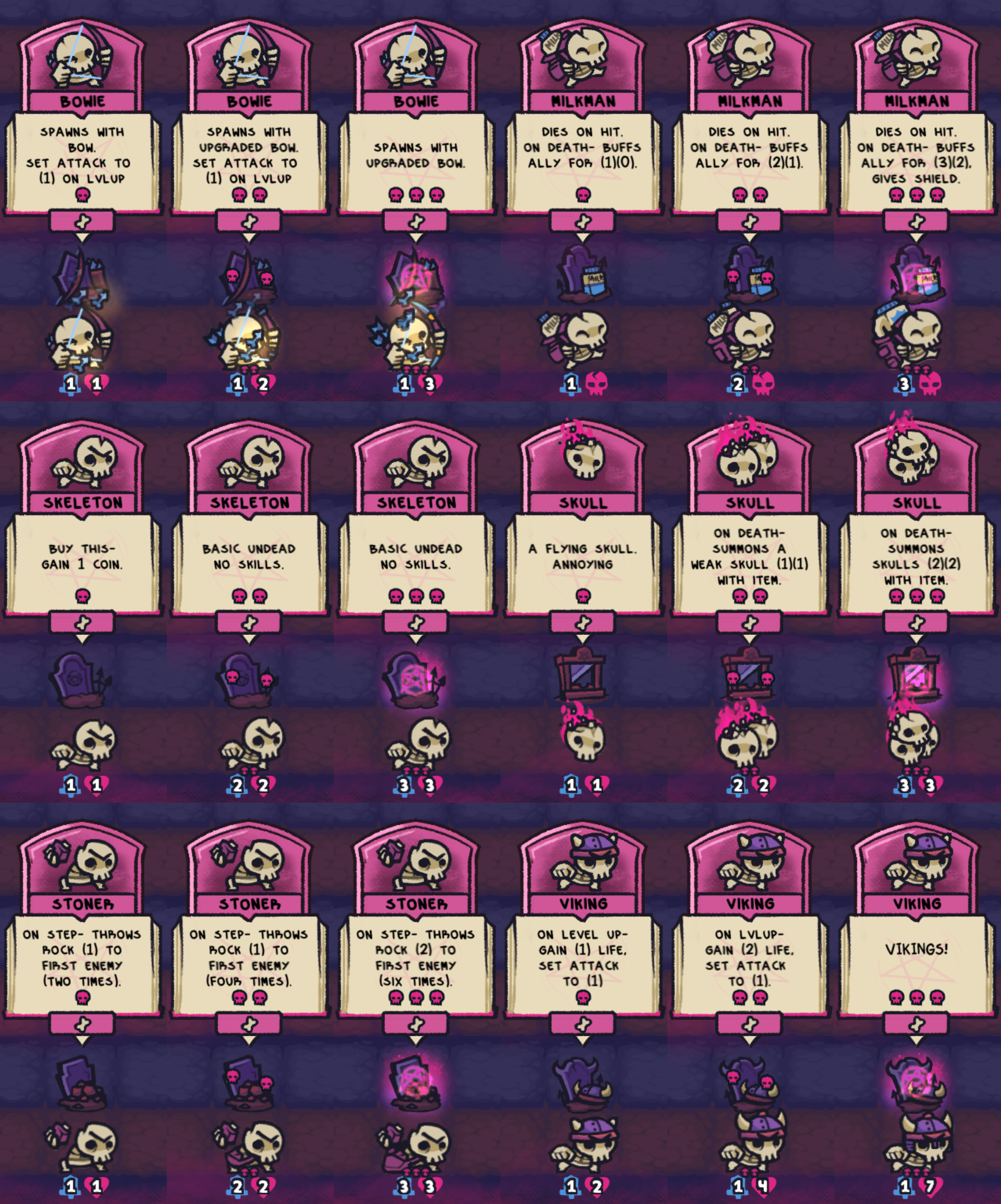
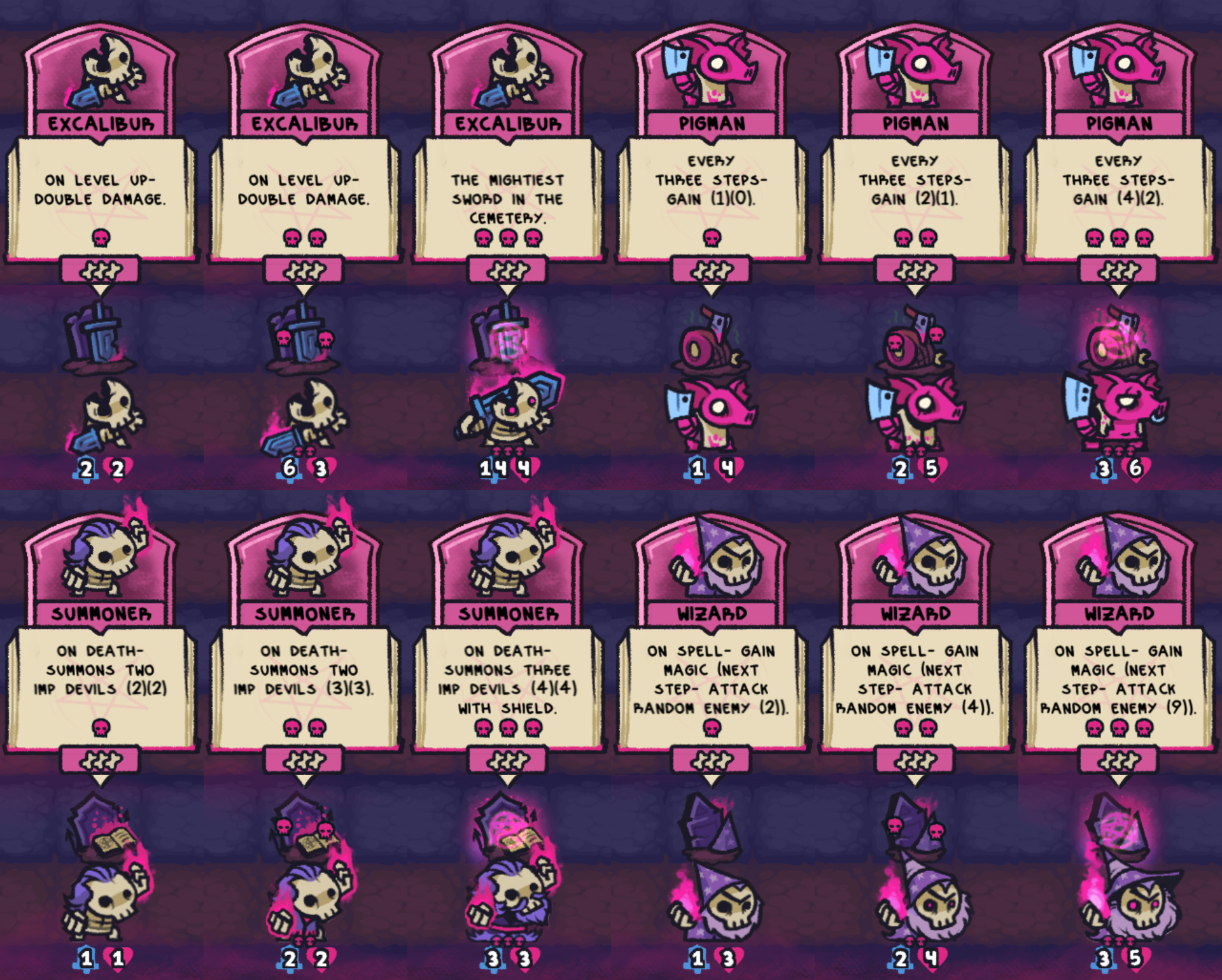
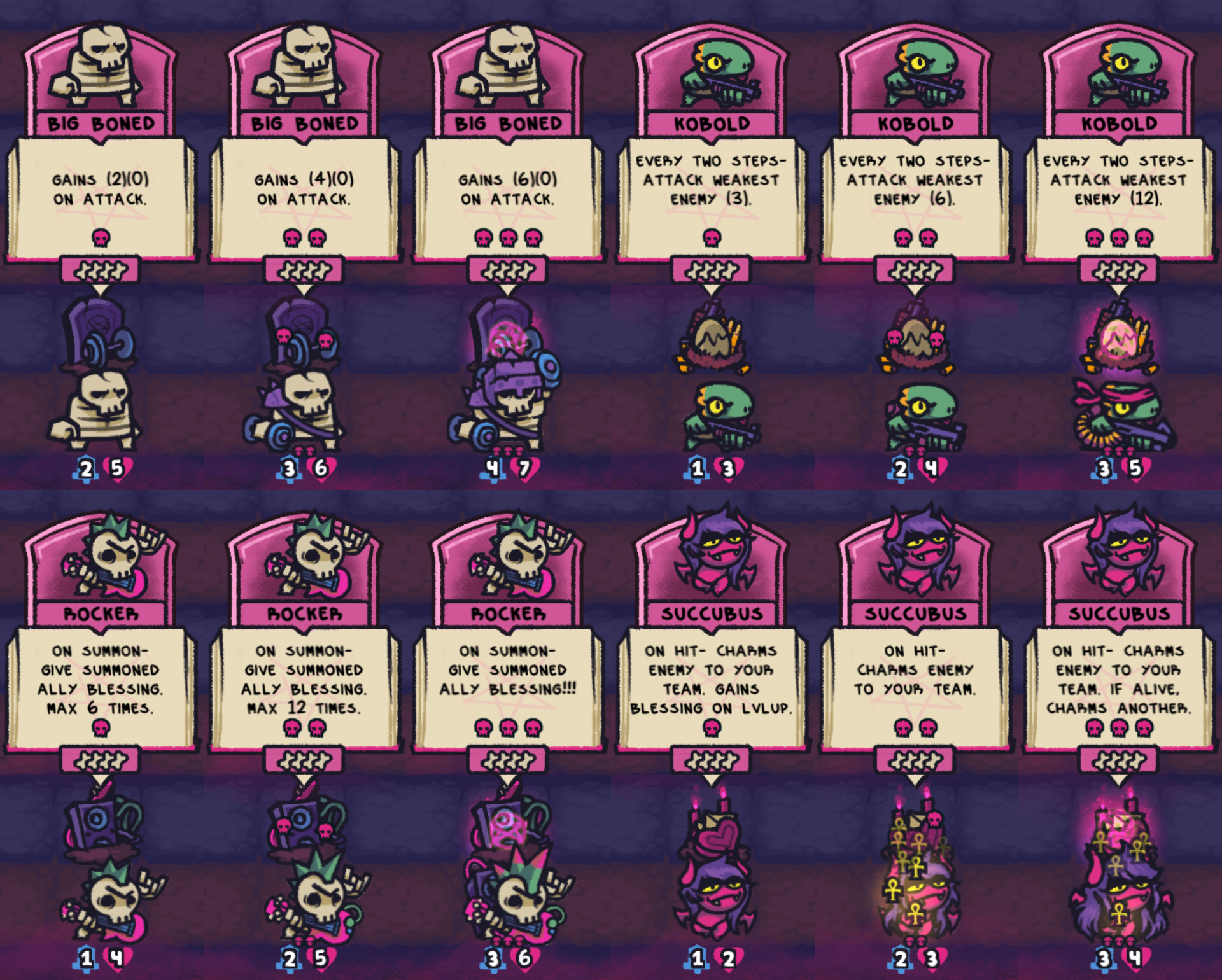
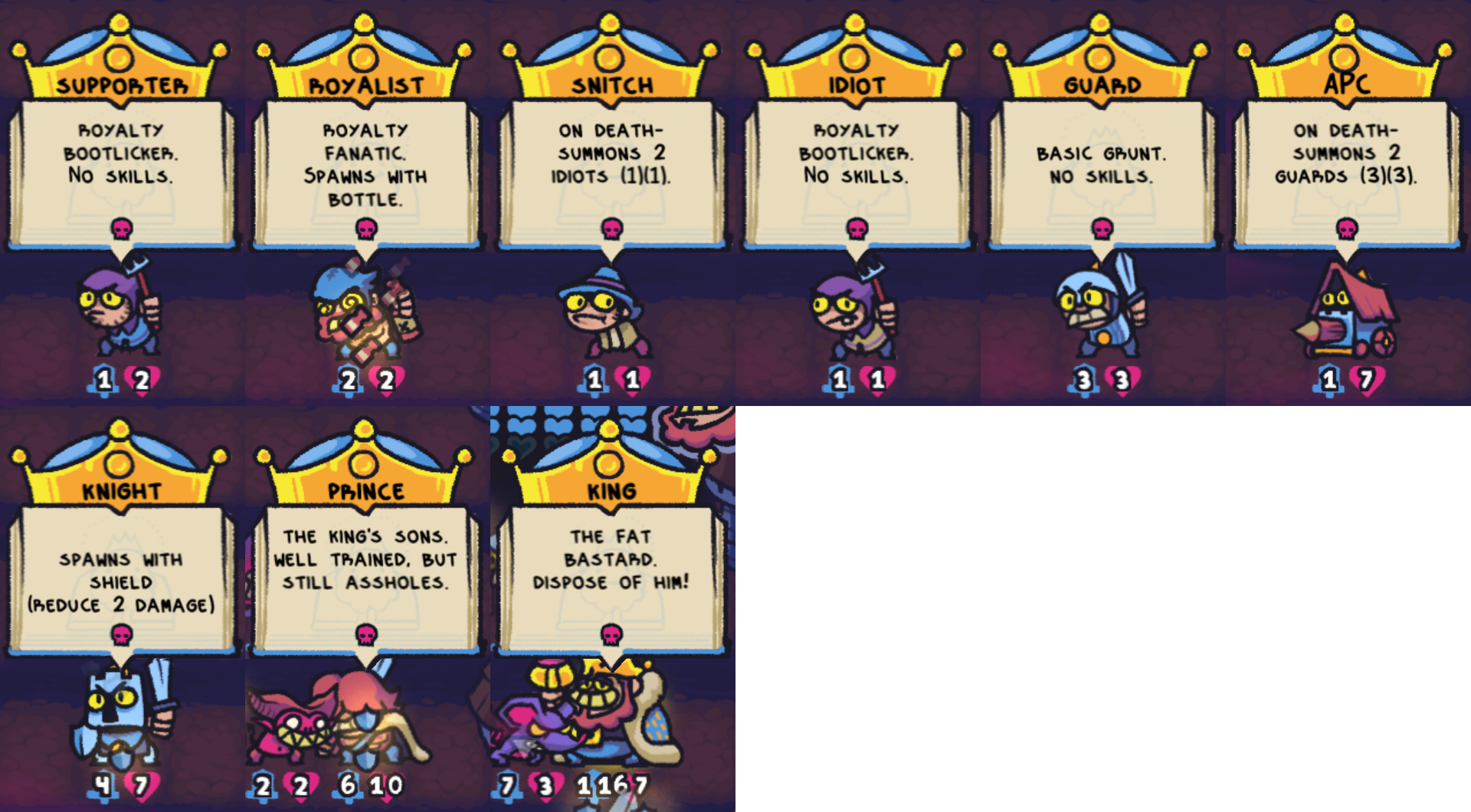
Inspired by this outdated text-only list by Flaminghair and motivated/invigorated by the game's wonderful artwork I had a somewhat crazy idea: Take loads of screenshots, write a script to take care of the tedious work (extracting + combining relevant parts), and finally create an

Image-based collection of most THINGS

Warning

  • Some of the in-game descriptions are a bit vague and/or misleading. Very few are actually wrong.
  • Some descriptions differ between preparation phase and battle phase. (Here mostly preparation phase is used.)

General notes

  • The two stats attack and health of units are capped at 99, so temporary and permanent buffs can not increase them further. However, damage can be higher … Hint: Blessing!
  • Constructive feedback is welcome! (See comment below.)

Spells

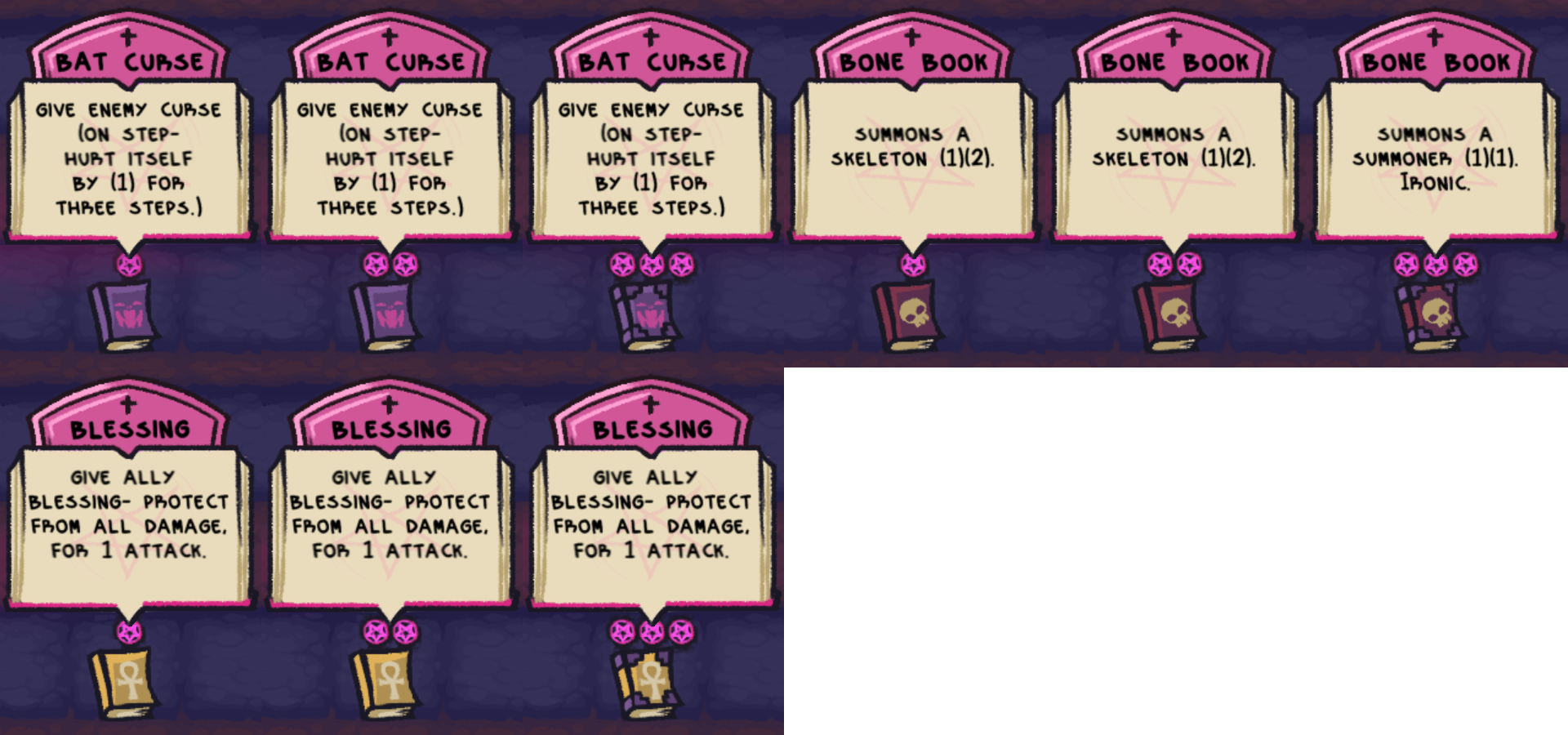
  • ERROR: Bat Curse lvl 3 gives "Curse!" not "Curse", i.e. deals (3) damage for 3 steps.
  • Bone Book:
    • The summoned entity can be placed on any empty spot that is not behind enemy lines.
    • It can also be placed on the spot of another (friendly) unit as long as there is a free spot somewhere behind (i.e. left of) that unit. This will move the unit 1 step back – and all remaining units on the way to the next free spot, too.
  • ERROR: Blessing lvl 3 gives "Blessing!" not "Blessing", i.e. protection and Double Damage once.
  • All lvl 3 spells sell for 5 coins while nothing else does. This might be a bug.


Buildings

  • "on buy"
    • Lvl 1 buildings apply their effect immediately on initial placement.
    • Placing a lvl 1 copy directly from shop onto an already placed building results in the lvl 2 effect (instead of the lvl 1 effect) being applied immediately.
      • Combining two already placed buildings does not apply an effect immediately.
  • "end turn"
    • This means after the battle phase, i.e. right before the next preparation phase.
    • The "end turn" buff from Blacksmith/Farmer will not be triggered at the moment you click "To Battle!".
  • Blacksmith and Farmer apply their buff only to a unit on the spot directly behind them. So placement "on buy" matters. And on "end turn" any unit can be buffed by at most one building.


Buffs and items in shop

  • Milk and Jumbo Milk are permanent buffs.
  • Bone and Shield create corresponding equipped items when placed.


Equipped items

  • Every unit can have at most one item equipped.
    • This means a new item will replace the current one!
    • Exception: Rocker's blessing ability will not replace items on newly summoned entities, but those entities will not get the blessing either:
      • Skull summoned by Skull lvl 2/3 (with item)
      • Devil Imps (with Shield) summoned by Summoner lvl 3.
      • I have only tried Skulls + Bone and Summoner lvl 3.
      • TODO: test Skulls + Shield and Skulls + different Blessing lvl
  • Curses are actually items "equipped" by the enemy.
  • Shield reduces 2 damage of every (incoming) attack, but the minimal damage is still 1 per (incoming) attack.

Summoned entities

  • Every summoned entity deals only 1 damage to the castle – even the Skulls (2)(2) summoned by a Skull lvl 3.
    • TODO: Recheck this observation.
  • Some of the summoned entities have different names from what the summoning unit claims to summon.
  • Skull (1)(1) summoned by a Skull lvl 2: The description is completely wrong. (Note: The normal version has the same incorrect description during the battle phase.)
  • Ratling: Their health can not be buffed, but they can be protected with blessing.
  • TODO:
    • Try to get less crowded screenshots.
    • Add Idiot summoned by charmed Snitch?

Tier 1 units

  • Milkman: Their health can not be buffed, but they can be protected with blessing.
  • Skeleton: Placing a lvl 1 copy directly from shop onto an already placed Skeleton will give 2 coins instead of 1 – combining them later will not. (Similar to buildings!)


Tier 2 units

  • Assasin: To trigger their ability the ally has to be directly in front of them and use the default (melee) attack – attacking with abilities does not count.
  • Nurse:
    • To trigger their ability the ally does not have to be directly in front of them, but attacking with abilities does still not count. The ally also needs to survive their attack … No Resurrection!
    • They can not heal themselves, but one can heal another.
    • Overheal: Healing can increase a unit's health over their starting health for the duration of the battle.


Tier 3 units

  • Excalibur:
    • Here only the base stats are shown.
    • You should apply attack buffs preferably before level up!
  • Wizard:
    • Magic is an equipped item, so "on spell" it will replace the Wizard's previously equipped item if there was one. This implies: Only one "charge" of magic per Wizard per step.
    • Using a Blessing spell on a Wizard will not give this particular wizard magic … but the blessing.


Tier 4 units

  • Kobold:
    • Their ability targets only enemies on the same lane.
    • They shoot on their first step, i.e. they start the battle with step count at 1. (Pigman starts at 0.)
  • Rocker:
    • Their ability targets summoned allies on any lane.
    • Lvl 3 gives allies "Blessing!" – "Blessing!!!" does not exist.
  • Succubus:
    • Prince and King are immune to direct "on hit" charm.
    • Prince and King die instantly when hit by the "bounced" charm (only Succubus lvl 3).
    • When enemies are charmed, they respawn with their starting stats, equipped items and no curses … and now facing your enemy.
    • When a charmed Snitch/APC dies, the resulting Idiots/Guards still fight for your team.
      • TODO: Recheck whether they count as summoned allies regarding Bard/Rocker. IIRC they do.


Enemies

  • Every enemy can deal 1 damage to you if they reach your side of the battlefield.
    • Exception: The King will take all your remaining health and you lose.
  • TODO: Add Archer and try to get less crowded screenshots.

(3 edits)

Now for a "fun" experiment.

It took me some time to figure out that the (non-boss) enemy difficulty grows with number of rounds and damage dealt to castle. But if you can avoid dealing too much damage to the castle, a lot is possible. Like having to sell lvl 3 Things to make space. Or stacking several rows of coins each round.
To reduce dependence on luck you basically have to spy every round (3 x free, then 2 coins per round) for quite some time.
2 lvl 3 Bat Curse books can take out 6 units which is really helpful. But then there are rounds with 7 (or 8?) archers, so a third book was nice to have. Even if they don't die right away, replacing their bows is great for planning.
Also keeping different books inactive behind the front line can be beneficial for adapting to current enemies every round.
It feels a bit weird to rearrange the units every time to maximize your own casualties – e.g. supporter in front, but it can be done … even if it costs some of your own health during the first few rounds.
Using multiplying summons makes the planning rather difficult – as do random ranged attacks –, so most of them loose their use soon.
For this delaying strategy it is very useful that lvl 3 units only deal the same 2 damage to the castle as lvl 2 units, so you don't have to delay the upgrade too much.

I could have probably squeezed out a few more rounds if I had sold the succubi … but they are simply too cute <3.
EDIT: … And a whole lot more when focusing on only 3 units … as several older comments on previous pages point out. Why didn't I check there before? Now I feel a bit dumb. But this was still quite fun for a first try of a delay approach.

(3 edits)

The basic gameplay is explained well enough for someone with prior auto battler experience. (I can't really comment on the point of view of an absolut beginner.)

However, there are also some issues (not really bugs).

A lot of the initial difficulty of the game seems to be caused by important information being hidden or given in a somewhat misleading/inconsistent way.


Regarding the hidden part of the problem:

IMO most important for planning ahead would be the various lvl 2 or lvl 3 unit descriptions. It takes quite a few (or maybe a lot) runs to get every unit to lvl 3 at least once.
I assume the "Choose Deck" menu (Coming Soon) is going to solve this is in a more suitable way.

EDIT: Actually, there is a list of most unit/book descriptions on one of the past pages of comments, but it seems to be partially out-of-date.


Regarding the misleading/inconsistent part of the problem, i.e. mostly description issues:

The fast forward button has the tool tip "Move units to last space, ignore special effects".
I would assume this includes movement-based effects like Bat Curse and ranged attacks. But they are not ignored.
Is the description simply out-of-date?
If not, what special effects are ignored?

It seems Blacksmith + Farmer can not buff the same ally at the same time. :-( So "give ally directly behind" might make it clearer.

A few unit/book descriptions differ between preparation phase and battle phase.
Examples:

  • Blessing book lvl 3 in preparation screen is missing the "Double Damage!" part … which is kind of important.
  • Bone book lvl 3 in battle sreen is missing the "ironic" … which isn't nearly as important. ;-)


Shield claims to "Reduce 2 damage.", but it neglects to mention that minimal damage is still 1.

Ratfolk claims to summon Ratling(1)(1), but it is Ratling (1)(Red Skull – dies on hit), so buffing summon health is pointless here. Also " " is missing.

The target area of unit's abilities should be consistently stated like "first", "on lane", "random", "any", "directly in front", "directly behind".
E.g. Kobold targets weakest enemy on lane while Rocker targets any summoned ally. Both are missing these important details.
Related: It is unclear what "weakest" means. Lowest enemy tier? Or most damaged?

When several units buff the same unit (e.g. 2 bards on a summon or Nurse(s) + self-buffing unit) the animations are a bit misleading. If I am not mistaken the accumulated buffs are applied at once, but the visuals do not match. This can lead to the (hopefully wrong) conclusion that at least one buffer failed to do its work.


And then there are a few undocumented and somewhat surprising game mechanics.

Summon overflow:
Units that summon more than one unit on death might not summon all of them if there is not enough space directly behind them or at the end of their line where they could push their allies to – IIRC they never push towards the enemy.
This seems to be more of a feature you have to plan for than a bug (you can summon a Skeleton (1)(2) directly in front of a Snitch to take it and the sole Idiot out — or it could in turn cripple your summoner strategy) – so this mechanic should be explained somewhere. "On Death – Summon up to X Things if there is space" in the description might help make this clearer. And/or an additional page of the "?" regarding summons.

Succubus' issue with the royals:
Prince and King are immune to the direct charm (succubus lvl 1–3).
But the bounced charm (only lvl 3) seems to deal 99 damage to the unlucky 2nd enemy (any type). This kills the enemy before replacing it with a converted copy – except for the royals … they just die. (As pointed out by Isaac 576.)
This makes some kind of sense, but is a bit surprising.

Related:
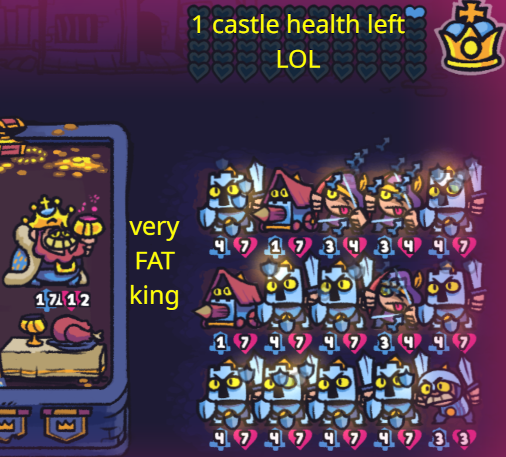
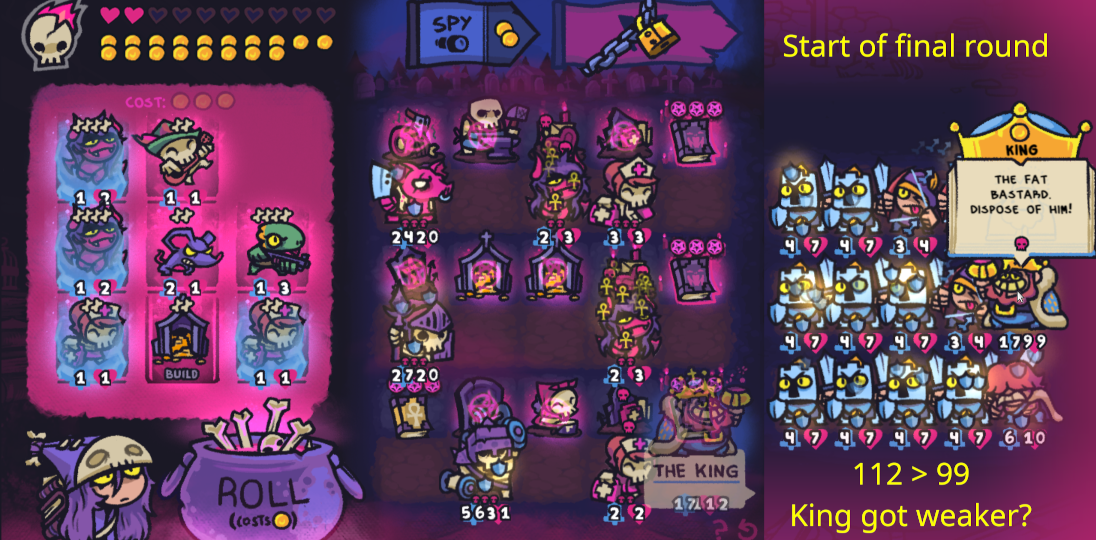
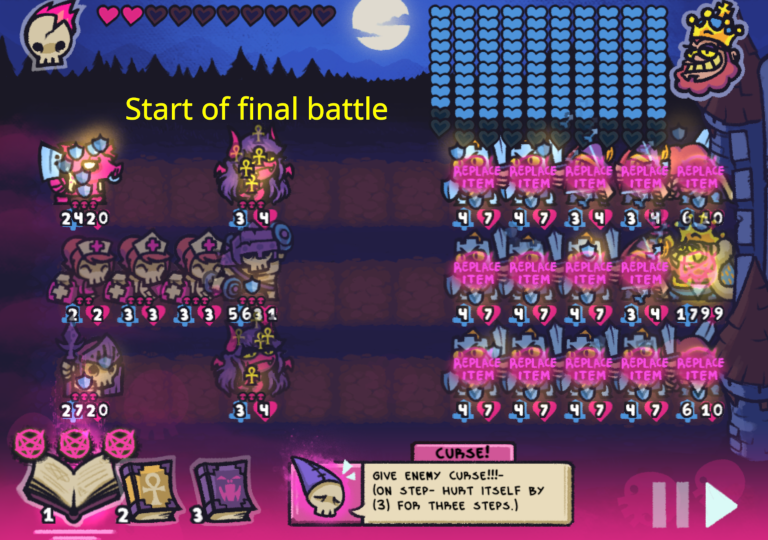
The enemies max health during battle seems to be hard-coded to 99 even if the king has already grown to 100+ health outside of battle. (See future comment below.)
EDIT: A few of the older screen shots on previous pages already cover this. And apparently all stats are capped at 99.

(3 edits)

First of all:
This game is already great and one of the best (of the smaller ones) I stumbled upon in recent years.
(And this account was just created to make the following comments. So this seems to be important to me.)

The art is really super cute while not being too distracting. Great work!


Request for two QoL features:

Full-screen mode in browser version. Please!

Tampering with zoom and scrolling is a a real hassle …
(At least I assume this would be easier than an build for all the OS that aren't Windows …)


Better Spy usability

  • When fine tuning the units' placement after spying on a large enemy army I have to go back and forth between the two screens a lot since my brain's memory can't handle frequently overwritten values very well. And those "values" (enemy units) change every round …
  • So instead of seeing only the enemy units on the spy screen it would help me tremendously being able to see the battlefield in its entirety while still being able to move units around (and going back to the shop).
  • I suppose seeing both shop and the entire battlefield at the same time would need to much horizontal space. But since the shop contains much less "values" that would be much less of a problem.
    • EDIT: Never mind this presumed restriction!
    • According to the full-screen image in this comment by Stopsignal the full-screen version has ample horizontal space. It should suffice for both the shop and the complete battlefield.
    • This small visual comparison shows there should be enough space for at least the spy results being visible in the preparation screen – in case the (preferred) version shop + complete battlefield would be too much work.
  • Before using the spy option this still modifiable battlefield view could simply hide the right 5 columns behind fog of war (or smoke or darkness – or disgusting light).
  • Furthermore the king's stats are shown briefly every round regardless of spying, so you could simply add them to this new battlefield view.

Related balance issue:
Spying is really powerful in long runs which tend to involve a better income via (multiple) Mausoleum lvl 2+, so 2 coins every round might be a bit cheap. Maybe increase the cost every few rounds uses?