
Indie game storeFree gamesFun gamesHorror games
Game developmentAssetsComics
SalesBundles
Jobs
TagsGame Engines

Local_Dingus

8
Posts
2
Topics
2
Following
A member registered Oct 14, 2024

Recent community posts

(1 edit)

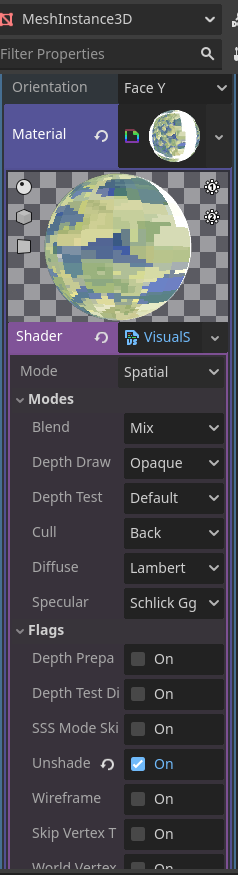
One other question for you alfred, as I'm still getting used to using Godot and thinking about materials like this. How do I enable "Alpha scissor" transparency for the custom shader we made? I found "unshaded" and it's great, but I'm also trying to apply some fancy effects to some textures with transparency and I just can't seem to make it work right.

Thank you for both of these. I'm now scratching my chin trying to decide how to approach this problem... I might just put two flat planes with backface culling riiiight next to each other, facing opposite each other, and try to pass it off as double sided. I'm doing all this for a background prop that you might notice if you're swinging the camera around to deliberately look for it, but if you're just progressing through the scene, it shouldn't be noticeable. 

I'm happy to. How do you prefer I send it to you?

Godot 4.5. I've checked the documentation for FAQs and explanations, how to set up my materials, etc. I don't see what I'm doing wrong, but I'm sure it's something simple.

View post on imgur.com

In case this is relevant: I made a mesh instance 3D with a quad mesh applied so I could add as many verts to a flat subdivision that I wanted (for testing purposes). I've also got the material combination left over from the multi-texture blending tutorial, which I've also applied a made-unique copy of the same material on the "next pass" setting of that material; both sides are set to cull their respective sides. This way I can have the same material splat mapped on either side of the quad, but splatted and painted differently as per the needs of the scene.

Also, I'm sure this will sound dumb but I'm not really sure how to combine unlit and splat mapping here? As you can see in this video, I have a mesh that is currently affected by light in the scene, and I want it unlit. But the tutorial for splat mapping just explains why we're using "original material." Why doesn't our original material in this example start out unlit? Is there a way to make it unlit before painting on it in the vertex shader add on? I know vaguely how to do it on a standard shadermaterial3D, but not really how to do it with these custom made shader materials.

Oh my god. You are absolutely completely right. God bless you and keep you my king.

Using Godot version 4.5, with vertex studio as my only add on.

I'm following along with the texture splatting tutorial and loving it, but I'm stuck on this weird software issue in the title. Here's a video demonstrating:

View post on imgur.com

Why is this happening? Do I need to update my version of vertex studio or something? Is Godot 4.5 the problem?

Highly appreciated! I've turned studying game engines and code into a hobby over the past several months and I'd love to learn how to, eventually, code in something like VR chat. On the one hand that's a long way away, but on the other hand I've almost taught myself calculus, so I like to think I can make it happen one day.

(1 edit)

Are there any examples of this working successfully in VRchat? I'd like to see how well it works, if possible. And, does it work on avatars and worlds alike?