

Hey there! We have reports from users running the DS8 inside of a PS Vita emulator on Android devices - should work for the most part but I haven't personally tested it. Would love to know if you give it a try!
Intermynd Instruments
10
Posts
3
Topics
10
Followers
A member registered 61 days ago · View creator page →
Creator of
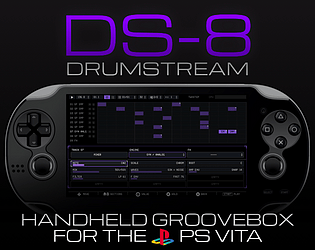
Homebrew drum synth, sampler and sequencing groovebox for the Vita
Recent community posts
Hi and thanks for the feedback! You're right, at the moment there is no quick way to remove notes from a sequence for a specific track (I''m working on a few sequence specific tools for the next update!), however you can use the GENERATE tool and set the SEED value to "ALL OFF" which once applied to the sequence will remove all triggers.
Hi and sorry to hear that you're seeing my page as quarantined. I've reached out to the support team and hope to hear back from them soon! https://itch.io/t/6477348/request-for-review-and-removal-of-quarantine-status-pl...
Meanwhile you should be able to to still download the app by selecting the "I understand the risks, let me download anyway". Thanks
itch.io Community » itch.io » Questions & Support · Created a new topic Request for Review and Removal of Quarantine Status! Please help
Hello itch.io Support,
I recently published my project, DS8 Drumstream, and noticed that it has been placed in quarantine.
DS8 Drumstream is an original drum synthesizer and groovebox application developed by me for the PlayStation Vita homebrew platform. The software does not contain copyrighted content, malware, or any material that violates itch.io’s terms of service.
I would appreciate it if you could review the project and remove the quarantine status if everything is in order. I’m happy to provide any additional information you may need regarding the application, its functionality, or its distribution format.
Project URL: https://intermynd-instruments.itch.io/ds-8
Thank you for your time and assistance.
Best regards,
PG @ Intermynd Instruments
Thanks for the detailed feedback! Very good to hear you're enjoying the DS8 and indeed your asks are on the roadmap, specifically:
- limiter/performance improvements to avoid occasional glitches and distortion TBC
- compressor with sidechain, WIP
- saving patterns: coming with the next release
- saving individual sound and fx combo presets: TBC
- sync capability: I'm going to explore writing a kernel plugin to expose the Vita as a USB midi HID device , or perhaps Ableton Link support over WiFi and Bluetooth BLE midi sync, very early
Keep the feedback coming!
DS8 Drumstream is in active development, so feedback is very useful at this stage.
Use this thread to report bugs, crashes, audio glitches, UI issues, confusing behavior, or anything that does not work as expected. You can also leave general feedback, feature requests, workflow suggestions, or notes on how the app feels on real hardware.
When reporting a bug, please include your PS Vita model, firmware / homebrew setup if relevant, DS8 version number, and the steps needed to reproduce the issue.
Thanks for testing DS8 and helping improve it.
Basic controls
- Use the shoulder buttons (L / R) to change focus between the main sections (Transport, Sequencer, Voice Edit).
- Use the D-pad to move around the interface.
- Use the face buttons to toggle steps, open actions, solo, mute, or confirm changes depending on the current screen.
- Use the analog sticks to adjust parameter values.
Global controls
L / R
Move between the main areas: Transport, Sequencer, Voice Edit and inside the Automation modal to select the active editing step,
D-pad
Navigate through tracks, steps, parameters, and menu items.
◯ × △ []Used for the main action on the current screen, such as toggling a step, confirming a change, opening automation, soloing, or muting.
Analog sticks
Adjust selected values and parameters.
[START] Start and stop playback.
[SELECT] to enter the global settings
×Toggle / confirm / edit selected item-
○Cancel / go back □Secondary action: mute, copy, clear, or reseed depending on screen-
△Alternate action: solo, automation, paste, or extra options depending on screen
Sequencer area
- Select one of the eight drum tracks.
- Move across the step grid.
- Toggle steps on or off.
- Set pattern length, up to 64 steps.
- Mute tracks.
- Solo tracks.
- Copy and paste steps.
- Open step automation for deeper editing.
Voice Editor area
- Edit the sound of the selected drum track.
- Adjust voice parameters such as tuning, decay, drive, pitch, noise, level, and related controls.
- Shape individual drum voices including kicks, snares, hats, claps, percussion, toms, cymbals, and FX
Pattern Generator area
Generate new pattern ideas using different modes.
Available generation modes include Euclidean rhythms, random patterns, alternating steps, every-N triggers, preset templates and more.
Generated patterns can be applied, reseeded, or manually edited in the sequencer.
Basic workflow
- Start in the sequencer.
- Choose a track, then toggle steps on or off to build a pattern.
- Adjust the pattern length if needed.
- Use mute and solo to focus on individual tracks.
- Open the voice editor to shape the sound of each drum voice.
- Use step automation to give individual hits their own velocity, decay, tuning, drive, or other parameter changes.
- Use pattern generation to create quick starting points with Euclidean, random, alternating, every-N, or preset templates.
- Use copy and paste to repeat or move step settings.
Enable the metronome when a timing reference is needed.
DS8 Drumstream is currently in active development. Version 0.1 may contain bugs, rough edges, performance issues, and features that change in future builds.