Thank you! I really appreciate it!
illo_cello
Recent community posts
I was just looking at Overloaded's philosophy here: https://github.com/OverloadedOrama and it's something that I not only agree with, but I'm actively working towards. Looking at these comments, the joy that you're bringing to artists from all walks of life with this software, I'd say that you're well on your way to achieving your goals! So a toast to Team Orama! Here's to many more releases!
Mint XFCE uses Thunar, unfortunately. I just installed Dolphin and some extra Cmake modules, but it keeps throwing errors probably because I'm not on a native KDE environment. Hopefully, a version for Thunar can be made. It would really make my day! Thank you for all your help. I really appreciate it.
Oh, no worries! Yeah, you first showed me the ffmpeg trick some time back, thank you! But it works unpredictably and it would sometimes hang the app.
Meantime, is there anything I can do about the thumbnails? I've been having to save pngs with the same name as the pxo so that I can have an idea of what file I'm opening, but when working with multiple files, it tends to become cumbersome. Any help would be appreciated.
The amount of improvements you have made in this app is incredible!It's been my only pixel art app since last July or so, and I have appreciated every new feature and performance boost.Thanks for all the hard work!
I have really been looking forward to having thumbnails for .pxo files and I was so excited when I saw it in the new release! Sadly, it doesn't seem to work in Linux Mint XFCE ( haven't tried any other OS yet as Linux is my daily driver). Is there anything that can be done about it?
I'm also still hoping for a less cumbersome way to import gifs.
Regardless, thank you so much for this release!
Just tried out the latest nightly build and I'm blown away by all the new features!
Would you consider adding thumbnails for .pxo files in the Open File Dialog box, like other graphics softwares have for their native file formats? An easier way to import .gif files would also be very handy and appreciated!
Thanks for such a wonderful piece of software!
Whoops, looks like I had replied on the wrong thread, sorry!
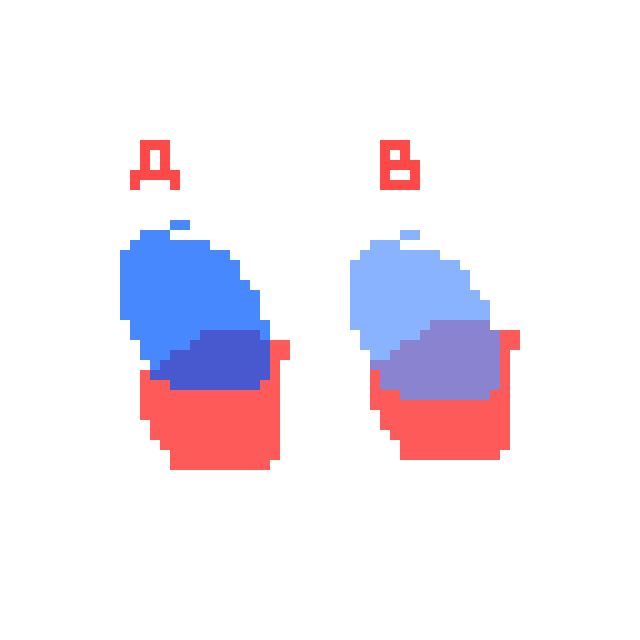
I made a small test for opacity.
A is two separate overlapping layers: Blue Blob - layer opacity 72%, on top of Red Blob, layer opacity 65%. There is a separate Background layer, White, Layer opacity 100%. There are no layer effects on any of the layers.
I duplicated the two colored layers to make B, which I then merged into one layer. As you can see, the Blue Blob in B becomes much lighter than it originally was and the color where the two blobs overlap also becomes lighter. If I switch the layer order, Red Blob layer over Blue Blob layer, the reverse happens and Red Blob becomes much lighter. Would it be possible to merge the two layers and have the new merged layer have the same result as A?
-My OS file browser doesn't show thumbnails of .pxo files, unfortunately.
- I'm glad to hear the color picker issue will be fixed, that's great news!
- I'd like to thank you also for adding Contrast as an effect! You exceeded what I had imagined when I had asked about the feature (adding saturation and RGB sliders!, A tint effect, whaat?!!) Absolutely top-tier work!
- I'm looking forward to the next release, along with @Variable's Index Map effect.
The changes you've made to this software are just astounding!!! And those extensions are great, too! I hope you don't mind if I make a couple of suggestions:
- Could there be a way to have thumbnails of .pxo files in the file browser? I have a lot of files and I think it would be great to see a thumbnail without having to actually open the file to see what's in it.
- Currently, I'm not able to move the color picker pop up in Gradient Map effects out of the way so that I can pick colors from the canvas or palette.
- Merging two layers with different opacity gives a wrong result. Put a color on a layer at <100% opacity, then make another layer on top with a different color and also <100% opacity to reproduce this.
- It would be great to have a way to flatten all layers without having to merge them individually or exporting and then re-importing a .png. Even better if one can merge only visible layers!
- The ability to zoom and pan in the Effects preview window would be a welcome relief! Or even making it possible to see changes on the canvas in realtime just like in Layer Effects.
- Possibility of importing .gifs?
I'm using Pixelorama 1.0.3-dev on Linux Mint.
I'd really like to thank your team for all the hard work!
Thank you for the response! Bummer about contrast, but I just tried out Voxelorama with a new nightly build, and it really works, thanks! Looking forward to seeing more from this tool. I just wanted to add that Overwrite Color in the Pencil tool and the Shading Tool are my absolute favourite tools in this app! I also like how your undo feature works, how it ignores some changes like layer opacity or some things that can easily be changed with a slider. It's a small thing, but it really helps my workflow, so please never change it! Overall, this has become my favourite pixel art app. Thanks for all your hard work!
Hello! I really like this tool and the improvements for the 1.0 version are gamechangers! I was just wondering if it would be possible to add contrast as an effect? I really hate having to go to another app to adjust contrast and RGB balance. Also, does Voxelorama work? All it does is add a new menu item that doesn't seem to do anything in my 1.0 nightly build, and I can't get any info on how it works.