Oh nice, I see what you mean by the inventory menu! I think directional buttons there would be great and simplify things!
Also, like Ganimoth mentioned, they did get the password input working by using a txt file, but that does require decompiling the game, updating it, and recompiling it, so I'd rather not go that route.
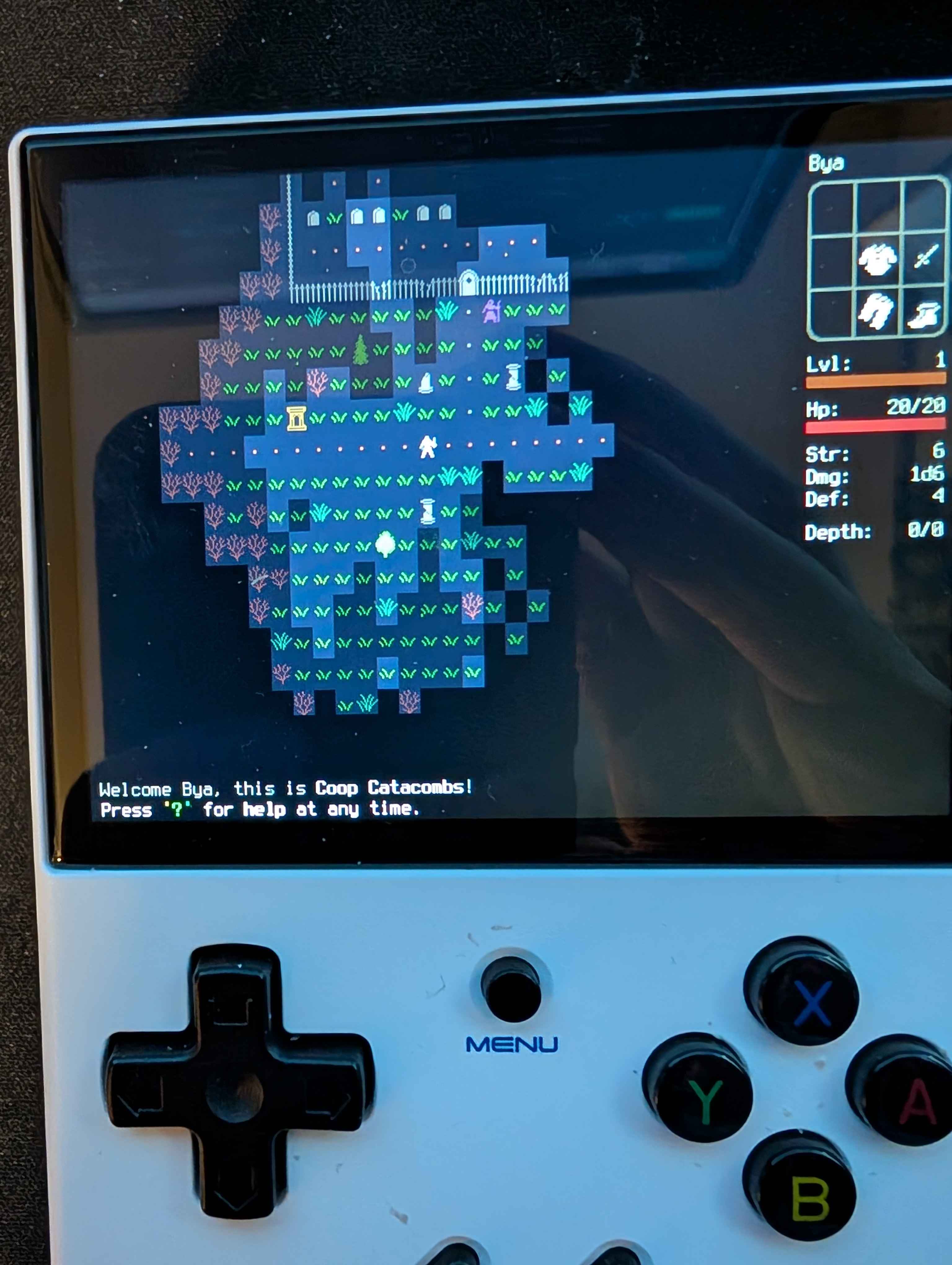
With the R36S, do know that they do not have built in WIFI, so in order to play you would need a usbc wifi dongle. I am using a RG35XX + which is slightly more than the R36S but does give you wifi/bluetooth.
Let me know when you have the new build and I can test the update with the port to make sure it works well with it.
harminoff
Creator of
Recent community posts
Of course! The controls are as follows ( I am still playing with this, so not final but wanted to map what I could. Will definitely be moving things around until it feels more comfortable)
We have up/down/left/right for movement. Then we have L1 as a modifier (basically, letting us use all the buttons a 2nd time) so that gives us diagonal movements and extra actions.
Controls
| Button | Action |
|--|--|
| Dpad | Move |
| L1 + DPAD | Move Diagonal|
| A | grab |
| B | apply/use |
| X | throw |
| Y | wait 1 turn |
|L1 + A | equip |
|L1 + B | remove |
|L1 + X | drop |
|L1 + Y | examine |
| L2 | list discovered items |
| R1 | view inventory |
| R2 | write message |
| L1 + L2 | Enter Text Input Mode |
| L1 + R1 | close door |
| L1 + R2 | cancel action |
The only issue I currently have is entering user/password. The way it works in these handhelds is that you enter them kind of like a high score (activate text input and then scroll with up/down until you get the letter you want)
This is fine for username, but the password is all * so hard to enter too complex of a password.
From what I see, there are two approaches. One would be to possibly add a virtual keyboard through Godot, the other would be to supply these in a txt file and have that pushed to the game, though I don't think you actually store the credentials for me to pass them this way, but I haven't tested it yet.
I have the current build here https://drive.google.com/file/d/1drOQ9kKosZXaN9JXIrrXIWmza0UmRJzx/view?usp=shari... which you can open and read the controls.ini and coop catacombs.sh in vscode to see what it's doing!
Thanks again for the great game!
Hello! I am really enjoying this game, thank you for making it! I have been working on getting it ported to retro handhelds, and I wanted to get your permission to get it added to PortMaster for people to play.
https://portmaster.games/index.html
Let me know what you think, and if you have any concerns.
Thank you again!
Hello,
My game has a few issues and I wanted to know if I could fix these during voting?
I have set my character to triple jump, however sometimes he is only able to jump twice.
When going to fullscreen the aspect ratio is broken.
When getting a game over, the level instantly restarts. Would like to replace this with a prompt that you died and to press r to restart.
Hitbox on the character is too large.
Thank you!
Thanks for giving it a try! Were you playing in full screen? I didn't even think of that but need to change some settings so that it doesn't stretch it looks like as fullscreen there is no visualization of the play area so that was causing confusion. Will update that today and throw up a bugfix.
Thanks for playing!
Would enjoy some feedback on ours! Thanks https://itch.io/jam/go-godot-jam/rate/1062902
I'll throw ours into the mix! https://itch.io/jam/go-godot-jam/rate/1062902
Thank you for the kind feedback! Was fun coming up with new ways to use the 3 mechanics I had created (getting bigger, getting smaller, and being fast enough to not get hit by the spike wall)
Coming up with puzzles that work is a challenge, and I have a lot more respect for people that make puzzle games now. Finding a balance between beatable/too easy/ and too hard is challenging,
Thanks for trying out our game!