On Sale: GamesAssetsToolsTabletopComics
Indie game storeFree gamesFun gamesHorror games
Game developmentAssetsComics
SalesBundles
Jobs
TagsGame Engines

GGZiron

23
Posts
39
Followers
5
Following
A member registered Dec 07, 2020 · View creator page →

Creator of
Recent community posts

If you have RPG maker account, can you PM me there too, for private convo? Also, I might want you to test my fix before I upload it here. 

Anyway, replicated the error you reported to me! 

The plugin you use, it is introducing feature, to add JS code between two tags. So, you don't use that? Okay. Maybe plugin order or something else. But I already seen an error even so. Later today will fix it, then test. Hope tomorrow to upload. 

Hey, can you test one thing? It is just for the sake of testing, is not an actual solution, even if it works. 
In the bottom of the plugin, add this:

GGZiron.FormationManager.setFormations();
Then tell me if it still crashes, or now it doesn't. 

No, is good. I though you might want it down. 

As about the error, from simply loading the plugins, I don't get errors. Will play a little with it. But even if I fail to replicate it, at very least, I will change how I read my plugin data.

Alright. I have downloaded it. You can hide the link or remove the files, if you want. 

(2 edits)

Hello!

Can you post me link to the WAY plugins, that are triggering  the error?

I believe I initialize my formations on New Game or on Load Game. But since they are always derived from the Plugin Parameters, I should initialize them on plugin boot. Probably Way's plugin tries to access data tied to my plugin, at earlier state. It is fault of my plugin, if that is the case.

I still would like to have the exact version of your plugin, to make sure. 

(1 edit)

Hello! Thank you for your feedback — I’m glad it mostly works for you.

The idea of forcing a formation during an ambush is actually a good one — and probably more doable than some of the formation-switching options I’ve tried in the past. That said, I’ve gotten very busy with life lately, so I’m not sure when I’ll be able to work on this again.

As for the lack of errors — my plugin definitely started with a few. I just fixed the ones that were reported to me. 

(1 edit)

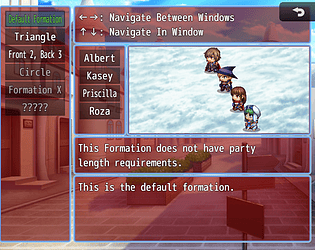
Default formation have all settings the other formations have, except the ID, and the conditional ones, as the default is always visible, is always active, and have no members count restriction. 

Within, you can position them on similar way as in FF IV, and even give atk+ for front line positions, and def+ atk- for backline. But there is no way to switch rows in battle, as you can do in FF IV.  Or make it party be with reversed rows when caught unprepared. Other big minus, backline members would keep their def+, even if all front line members are KO. I didn't set conditions for stat bonuses.  About changing formation in battle, I had attempt, but didn't like the result, and for now, no time to improve it.

I uploaded new version. It should fix this error.

Hello!

I managed to recreate your error. Is plugin error, not you. Later today I will publish a fix.

Thank you for your report! 

No, sorry. I am not using that resolution, and I do not know what else you use with it. 

There are settings for "Window Formation Display", where you should edit the Formation X and Y offsets, so they stay inside the box. Also, would be good idea to increase the window Width, which would in turn decrease the "Transposition Select" window width (the window with the actor names).

Even then, cannot guarantee my formation scene would look good for you, maybe it indeed doesn't. But there are settings to change window proportions, and the X and Y offsets, so you should try them out. 

Also, forgot to ask, did you check the settings? There you can resize a lot of stuff. Otherwise, yes, it indeed doesn't look well on big screen, if default settings used.

It is possible to show me with screen shot, what exactly you mean by "don't adapt well"? 

(1 edit)

Ended up simply updating my plugin to not use for-in loop when iterating through array, since for-of was working just fine.

I think OcRam should update his core too, because it would conflict with all other plugins that use for-in loop for iterating through array, but that is up to him.

Downloading my newest version should resolve your issue. Would like to know if is so. Thanks!

Found what cause the troubles. Later will post additional file, a small js snippet that must be placed after OcRam's Core and before my Formation Manager.

As temporary solution, if possible, move my Formation Manager above Ocram's Core. That should work too, though I do not recomend it as permanent solution. 

(1 edit)

Hello!

Hmm, which of the Ocram plugins conflict with mine? I need to replicate the error to be able to investigate the reason. 

Also, did you try to disable Ocram's plugin, to make sure the error is really because colide, but not incorrect data input?

Uploaded the new version.

Hopefully it fixes the issue for you.
Also, made a part that should fix save files made with older version. When you try to open such save file, it will load even slower than before. But once loaded, the data will be optimized and map transfer should be smooth, and when you save again, save file size should be normal. 

Looked in your project. 

So, I saw some wrong things in the data. First is, you created 16 seasons, with 12 of them having blank data. Those blank seasons, you better delete.  Though that not related to your error. And curious why you needed to create blank seasons to begin with. Maybe I can help, if there is issue. 

As about the error, I see same trigger over and over, million entries. A repeatable trigger must be added only once. But I think something in your events add same trigger again and again. 

Still, is my error too, because my code allows it. When able, I will write the triggers container not to allow two triggers with same name. And if event adds trigger with name that is already in container, it will replace the previous one, instead to add new entry. That should prevent this issue. 

Now, cannot say when will publish the patch, but should be later today, or tomorrow.

Btw, your save data is only 9 kb, when I removed the junk data from it :D. 

Thank you for feedback! And if you need further assistance after I upload my fix, contact me again. 

Got it.

(4 edits)

Those with 1.8 mb are clearly bloated. Even 114 kb save files seems to be bloated.
Can I have a save file, to look which part is bloated? You can send on my personal discord: GGZiron#8943 . Or in rpg maker forums via private message. Or here, via download link. I do not need the very game, just the save file, to see what part of the data is bloated, so to know where to look for issues.

If possible, prefer save file with 1.8 mb size.
Edit: NVM, forgot save data is encoded. Save file alone will not help me. 
But big save file and demo project that can load it, will help me.

So, if you just open the game client, but load save file that have one hour gameplay, the game gets slow too?

Hmm, by any chance, is the save file unusually big on size? Like bloated? 

(4 edits)

Hello!
First, sorry for the troubles and you having to discover which plugin cause such error. I myself rarely play too long, which is why I didn't discover that issue.

Can you tell me how you set the clock? 
One timer, or more? Is there visual clock? Do you insert triggers? 
And how the game becomes slow to load? You mean the FPS drops? Or when you change map, takes too much time? It is too slow when you go on the menu, or there it works normally?

I will try to see what causes it and fix, but little more info would help me.
You also can check if you forgot some event that adds things on my timer all the time, or every time you visit certain map. Probably that not the reason, but better be sure.