

tysm! ㅠㅠ
A member registered May 06, 2020
Recent community posts
Hi, thank you for developing such an awesome tool! I primarily use it to apply pixel effects to 2D sprites & each 2d animation frames. I am using a translator to write this, so I apologize if any sentences sound unnatural. ㅠㅅㅠ
As of version 1.12, it would be highly appreciated if you could enhance a batch processing feature—allowing users to import multiple 2D sprites, apply a filter to all of them simultaneously, and export them at once.
I've noticed that sometimes the filter doesn't apply to specific images when loading multiple materials(2d images) and clicking 'EXPORT ALL' does not work at all (The images are not being generated in the folder)
Due to these issues, my current workflow is highly inefficient: I have to click the ‘+’ button next to ‘MATERIALS’, import 2D images, apply the filter to each image, and then export them one by one. I might be doing something wrong, so I'd appreciate it if you could share any tips or better ways to handle this.
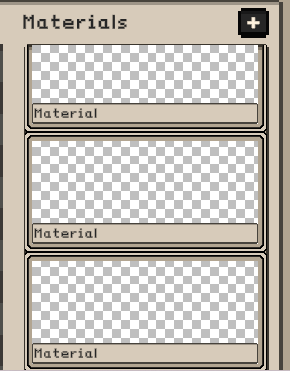
However, the thumbnails in the MATERIALS UI do not display the imported images correctly (as shown in the attached screenshot). This makes it very confusing to identify which MATERIAL is which.
Additionally, I would like to request a clear visual highlight (e.g., a colored border) for the currently selected MATERIAL. Since I work with 2D sprite animations, the frames look almost identical. Without a clear indicator, I often make mistakes, such as accidentally applying a filter twice to the exact same MATERIAL.
Still, this is my favorite and most convenient graphics program! Thank you for your time and hard work!
Kadajah's REInventory - Attache Case + Merchant for RPG Maker MZ comments · Posted in Kadajah's REInventory - Attache Case + Merchant for RPG Maker MZ comments
 Hi! I'm absolutely loving your fantastic plugin. Thanks for your hard work on it!♡♡
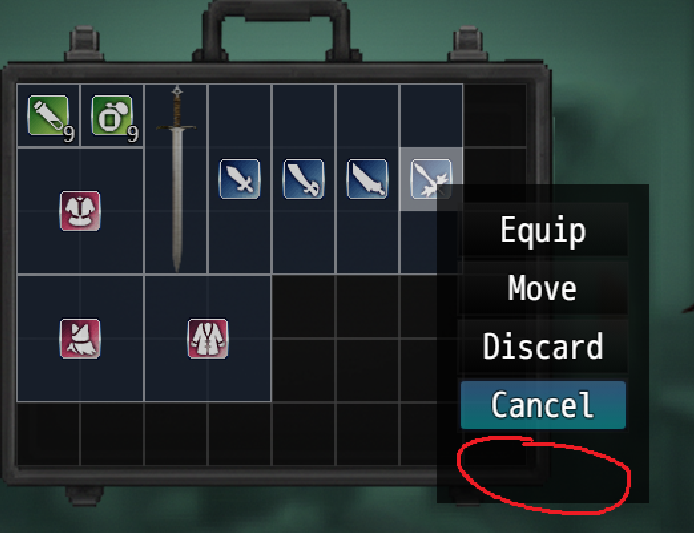
Since my game doesn't feature a companion system, I don't use the 'Send' (transfer) feature. It's great that the SEND button itself automatically hides when there are no companions. However, there’s a slight UI issue where an empty black background box is left behind (I've circled it in red in the attached image).
Is there any setting or workaround I can use to completely remove that empty space? (T▽T)