On Sale: GamesAssetsToolsTabletopComics
Indie game storeFree gamesFun gamesHorror games
Game developmentAssetsComics
SalesBundles
Jobs
TagsGame Engines

FoeFear

22
Posts
2
Topics
5
Followers
1
Following
A member registered Aug 09, 2022 · View creator page →

Creator of
Recent community posts

It's different for this developer.

Development has been completed since January 27, 2024, but it will get updated occasionally.

Cool game jam game. I really like the art design, it fits with the environment.

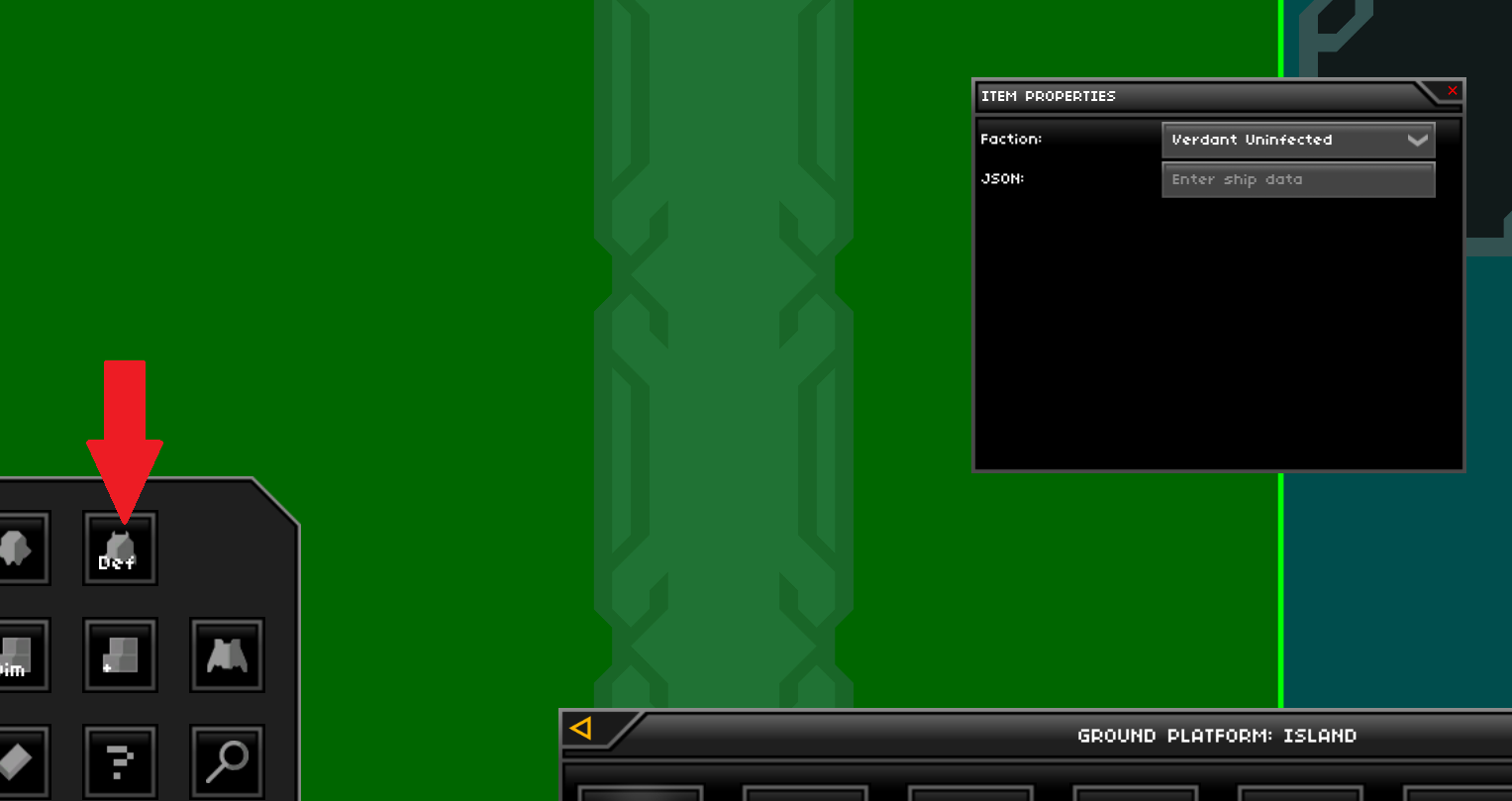
Like what I said earlier, remove the JSON code from the item defaults and just leave it blank (refer to image below). Item or sector defaults that were changed from prior versions are kept in the later versions. That's what it looks like in your case. I tested this on another device using the latest version, and this bug does not exist.
(1 edit)

Check the JSON of those strike drones. If there is a blueprint in it, remove it. This might be due to you putting a ship name or JSON code in the item defaults (there is a button called Change Item Defaults in Item Mode).

Dang, I didn't even notice this. Well, technically I kind of forgot about it. Thanks!

(1 edit)

Never mind, I pretty much got mixed up with the project's metadata and the project's banner.

(7 edits)

Hi,

I'm very puzzled with this issue. I'm trying to update one of my mod's wide cover images from the promo image section (in the metadata) with a new image, but I seem to be unable to update it. The page shows it is using the updated image when editing the project, but it is not applied to the actual project page (still uses the old image). Additionally, I am unable to remove the old cover image. The only thing I am able to remove or update is the favicon image. I'm not sure if it has to do with the project's visibility (currently a draft), and I'm just wondering if anyone else is having this problem.

The only things I could think of is either it has to do with the server connection or the file size, both of which I can not confirm.


Edit: I did a bit of testing, and it is not related to the project's visibility.

Very helpful. I personally put these values in google sheets just to do the calculations and get the faction relations, but this makes it more visual.

I can only assume this issue has to do with ui scaling. All ability buttons use mip maps to keep the rendering quality smooth and become less detailed the smaller it gets. So, depending on the value you originally had might have caused it.

(1 edit)

I released a hotfix, so it should be fixed now.

I guess this has to do with my pc's resolution. I'll just revert the commit.

(1 edit)

Can you recreate it? An image showing the difference does not help.

(1 edit)

I was able to beat the game, but I'm not really sure how you are supposed to beat level two or three the intended way.

(5 edits)

If you come across a bug in the current version of the mod or in a custom world, please create a new message board and report them with appropriate information. If you can recreate it, make sure to include instructions as to how you can reproduce it. You can also attach your save file and player log if necessary (but make sure you remove your personal information attach to it).

It is recommended to check the message board if the bug you are experiencing has been reported. Any duplicate reports or comments containing bug reports outside of the message board will be locked or removed.

(2 edits)

This is intentional. Since you can not obtain random parts as a daily reward per day and I do not want to include that type of feature, this is pretty much the alternative.

(1 edit)

This should be fixed, but I won't be able to do a hotfix.

If the macOS and Linux versions of the game don't work, please let me know.

If there are any issues related to this, comment down below.