
On Sale: GamesAssetsToolsTabletopComics
Indie game storeFree gamesFun gamesHorror games
Game developmentAssetsComics
SalesBundles
Jobs
TagsGame Engines

doover25

9
Posts
1
Followers
16
Following
A member registered Jun 09, 2020

Recent community posts

This page says, "In order to download this game you must purchase it at or above the minimum price of $5 AUD.", but there is no link to purchase. Please assist.

On itch, it sounds like the Investigator's Edition is being updated: "Investigator's is an update to the core zine (now title Legacy Edition) intended to mirror the future updates in the Deluxe Edition"... but it's unclear if that includes everything, including the solo rules/guide? 

Will these other components be added to the Investigator's edition or only in Deluxe?

Does this include any world-building and/or adventure creation instructions suggestions for the GM? Or are there any pre-made scenarios for a GM to take players through? Or is this a 100% sanbox game?

Whoohoo!! Sweet!

Thank you. Once I clicked on the "Thank you for purchasing <bundle name>" link, and then scrolled to the end of the page (after it displays all games in that bundle) = one download into one CSV file. Magic. Thanks again!!

(2 edits)

I guess I never responded back on how this works...

OPTION 1:

1. I just bought a bundle with over 700 items

2. I used your script to download each page of 30-ish items listed into separate CSV files. It seems the way itch.io displays the bundle is only 30 items at a time per page and the script can only grab what is on a single page. Thus I had 26 pages of content to export to 26 individual CSVs

3. I then had to SAVE AS each CSV as an XLS or XLSX file.

4. Followed this video on merging multiple Excel files into one:

5. TADA! I have a single file with hundreds of entries: Name, Author, URL, and Short Description of the item. Excel automatically did the color highlight so I can easily see each row separately.
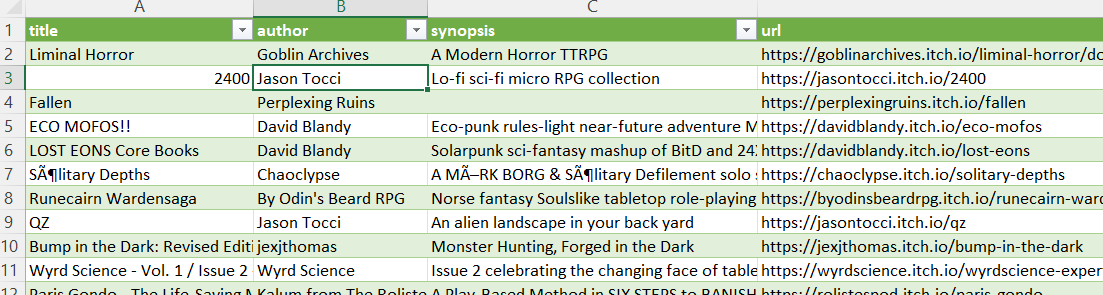

OPTION 2:

1. I could also simply export each CSV

2. Then copy-n-paste rows from each CSV into a Master/Primary file

3. Save and I have all 700+ rows in one file.

Neither option would be possible without your awesome script. Thanks a ton!!

The follow-up on this is much appreciated. Checking your updated script now. Thank you!!

"was to export the Blurb section of the items.  It means a bit of manual work on your part"

What does a user need to do on their part to allow the Blurb section to be part of the csv export?

So I see how you have to start at the Purchases page and can scroll down to get a list to export.

What about bundles? I picked one of my purchased bundles and scrolled through 22 pages = no grey button anywhere.