On Sale: GamesAssetsToolsTabletopComics
Indie game storeFree gamesFun gamesHorror games
Game developmentAssetsComics
SalesBundles
Jobs
TagsGame Engines

Calae

3
Posts
2
Followers
1
Following
A member registered Apr 25, 2022 · View creator page →

Creator of

Recent community posts

(1 edit)

Make sure to use the overlapping actor given from the event. Ensure collision is properly set up so the overlap events are firing. Also be sure to tick “Generate Overlap Events” on the objects that can be affected. And this is all it needs in the trigger volume blueprints. Zero G Trigger Volume Blueprint
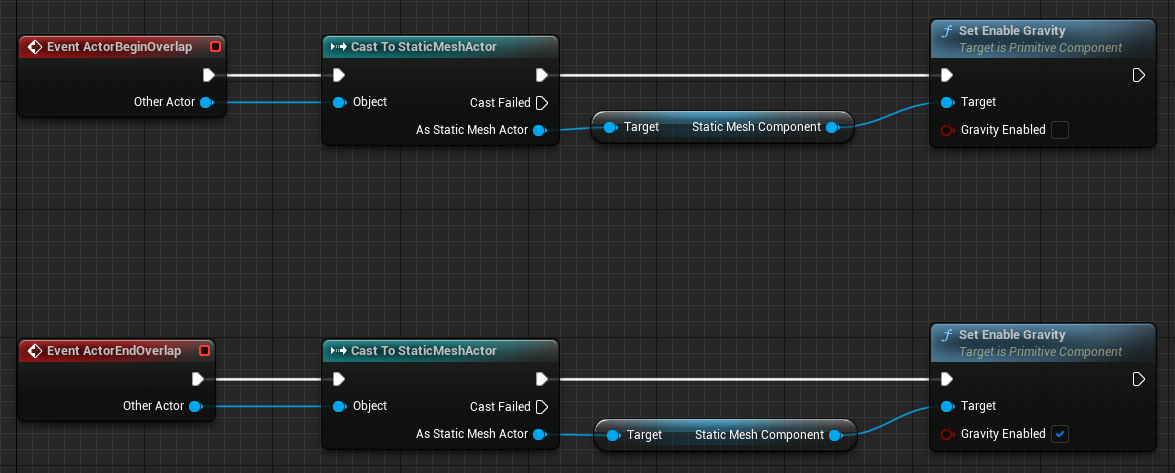
What I did was use a trigger volume. When an object first overlapped with the volume (using the on overlap event), the volume would disable gravity on the object. When overlap ended (using the on overlap end event), the volume would re-enable gravity on the object.

Nice! For sure I can slim down these downloads with removing the content that isn’t being used. A shipping build would probably also help. Definitely in the back of my mind! Good luck!