


Update launched
A member registered Jun 02, 2023 · View creator page →
Creator of
Recent community posts
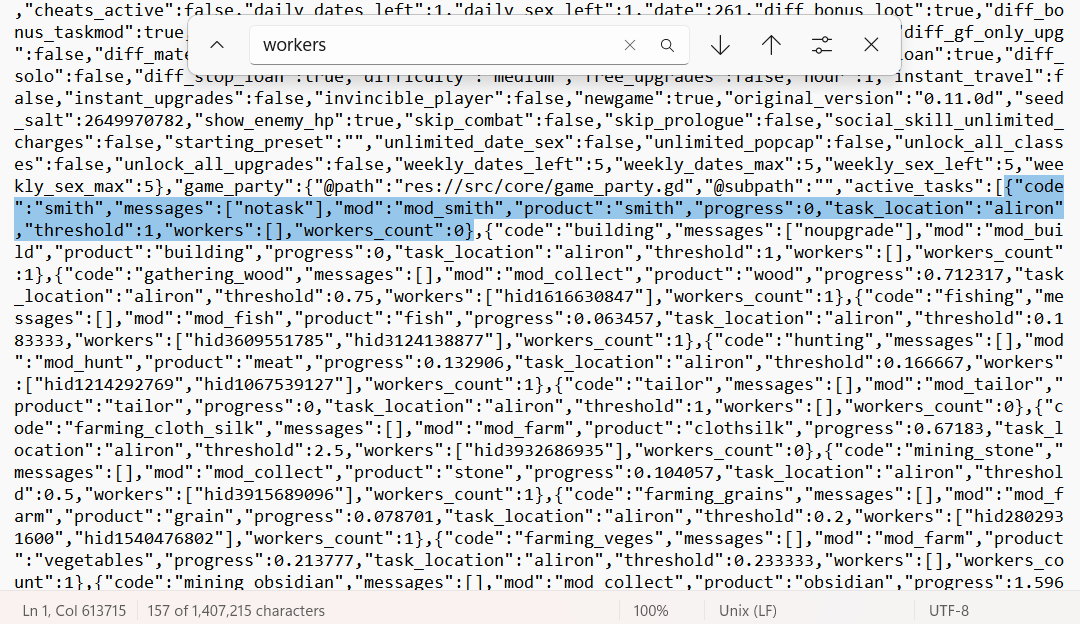
To fix the bug, you need to modify the save data. To do this, press 'Win+R' and enter '%appdata%\Strive for Power 2\Saves'. Select the SAV file with the problem, open it with Notepad, then press Ctrl+F to search for the word 'workers'. Press 'Enter' to go to the section where all the professions and data for this function are listed. You then need to modify the following structure depending on the bugged profession:
If the "wood" profession is bugged, you'll find something like this:
{"code":"gathering_wood","messages":[],"mod":"mod_collect","product":"wood","progress":0.712317,"task_location":"aliron","threshold":0.75,"workers":["hid1616630847"],"workers_count":1}
The part in bold is what you need to modify: erase the worker ID and change the counter to 0, as shown below:
{"code":"gathering_wood","messages":[],"mod":"mod_collect","product":"wood","progress":0.712317,"task_location":"aliron","threshold":0.75,"workers":[],"workers_count":0}
That works for my saves, but first make a copy in case of errors.
PD: In the image, you can see where you are going when you enter 'workers' in notepad, and one of the professions is listed. So, just search for the profession you are having trouble with.