On Sale: GamesAssetsToolsTabletopComics
Indie game storeFree gamesFun gamesHorror games
Game developmentAssetsComics
SalesBundles
Jobs
TagsGame Engines

AmishTechBro

6
Posts
2
Topics
A member registered Jul 16, 2025

Recent community posts

The results are surprising. Increasing the image scale factor has no effect, but reducing it noticeably improves OCR results. A scale factor of 0.25 seems to work best.

I'm running all these tests on a 4K display. Could it be that PaddleOCR doesn't do well with text that is large in terms of absolute pixel size?

Importing the dictionary file made it capture text. I appreciate the help in getting this fixed.

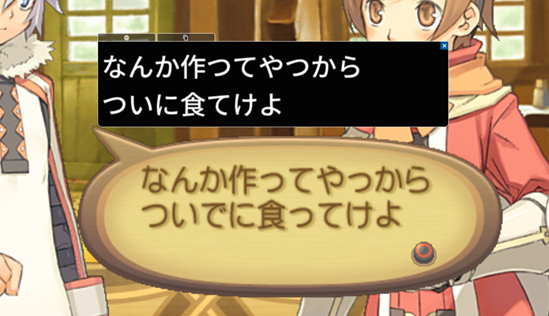
I was hoping the character dropping issue present in the other models would be fixed, but unfortunately, it's still present in many games. One missing character often makes the translation wrong or nonsensical, so this is a pretty serious issue.

 Is this an OCR model problem or an image processing problem? Note the missing characters even in the white-text-on-black-background image, which should be one of the easiest OCR scenarios.


I have a powerful computer, and would like to use PaddlePaddle's v5 server detection and recognition models to capture Japanese text. Unfortunately, GameTranslate doesn't support them, at least for Japanese. It's possible to import the models in the OCR config, but changing the detection model causes no text to be detected, while changing the recognition model makes it capture nonsense, like it's trying to capture Chinese text and failing. Are there any plans to support these models in the future?

If anyone wants to try to get them working, the server ONNX models can be found here.

Fixed!


You were on the right track, but the magic parameter I needed to set was num_predict. Setting that to 128 forces the model to terminate if it gets stuck. Longer translations are cut off, though. I'm going to experiment with some other translation models to see if this is an issue with the model or ollama itself.

Thanks again for working through this with me.

Thanks for implementing this. I can confirm the basic functionality works. I get valid translations back from the API and they appear ingame. Unfortunately, there's a problem.

After about 10, captures, the capture functionality softlocks. GameTranslate doesn't crash (no crash report prompt), but no more text is captured. I can select a new capture region, but no text is actually captured when I do. This happens in both Internal and Attached modes. I tried it three times just to make sure it's reproducible, and it happened every time. Switching back to the internal translation model fixes the issue.

I did try reproducing the issue after turning on debug mode for the tool, but I don't know how to get the information you need to investigate. I expected debug mode to write a log somewhere in GameTrranslate's folder, but I don't see anything obvious.

If you need me to do anything on my side to get a fix going, let me know.

(1 edit)

Problem: The internal Japanese-English translation model provides poor translations. DeepL is limited on the free tier, and very expensive on the Pro tier.

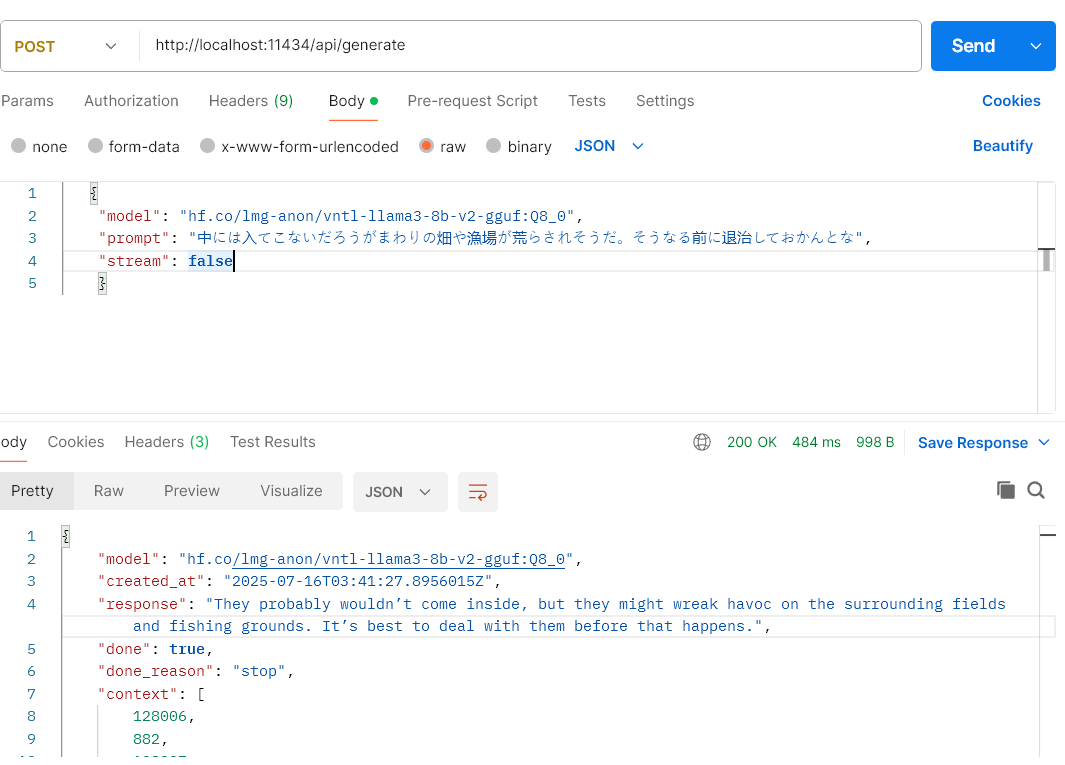
Possible Solution: Allow users to send translation requests to an arbitrary API endpoint to be processed by GameTranslate and overlaid onto the game window in automatic mode. Most people would use this functionality to route requests to a local webserver, but it could in principle be used to connect to a remote endpoint if it had acceptable performance.

I would want to be able to specify:

  • An endpoint URL
  • Metadata (request headers, etc.)
  • A request format, with a special token to represent the text captured by GameTranslate (e.g. %text%)
  • The JSON path of the field in the response object that represents the translated text
  • Optionally, a way  to filter unwanted text in the response

Example: This is an API call to the hf.co/lmg-anon/vntl-llama3-8b-v2-gguf:Q8_0 language model. I would like to pipe the response field into GameTranslate.


This software is pretty rad so far. I look forward to watching it evolve!