
On Sale: GamesAssetsToolsTabletopComics
Indie game storeFree gamesFun gamesHorror games
Game developmentAssetsComics
SalesBundles
Jobs
TagsGame Engines

Importing the dictionary file made it capture text. I appreciate the help in getting this fixed.

I was hoping the character dropping issue present in the other models would be fixed, but unfortunately, it's still present in many games. One missing character often makes the translation wrong or nonsensical, so this is a pretty serious issue.

 Is this an OCR model problem or an image processing problem? Note the missing characters even in the white-text-on-black-background image, which should be one of the easiest OCR scenarios.

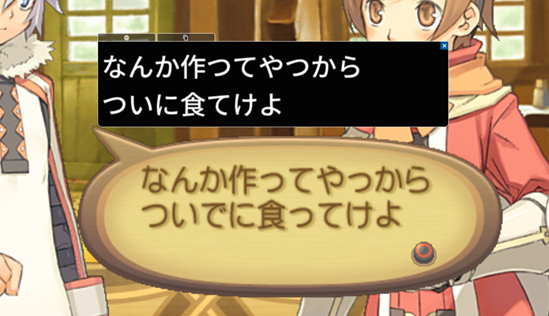
This is an issue with both, I'd say. I've done some testing & increasing the image size by 3~ helps a lot with missing characters. I will add an option for you in today's release so you can adjust it. Bear in mind that a 3x increase in image size could significantly affect OCR speed, especially when capturing a large amount of text. I think it will be totally fine in your case though, with a good PC and a rather small capture area.

Even with an enlargened image, the last example you gave had the Japanese rec model struggle a lot without any preprocessing. The PPOCRv5 model almost captured it all on its own.
There can be a use case here of adding preprocessing options to the settings, but the reason it isn't already there is due to the PaddleOCR models being trained on actual images with text, not just plain black and white text. Thus, preprocessing can result in worse results, not necessarily better.

I am considering adding the option to use Google's OCR, but adding a new OCR pipeline is a lot more work than adding translation options.. I will have to investigate it further.

Thank you so much for your examples.

0.5.4 is out now with the Image scaling factor user config. You can find it in the OCR settings. Try it out and see if it solves most problems for you! :)

The results are surprising. Increasing the image scale factor has no effect, but reducing it noticeably improves OCR results. A scale factor of 0.25 seems to work best.

I'm running all these tests on a 4K display. Could it be that PaddleOCR doesn't do well with text that is large in terms of absolute pixel size?

That is indeed very surprising..

It could be the case, but I haven't seen this problem before. The odd thing to me is that using RapidOCR/PaddleOCR official demo on the specific images you uploaded gives the same broken results. Only upscaling helped. I'll have to investigate this further..

Thank you!