On Sale: GamesAssetsToolsTabletopComics
Indie game storeFree gamesFun gamesHorror games
Game developmentAssetsComics
SalesBundles
Jobs
TagsGame Engines

abacus-tabletop-games

36
Posts
1
Topics
36
Followers
68
Following
A member registered Aug 24, 2019 · View creator page →

Creator of

Recent community posts

Super efficient way of handling this. Love it!

(1 edit)

I think this is nice: the ability reduce the damage an early curse has. They make Loadbearer abilities even more important, though.

I can only talk about how I felt; I may have been completely wrong in my evaluation. But here it is!

I felt both Loadbearer were no-brainers: I had to take them as soon as possible. They do not really help you score a victory like the wards and breaker abilities (both letting you keep more cards in your armory to keep fighting), but they definitely help you gain Knowstones. They also makes pretty much all other abilities stronger, especially the Pathfinder/Lorefinder/Quartermaster. Once I unlocked them, I was very often able to beat the Knowble in front of me and know how I was going to gain the next one. Maybe make Master-at-Arms a prerequisite to Loadbearer II?

All the Breaker abilities were also no-brainers, but I could not unlock them before a couple of games. As soon as I could, I did. Same for Sunderer, but I did not play enought to gain the Cruel Kings Club feat. I liked this. 

On the contrary, I felt the active abilities were not worth the cost in comparison to the passive abilities.

Going Knowhere community · Created a new topic Fun!

Had a nice gaming afternoon Going Knowhere :D

It took me around 3-4 hours to properly beat the game and collect all Knowstones in a single run. I went in having unlocked almost all passive abilities (all except Master-at-Arms, Opportunist and Sunderer), no active abilities and no Masteries. It was fun!

One thing I found a bit disappointing was the complete elimination of the Curses. Maybe Master Ward could put the Item at the bottom and let you draw another item instead? The curses becomes much less powerful, but this keeps the jokers in play. Just a thought.


Anyway, thank you for the good time!

Quick update about hex size: I just realized that Foundry consider that the hex size side to side is equal to the grid size. So 100 px per square is equal to 100 px per hex side to side. 

Hope this helps!

Wow, this is fantastic. Thank you!

I used the Terrain Brush. Background (must be selected as the first color) is Light Grey, then I "paint" the hatchings with ! Hatch Light Grey

Have fun

Thank you! This is very nice :

I get it, no problem!

Great addition! I have a question: is there any plan to support the cave brush tool?

Wow, this looks fantastic. Can't wait to try it!

Wow, looks like a great design learning tool! Will definitely read it thoroughly! Thanks!

This looks great!

(1 edit)

I just created a Foundry module for Tomb of the Serpent Kings. I made the map using your assets! Thank you so much :D 

https://foundryvtt.com/packages/tomb-of-the-serpent-kings-saam

Very cool! Thank you!

Hi Mark! Thank you for all of the assets. They are fantastic.

I created a free Foundry VTT module to make their use easier on the platform. https://foundryvtt.com/packages/old-school-map-symbols

Hi Mark! Thank you for all of the assets. They are fantastic.

I created a free Foundry VTT module to make their use easier on the platform. https://foundryvtt.com/packages/old-school-map-symbols

I created a project with one of your art piece: https://abacus-tabletop-games.itch.io/backpack/devlog/914497/v11


Thank you so much!

Thanks for the kind words!

Thank you!

I just published something with your illustration in it. Thank you so much! https://abacus-tabletop-games.itch.io/backpack  

You might like DungeonScrawl for this. It's not generated, but it's easy to use. The free version lets you do plenty, but cannot export at 100 px.

Hi Watabou! Just wanted to let you know that I created a small Foundry module. It's basically only your maps, walled, with some journal entries. For now, I only used 5 maps generated by 1PD, but I plan on doing more, also using other genarators. Cave/Glade and Dwellings would fit right in, I think.

Thank you so much for all you do!

Thank you for thaking the time to answer!

Thank you for taking the time to read and answer!

I'm keeping an eye out! ;)

Wow, thanks for the quick answer! I'll definitely update my installation. 

Still, I'll try your workflow, too. Maybe it's a better way to use Dungeondraft. As you can imagine, I'm pretty new to it (and have absolutely no artistic talent nor training). I used it a bit a little while ago to redo Stonehell maps for my Foundry game (the "trace image" was very useful), but eventually went back to Dungeonscrawl when I had a hard time with some things (I had trouble with some wall and door placement, but I'm not sure I remember correctly). With your pack, I'll probably use Dungeondraft again! It's exactly what I wanted and it looks fantastic.

(2 edits)

I saw a map shared on reddit and they credited you. Found this pack, INSTA-BUY!

Thank you!

Question: you cannot use the assets as "floors" in the building tool. Do you advise using the wall tool and the terrain brush as background? Or am I missing something?

(1 edit)

Foundry VTT user here. I do not know about Roll20, but it must be similar.

I see 2 problems with importing generated map. 

1. The hexes do not start "flush" at the edge. In Foundry, that means that I need to manually offset the map to fit the hex grid. This is a manual process; Foundry has a tool that helps quite a lot, but it's time consuming and imperfect. Ideally, the exported map from PS would have hexes starting flush at the edges. Here are the 2 ways "flat top" hexes cap be flush:
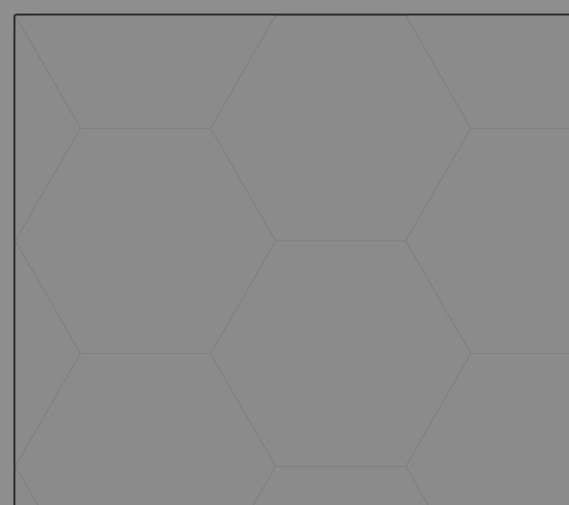
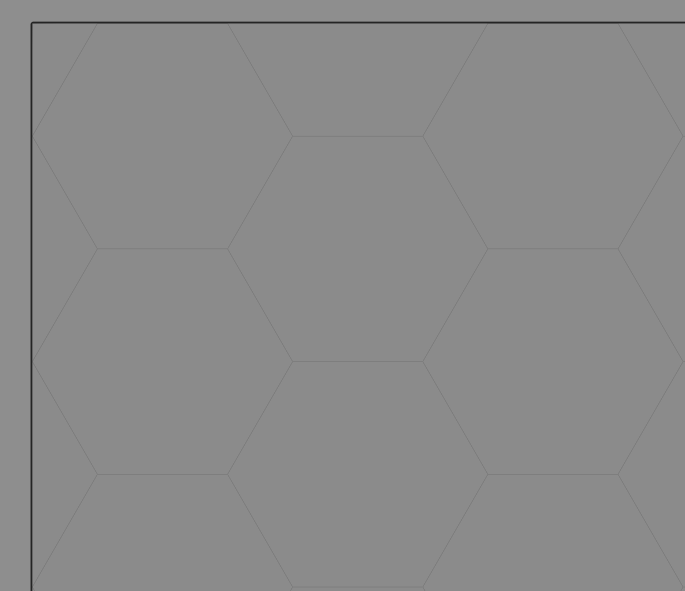

2. The "grid size" is not specified. In Foundry, maps are defined by how many pixels fit in a single grid square (the devs suggest at least 100 px, and that is what I use). For maps using a grid (like the ones generated by OPDG), it makes things super easy: export at 100 px, use the same size in Foundry and boom, everything lines up. In the best world, exporting a map from PS would be just as easy. Ideally, PS would scale their hexes to pixels per square so that exporting at say 100 px per square would fit easily and perfectly on a VTT. I read a reddit post where someone describe how to calculate it; maybe that could be useful to you: https://www.reddit.com/r/FoundryVTT/comments/t8anvc/hex_grids_in_foundry/

Thanks for taking the time to read and answer the comments! Also, thanks for everything you do :D

Great art packs, thanks! A small suggestion: inclusind a texte-file a readme file with your license would be great.

Excited to see what is coming! Small comment: the "double" and "single" documents arte both "double". 

Great!

Very cool, I'm impressed! Thank you for making it. 

I would suggest a change of font for the vertical subtitles: it's quite hard to read as is (on the screen, at least). It works when read horizontally, though.

Thank you!

Great stuff, thanks! An elevator icon that is neither top nor bottom would be useful.

Hi! This look great, but I'd like to know a bit more about the length of the adventure. How many pages to the PDF? How many location in the town? How many room to the dungeon?


Thanks!