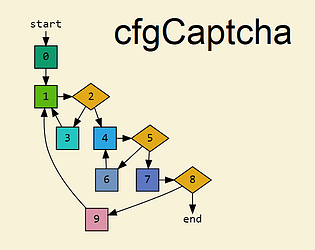
Which keywords you see and how they manifest in the code depend on your solutions, so rotating the languages is essential for unlocking all of them.
2020
Creator of
Recent community posts
A level that has n prerequisite levels (n≥1) gets unlocked either when you solve all of those levels or when you solve n-1 of them as well as all prerequisite levels of the one you don't. In this context, root is treated as normal solve.
In your case, since all are solved except F5, you'll need to solve both F1 and F4.
Are you talking about this? I was just following the platform's conventions...
Try this version, which demonstrates
Do you remember if you got the error while trying to solve the first OCaml puzzle or the second one?
Server logs suggest that you solved the first OCaml puzzle successfully, got a second OCaml puzzle in response, then after ~30 seconds refreshed the page, which could actually be done automatically by the browser upon network error. That refresh resulted in starting a new game.
Without more info, my only guess is that the server was too busy for the reverse proxy to fully process the request.
Unfortunately, the game isn't downloadable, and being a "Web 1.0 captcha" poses limitations regarding connection retries.
In case of an error like this (or one of the 50x errors), the best workaround depends on the browser: first, try to go back to the previous page, then either go forward (if the browser allows that) or re-submit the same diagram again. If the browser doesn't support going back to the previous page, refreshing the page may do the trick.
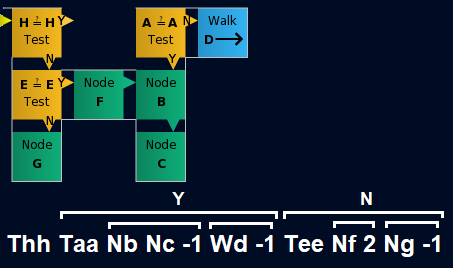
Non-negative numbers represent jumps to previous commands (loops), and -1 means termination.
For example, see Try it online.
The mouse sensitivity issue should hopefully be fixed in the new version. Thank you for reporting it!
It's tricky to rotate even-sized bounding boxes in place in a way that's reversible without using Undo, and I'd also like to maintain consistency with Home/End. I'm also not sure about conditionally entering Move mode, given that pressing Enter/Space while not in that mode would start executing the solution.
Now that mouse sensitivity has been lowered, please retry using the Ctrl+E - PgUp/PgDn - Enter sequence; if it's still too much of a hassle, I can consider having PgUp/PgDn/Home/End + modifier key (Shift or Ctrl) perform an implicit Ctrl+E.
I've temporarily added two special modes, would you be able to check whether any of the following fixes the issue?
1. https://graphomata.com/game/play-online.html?wndopt=1
2. https://graphomata.com/game/play-online.html?wndopt=2
(If so, I'll make it the default.)
The game negates the browser's zoom settings actively in order to achieve pixel-perfect text, so changing it wouldn't help.
A few questions:
- Do you play in windowed mode or fullscreen? If fullscreen, is it activated in the game (Options > Fullscreen) or by the browser (F11 or View > Full Screen)?
- Do you get the same issue when playing the Intro here on itch.io? Normally, you should see "Done" and "Skip" buttons on the top-right and bottom-right corners.
- In about:config, has any of the following settings been modified (appear in bold): layout.css.devPixelsPerPx, layout.css.dpi, privacy.resistFingerprinting ?
- Most importantly, do you currently have any workaround?
Does it only happen in the Windows version, and the HTML5 version connects successfully (can be tested in About > Server Data)?
If only in the Windows version, does running
curl --http1.1 -I https://graphomata.com/game/
(pre-installed on Windows 10+) produces "HTTP/1.1 200 OK" as the first line?
If also on the browser, what relevant errors do you get in the Developer Tools (Console and Network tabs)?