

I followed the compatibility information with Yanfly keyboards plugins, I also tried without these plugins. In parameters I left the same in the example image, but it just didn't work. I didn't receive any kind of error message. It's like he wasn't even there. Could I email you the Qabs link? the Plugin I'm using in my commercial project so you can take a look at it with your active system plugin? It's like QABS and your plugin are not being compatible.
If possible, could you give me the link of this ABS that you use in the video so that I can also buy and test it?
Hello I'm getting started looking into QABS to see if I can replicate your issues. In the meantime here is a link to where you can find the ABS which is used in the video. It's called Chrono Engine ABS by Moghunter. It's a free ABS that's been around for a long time.
https://mogplugins.wordpress.com/rpg-maker-mv/
The HUD shown in the video was thrown together using SRDudes HUD Maker.
Hello, sorry this took a bit but I believe I've found compatibility.
Keep in mind though that this fix will override the functionality of QInput for the key bindings used for the Active Item System. So don't double up and use the same key for bindings between plugins.
You will have to make sure the Active Item System plugin is located below QInput inside the plugin manager.
I'm sure this will require some testing and currently there is no compatibility for the dev mode. But if you wanted to use dev mode simply enable dev mode and then disable the QInput plugin to use dev mode and then disable dev mode and re-enable QInput.
The file is uploaded to the store page which you can now download.
Ritter_ActiveItem_System_QInput_Compatibility.zip
Good luck! I hope this solves your issues!
3 years ago(+1)
Thank you, I'll download it and as soon as I have some time and test it, I'll get back to you to let you know if it worked or not
I tested it here at home and the problem persists. I'll send you the link to the QABS I use (An ABS system) to see if you can solve it
https://drive.google.com/file/d/1MvpLPaXa_v-uONnA8zAvaqoUvJkKMGkD/view
https://quxios.github.io/plugins/QSprite
can you show me a screenshot of your plugin parameters?
I've downloaded the QABS master demo and got this plugin working within that demo project.
https://github.com/quxios/QMV-ABS-Demo
It's possible you have the "Use On/Off Switch" Parameter set to true and do not have the assigned switch set to true which may be causing this plugin not to function. If the plugin isn't properly configured then it will not function as expected.
The Use On/Off Switch parameter is meant to assign a switch to enable/disable the Active Item System, so that you can have areas where the active item system is disabled. If you have this parameter set to true then you must assign a game switch id in the following parameter and make sure that switch value is set to true.
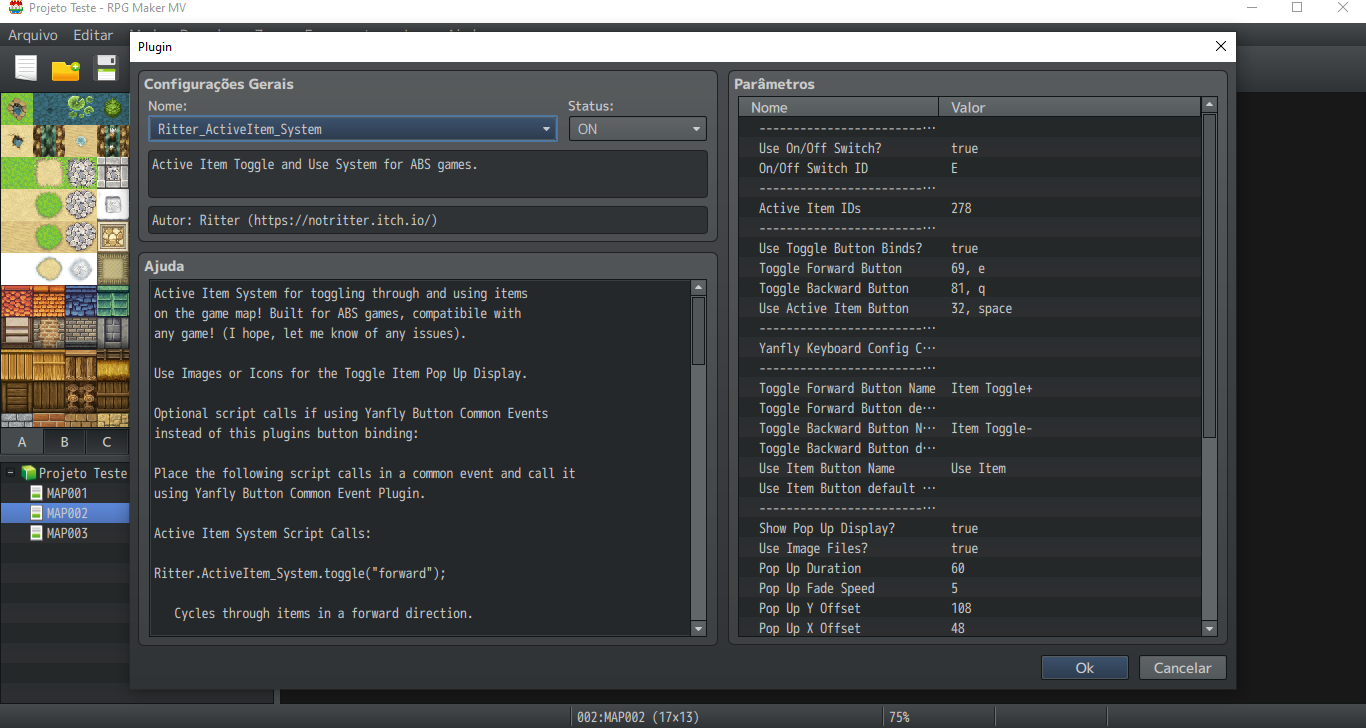 right, this is the print of my plugin parameters