

Gotta carry a bunch of stuff around in your pockets? Why not try the
InventoryBar Contraption
It's fair(l)y common for people making adventure games in Decker to want a way of showing some kind of inventory system on many cards. This contraption offers one possible approach which can be tweaked and customized:
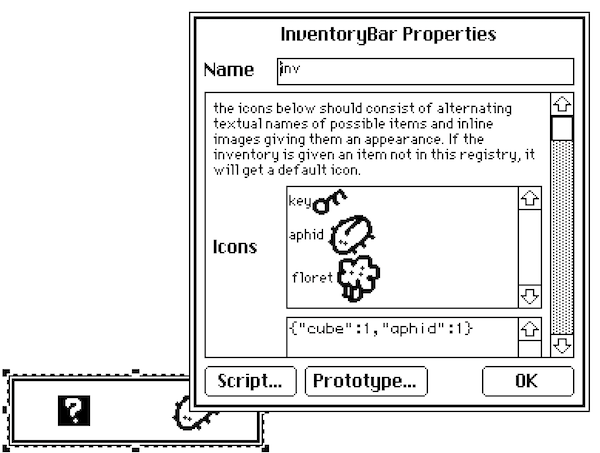
The InventoryBar is a resizable rectangle that can contain zero or more horizontally-arranged icons. Every instance of this contraption in a deck must have the same name and dimensions in order to work as intended. It has several data attributes:
- .icons is a rich-text table which associates textual names of inventory items with adjacent inline images. If you don't specify a name's icon, you'll get a default icon.
- .items is a dictionary mapping the names of items to a boolean; if it's truthy, you have the item in the inventory.
Both of these attributes are shared across every instance of the contraption in your deck. They work by modifying values stored in the prototype, rather than in each instance. This provides the impression that every instance is displaying the same inventory. I've talked about this technique for having "singleton widgets" previously.
This contraption also exposes several functions, which are the main way you'll make it do things:
- .animate[]: request that this contraption update itself visually; call this if you manually set .icons or .items in a script.
- .give[name]: add the named item to the inventory.
- .take[name]: remove the named item from the inventory.
- .has[name]: returns a truthy value if the named item is currently in the inventory.
Here's an example of a script using these functions of an inventoryBar named "inv" for a simple "puzzle" interaction:
on click do
 if inv.has.floret
  inv.take.floret
  alert["wowie, thank! have a key!"]
  inv.give.key
  alert["(monch monch)"]
 else
  alert["come back when you have a floret, okay? i love you."]
 end
end
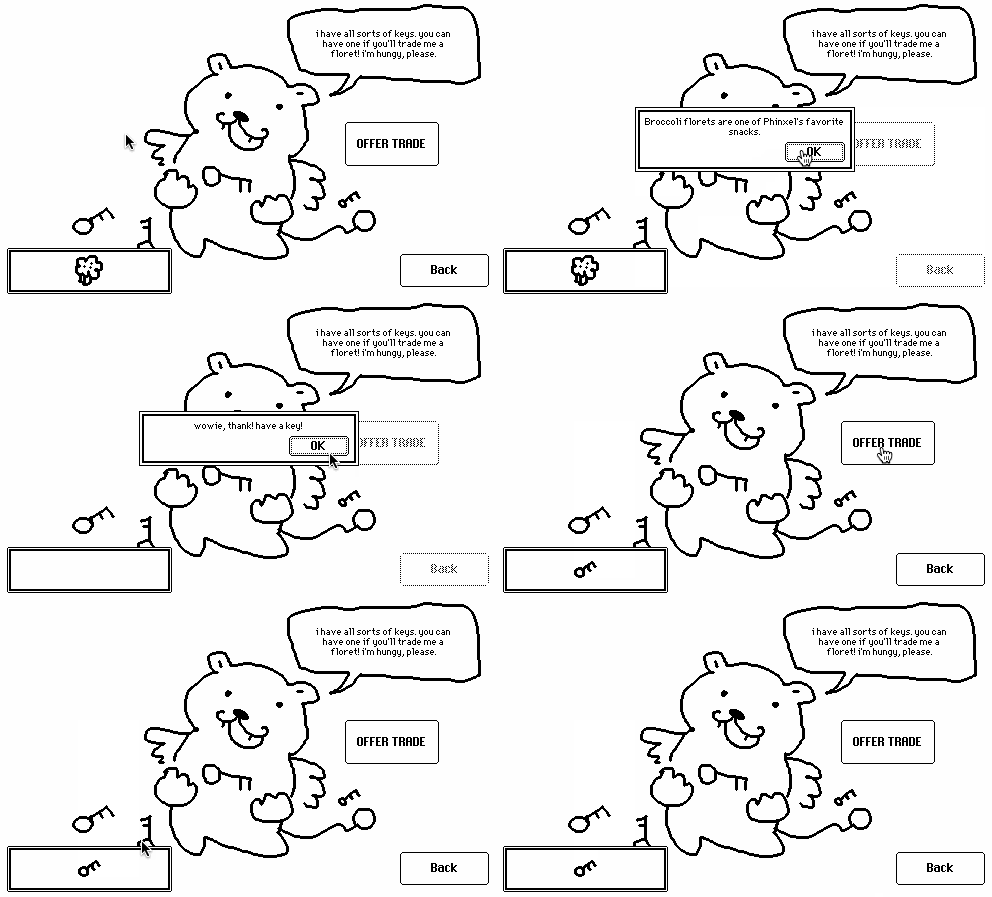
Note that this takes advantage of the fact that in Lil inv.has["floret"] is equivalent to inv.has.floret. Your life will be easier if your items use names that don't have spaces or punctuation marks in them!
If you click an item in the inventoryBar it will emit a "use" event that specifies the name of the item you clicked; The demo above has a deck-level script that describes items when they're clicked, but you could use this event to "activate" items, if you like!
on use name do
 descs:raze insert k v with
  "key"    "A weird, rusty little key."
  "aphid"  "A juicy aphid. Fairies love eating these."
  "floret" "Broccoli florets are one of Phinxel's favorite snacks."
 end
 alert["I have no idea what this is." unless descs[name]]
end
Here's the contraption itself:
%%WGT0{"w":[{"name":"inv","type":"contraption","size":[165,46],"pos":[14,288],"def":"inventoryBar","widgets":{"i":{"pos":[299,-25]},"h":{"size":[100,49],"pos":[299,3]},"c":{"size":[159,40]},"deficon":{"pos":[301,79]}}}],"d":{"inventoryBar":{"name":"inventoryBar","size":[17,17],"resizable":1,"margin":[5,5,5,5],"description":"A horizontal inventory bar which can gain and lose items over the course of a game. All instances share their state.","version":1,"script":"on get_icons do card.def.widgets.i.value end\non set_icons x do card.def.widgets.i.value:x end\non get_items do card.def.widgets.h.data end\non set_items x do card.def.widgets.h.data:x end\n\non click pos do\n i:get_items[]\n if count i\n cw:floor c.size[0]/count i\n ii:floor pos[0]/cw\n card.event[\"use\" (keys i)[ii]]\n end\nend\n\non view do\n local ic:get_icons[]\n local ik:extract trim text where \"\"=arg from ic\n local iv:extract arg where !\"\"=arg from ic\n local m:ik dict iv\n local i:get_items[]\n local cw:floor c.size[0]/count i\n c.clear[]\n each name ix in keys i\n local icon:deficon.copy[] unless m[name]\n local pos:((cw*ix+.5)-.5*icon.size[0]),(.5*c.size[1]-icon.size[1])\n c.paste[icon pos]\n end\nend\n\non get_innercanvas do c end\non view_all do\n view[]\n local i:c.copy[]\n local n:card.name # all instances must have the same name!\n deck.cards..widgets[n].innercanvas.paste[i]\nend\n\non get_animate do view_all end\non get_give do on give x do i:get_items[] i[x]:1 set_items[i] view_all[] end end\non get_take do on takei x do i:get_items[] set_items[x drop i] view_all[] end end\non get_has do on has x do get_items[][x] end end","template":"on use name do\n \nend","image":"%%IMG3ABEAEQZAQGBILBqFoKRyyRyCjFCnlEkNPK1W6hKL1W6vT6+SGxaHp2ZyVqw2n7tp8NrbjkujRrB7LMRDAUE=","attributes":{"name":["icons_exp","icons","items"],"label":["the icons below should consist of alternating textual names of possible items and inline images giving them an appearance. If the inventory is given an item not in this registry, it will get a default icon.","Icons","Items"],"type":["note","rich","data"]},"widgets":{"i":{"type":"field","size":[100,20],"pos":[151,-25],"show":"none","value":{"text":["key","i","\naphid ","i","\n floret ","i"],"font":["","","","","",""],"arg":["","%%IMG0ABcAEQAAYAAA8AAD+AAHuAAfHAA/Hg9/DD/3AH/ngPHjwODhgODgAODgAPDgAH/gAD/AAA8AAA==","","%%IMG3AB8AGgZAgHBILAoDyKRxyQQkn89mE0pVSo/VgDN7rYK+ULCVGf6CymItOWlOB9ppo/YJp8PP4y27vr/j1Vh9aX5teXp8SIRmhoJ/im5EjY6PjIl3b5RQQ5KPblGHnYhqSIGYZ6GfkXZspqJrlqeNVFOwi6KpcrW3gbSthbiAS3a/hld6WbjGx7PFyrObykE=","","%%IMG3ABwAHwZAgHBIJAaOyEBxyRQmn00nFPCsMqtVkHaLXGKf23C3iAyDkmbt2Hg0l9PnKbXtrqut8wBcTI9D0Xtqe11ggoFuX3d6XIGJjFx9iICHi4qKb4d8X5FplZdJeY2ccpOemJpsWZadR2RYl6xKrpucfldtm5K3emC0TWWYm1HAfV/DxJVrUVKqtsupgKDPXsbT1HjW163ZQQ=="]}},"h":{"type":"field","size":[100,20],"pos":[151,3],"show":"none","value":"{}"},"c":{"type":"canvas","size":[11,11],"pos":[3,3],"locked":1,"show":"transparent","scale":1},"deficon":{"type":"canvas","size":[21,20],"pos":[153,50],"locked":1,"show":"none","border":0,"image":"%%IMG3ABUAFAbAgHBILBqPyOQQxGyClEunExqQSqFNYla5FXaTzyiTKv5yr+Sqmbpmj9NauJw9977n4bqeGgQ=","scale":1}}}}}
There are innumerable possible alterations and additional features intentionally left out of this contraption; go ahead and make your own variations!
- Configurable background images (you can just edit the prototype and its margins to do this!)
- Item counts (you'd need to come up with a way to display the counts, and probably make many other tweaks!)
- Animated items (more complicated .icons and view[] implementations)
- Drag-and-drop stuff with items (this can get really complicated! beware!)
- etc!
Go nuts.