

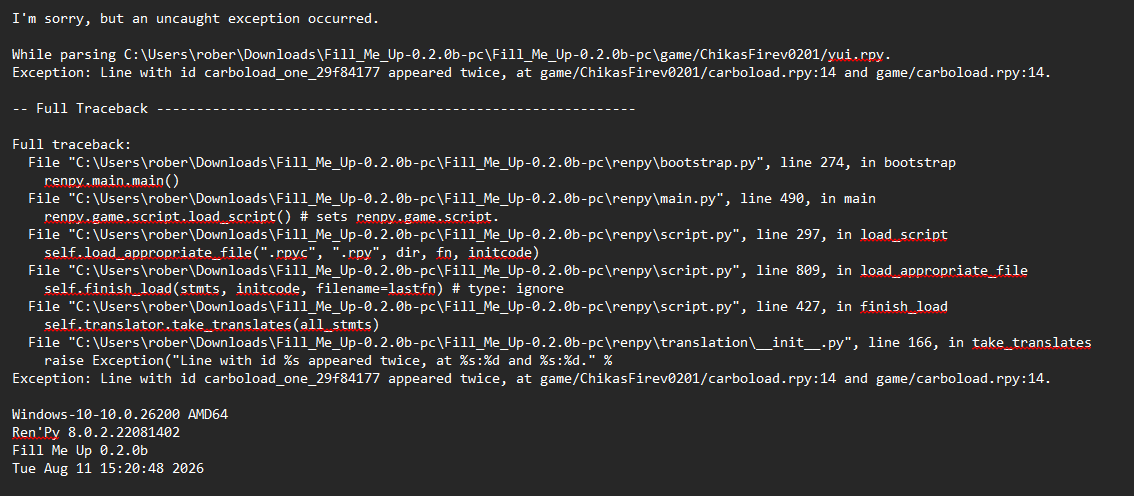
 I'm getting these errors, I don't know if I should delete something
It looks like you unzipped all the files into a subdirectory in "game" called "ChikasFirev0201". That's going to give you errors - it means there's duplicates of a lot of the *.rpy material now, and Ren'Py doesn't have a system for deconflicting when multiple labels have the same name, that sort of thing. We need to get the 'vanilla' Fill Me Up files overwritten by the Chika's Fire ones, not supplemented by them.
If I'm not mistaken : You can look now you'll see that there's a script.rpy in "game" and in "game/ChikasFirev0201", right? A lot of that kind of doubling-up? That's the issue, if true.
Delete the whole ChikasFirev0201 directory, then try re-extracting the zip such that all the contents 'overlap' with the existing files. So the script.rpy in the zip file overwrites the script.rpy that's in the "game" folder, the screens.rpy in the zip file overwrites the screens.rpy that's in the "game" folder, etc etc.
Yes, that's where the FILES need to go. There shouldn't be any folder named ChikasFireV0201 - if you're seeing one with your unzip software, open it up and extract the files inside of it directly into the game folder.
If you unzip it to the right place, your operating system / unzip software should ask you "Do you really want to overwrite these twenty-something files?". That's the key - it needs to overwrite some of the baseline FillMeUp stuff or else the ending material never sees it's trigger conditions.
What you did, unzipping so the files are in the game's folder tree but not replacing the original stuff, just confuses the game - there are a lot of places where two copies of the same information exist, and it doesn't know which to go with. That's what your previous error was all about.
For this to work :
- You can't have that second set of files. That'll always throw error messages, even if you do everything else correctly. I'd recommend deleting everything and starting again from scratch.
- When you unzip Chika's Fire, after unzipping Fill Me Up, you have to drop the files such that all of the non-image files land in the /game directory and overwrite existing files.
Don't be hard on yourself - it's not exactly a standard installation process!
I've gotten a fair deal of "sucks but it doesn't work why?" level requests for troubleshooting - your initial post was excellent, detailing the issue and providing enough data to figure out the issue right away. I'd be happy if all the messages I got for my games about elements not working were as thorough.
6 days ago(+1)
Don't worry, if I have any other problems I'll write to you right away. I've also tried several of your projects and haven't encountered any problems so far. I really liked them too.