

Thank you for the information, any chance you can let me know what Browser you are using?
I have been informed of this bug for the Browser Opera by another player as well.
7 days ago(+1)
Interesting, I have other users playing on Google Chrome right now with no issues, so it is not a Browser specific problem. Could be a setting or something else. I will look into it and respond here if I find something that makes sense.
Thank you for the feed back :)
7 days ago(+1)
I found a likely cause and have published a fix.
The game creates a save after you choose your Oath but before entering the game. If Chrome blocks persistent browser storage due to a privacy setting, extension, or site-data restriction, that save could fail and prevent the game from starting.
The game will now start even when persistent storage is unavailable. If saving is blocked, you will see a warning with instructions for fixing it. You can then test saving again or continue temporarily without persistent saves.
Please try the updated version when you have a chance and let me know if you can enter the game successfully. Thank you again for helping me track this down! :)
Hey Sir! Thanks for that fast fix. Now the Game works for me, but yeah, like you say, i get a warning. So i try the fix you say.
So in the Settings the Third Party Cookies are allowed as standard.
I also fill in this Site into the List for allowing. But it only accepts https://win-streak.itch.io
And at the End, saving is still not working for me, still the Warning.
So yeah, i can play the Game, but without save ... haha you know what i mean.
Other Tipps what i can try? **Edit** Just for Info, i tried this one too
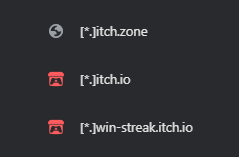
oh, i see now, temporarly saves the progress? so if so, its fine for playing and testing.
7 days ago(+1)
I am not sure beyond updating the browser settings. I am glad that you can at least see the game instead of just crashing out on the selection zone now.
For now, you can always try a different browser if you are interested in the game enough to try to get a save state.