
Indie game storeFree gamesFun gamesHorror games
Game developmentAssetsComics
SalesBundles
Jobs
TagsGame Engines
(+3)

Medieval Dungeon – Modular Base Kit
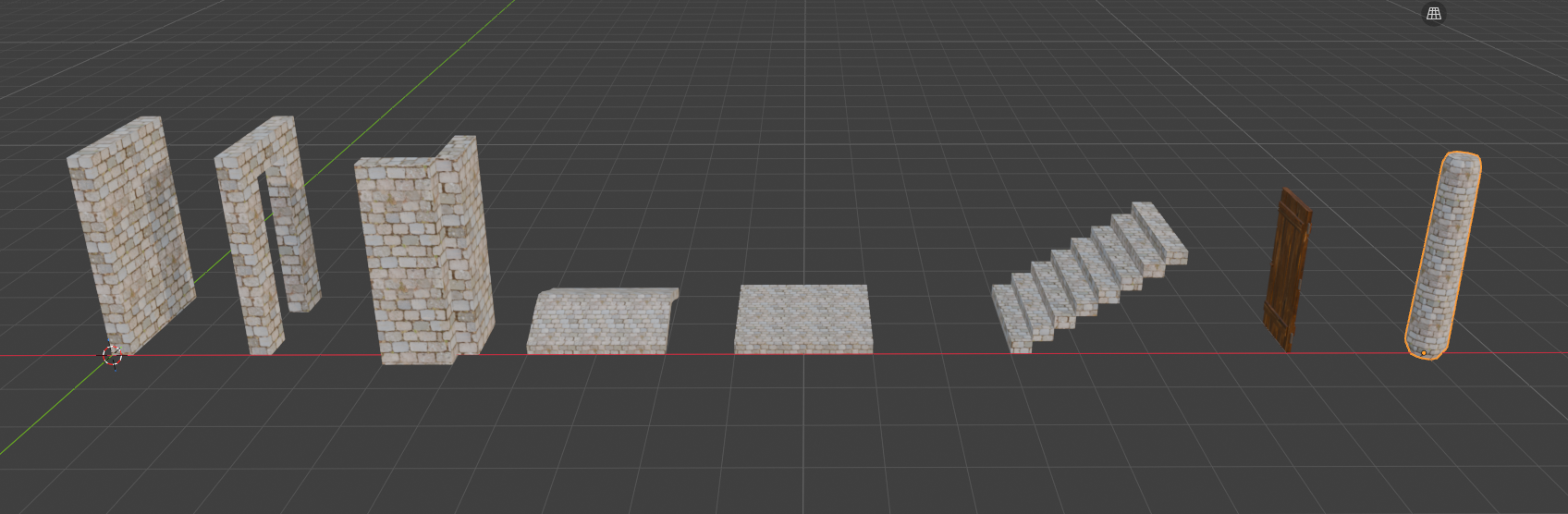
Hey! Just published my first asset kit — a modular medieval dungeon kit made in Blender (8 pieces: walls, corner, floor, ceiling, stairs, pillar, and a door). Fully modular on a 2m grid, glTF format, game-ready. Pay-what-you-want.

Would love any feedback from other creators here — this is my first published pack, so I'm curious what people think! https://nodex3d.itch.io/medieval-dungeon-modular-base-kit

(+1)

Cool! Thats a great kit! 

Keep it up, I wish you the best!

(+1)

Thank you so much, really means a lot! This was my first time publishing anything, so hearing that from someone active in the community is a great feeling. Appreciate the support!

(+1)

Quick update — added an interactive 3D preview if you want to check out the pieces from every angle: https://sketchfab.com/3d-models/medieval-dungeon-modular-base-kit-free-17e68e4a5.... Also improved the screenshots on the download page!

(+1)

Cool! And your itch.io page looks much better now!

(+1)

Thanks so much, that means a lot! I've been putting real care into making the page feel like an actual portfolio piece instead of a random upload, so it's great to hear it shows. Really appreciate you checking it out again!

(+1)

Yeah! That's why I mentioned it. Because I can tell you've put time into it! Well done!

(+1)

I recognize the Blender UI. Coincidentally, I've got a modular set of my own in the works (which are supposed to resemble space station corridors) and once I add enough details to it and make sure the pieces line up with each other it should be good to upload.

Very fancy artwork for the walls! As someone who is getting started with Blender, can you tell me how you added the brick textures? (I am currently doing low-poly assets as that is easiest for me, I create materials and then assign them to each polygon).

That's awesome, good luck with the space station kit! Getting the modular pieces to line up cleanly without gaps or overlaps is honestly the trickiest part -- took me a few rounds of testing everything in-engine before it clicked. Looking forward to seeing it once it's up!

And thank you! For the walls, I'm not assigning a material per polygon -- instead I built a shared trim sheet: one texture atlas with a few materials (stone, wood, metal) baked onto it, then I just adjust the UV mapping on each piece so it points to the right zone of that single texture. It's a lot more efficient since multiple assets can reuse the same texture without adding extra materials or draw calls. Since you're already doing per-polygon materials, you're most of the way there -- the trim sheet approach is really just about being smarter with your UVs rather than a totally different workflow. Happy to go into more detail if that'd help!