Indie game storeFree gamesFun gamesHorror games
Game developmentAssetsComics
SalesBundles
Jobs
TagsGame Engines
(+1)

Sorry for the delay; I was ready a few days ago but was waiting for a second controller to arrive so I could run all the tests. The new V30 version features detailed input customization parameters and adds logs in debug mode to help map a wide variety of controllers.

https://kadajah.itch.io/kadajahs-parallel-lives-split-screen-dual-control/devlog...

Thanks for the great suggestion, let me know if you have any questions!
Deleted 27 days ago
(3 edits)

Thank you for updating and adding features to the plugin so quickly! I just downloaded the plugin, and I have a few questions! I'm also curious if you have a demo project available with it working so I can reference it to make sure I'm setting everything up correctly.

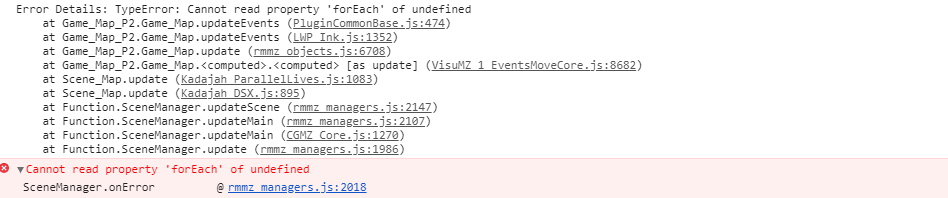
In my current project, I use the "PluginCommonBase" plugin by triacontane that comes with MZ for the "ExtraWindow" plugin. Upon running the game while that's enabled, I receive the console error "TypeError: Cannot read property 'forEach' of undefined", so I think there might be a conflict somewhere. If possible, it'd be great to see if there's a way to resolve this!


And then in a fresh project with no plugins, these were a couple of areas I wasn't sure if I was doing correctly, but issues I ran into:

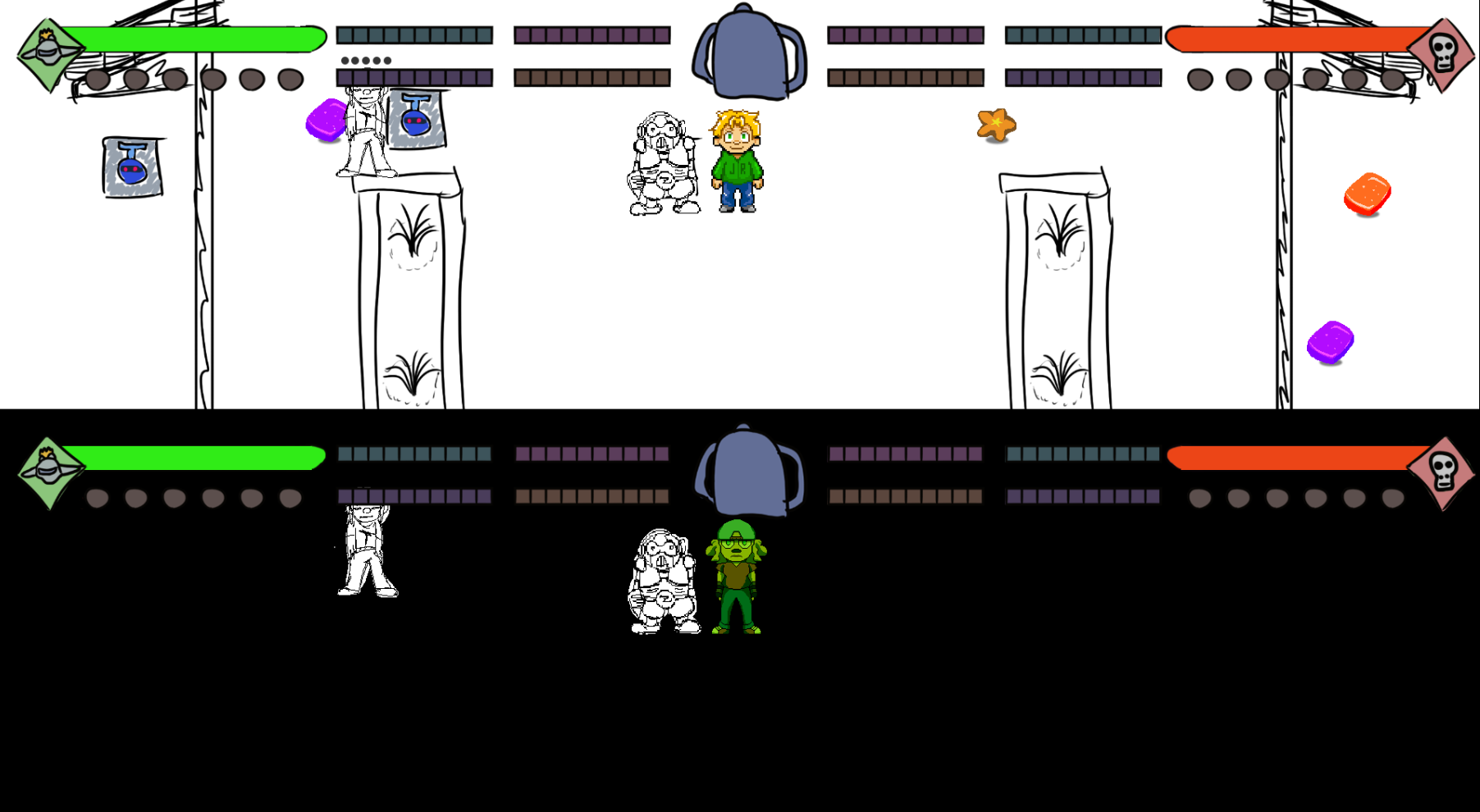
  • When player 1 and player 2 are spawned onto the same map, they're unable to see each other's sprites in their respective cameras. It looks like they still collide with each other, but the sprites aren't visible. 
    • I also tried using the VisuStella Events Move Core plugin in my other project and realized those events only spawned on player 1's view and not player 2's, so I'm wondering if that could be related.
  • When using a parallax background, it only displays in player 1's view and not in player 2's view. Player 2's view shows it as a black background instead.

(+1)

Hey Michelle, how are you doing?

First, I apologize for the errors you encountered. After analyzing the log you sent (and thanks for that!), it looks like a failure occurred during the map's `update()` call, seemingly involving a function from `VisuMZ_1_EventsMoveCore.js`. I added that plugin to my project and was able to reproduce the error; I then added the missing variables to my plugin's setup to satisfy `EventsMoveCore`'s movement update requirements, so I believe that is now resolved.

I also noticed an error regarding the creation of the Player 2 sprite on Player 1's screen, and vice versa. This happened because, when I originally designed this plugin a long time ago, I couldn't solve the dynamic update and movement issue without causing an FPS drop (hence the "Parallel Lives" concept—players weren't supposed to meet, lol). However, time has been on my side, and I now know how to fix that problem, so it is resolved as well.

I also added an update function for when you use parallax backgrounds on the same map; now, they update dynamically on both screens instead of just one. Previously, the parallax would load when the map started but stop updating, which caused a black screen.

I also improved the camera to allow characters to get closer to the map edges without leaving the view due to RPG Maker's built-in grid limits.

I included a small, working demo file to demonstrate interactions between the two players on the same screen; I hope it helps.

One note: DSX (Dual Screen X) is a bonus included in the package, but it modifies the exact same classes as Parallel Lives. They weren't designed to work together, so errors may occur if both are enabled simultaneously; personally, I don't recommend using them together.

Regarding your design, we’ll need to give some thought to the HUD issue, since Player 2 isn't treated as a second player (`gamePlayer()`) but rather as a movable event; significant, perhaps radical, changes might be required to make it behave the way you need.

Please download the V30 zip file again; it already includes all the fixes I mentioned here.

Hi, thank you so much for making these updates so quickly! It looks like the issue of the players not showing up on each other's screens and the parallax backgrounds displaying as black are both resolved and working now for me! That makes a lot more sense now. Thank you for that additional context and for including the demo project file too. That's been super helpful to really understand how it's working a lot better.

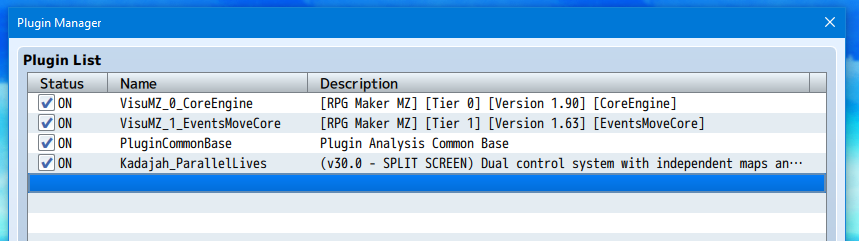
I'm still having a couple of plugin conflict issues on my end, though, unfortunately. I made a fresh new project file to test and added just these plugins:


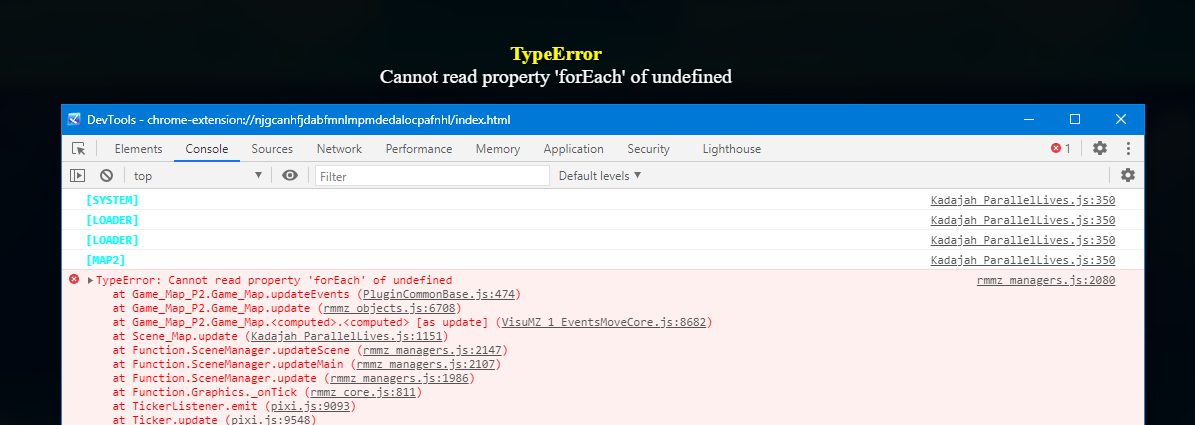
And this is the error message I'm still receiving:


It seems to only happen when the PluginCommonBase plugin is turned on, even though the error itself mentions VisuStella's EventsMoveCore plugin.

I did notice some weirdness in my original project with the VisuStella plugin, though, so it's possible they're both conflicting in their own ways. I'm using the Events Move plugin in my project primarily for spawning events on the map, so I did notice those are still only showing up on player 1's screen instead of player 2's, so I'm not sure why that is either. I know plugin conflicts like VisuStella can be tough to decode with the obfuscated code, but I really appreciate your help with this!

Hey Michelle, how are you doing?

The error isn't all that different from the first one we encountered; the plugins you're using are trying to update a variable that my plugin doesn't use, which leads to the error:

[Cannot read property 'forEach' of undefined] Basically, the plugins are trying to read a list that doesn't exist.

Creating compatibility with VisuStella is a real headache; even if I manage to fix the issue now, a simple update on their end can cause new problems to pop up.

I made a small tweak to my plugin's setup to force the use of the variables I created within the `update()` function. This might bypass the error, but it will likely prevent some procedural generation features from other plugins from working.

Please download the `ParallelLives_test` file; it includes the code modification designed to skip this error.

Another issue is that my plugin generates a second screen, but the other plugins aren't aware of this and weren't designed to handle two display environments. So, unless the plugins are built to inject elements into both screens, some procedural generation might fail. This is undoubtedly a bigger problem, and I'd love to help you solve it, but I'll need more information. Would you like to add me on Discord for more direct support?