
Indie game storeFree gamesFun gamesHorror games
Game developmentAssetsComics
SalesBundles
Jobs
TagsGame Engines

Formamorph

Every choice transforms your body and shapes your adventure · By FieryLion, Jake James

Connection Issues Sticky

A topic by FieryLion created Jul 27, 2025 Views: 16,846 Replies: 147
Viewing posts 81 to 99 of 99 · Previous page · First page

Now it's just not doing the prompt at al

Same is happening to me 

its down

it's still broken

25 minutes later and still broken

mhm don't know when it will be fixed but  it  will  eventually get sorted out and fixed  just have to be patient

I'd suggest everyone to expect the possibility that FieryLion might not come back to fix the AI, too. Dude has been maintaining the game every month or two for over a year since Formamorph was first uploaded. Prepare your life for what to do next and hope FieryLion the best.

Deleted 27 days ago

what I covered was to not reveal my location

Developer

should probably delete that image then, that's very much still visible

it's still broken

yay finally fixed

I'TS BACK UP

the worlds won't start, it says invalid endpoint url or model name

nvm

It’s down


Yet again

Downloaded worlds are gone, and also AI is no longer responsive on newly downloaded worlds either. :<

Developer

On what platform?

PC

Developer

you can try checking in '..\AppData\Roaming\formamorph' and copying everything in there over to the 'userdata' folder in the new version. Either way though, all you need to do is export your worlds and then import them into the new version. it's all backwards compatible, including saves. Just takes a bit of time.

Tried the copy thing. No luck. Also still can't get the AI to initiate anything after clicking Start either.

Developer

make sure you loaded a model in the endpoint settings

just downloaded the program and i dont know if im just not doing something correctly but when i try to play a world i get the error message failed to process ai request and failed to complete action please try again and its with every world but the odd thing is i did the exact same thing with the browser version and that one works fine

Developer

What local model did you load in the desktop version?

(1 edit)

i tryd all the default options native default to native high i tried inline aswell as planning and staged none of which gave me a different result im on an amd windows pc

not sure if i was just doing something wrong or not but after downloading a local ai model and connecting that to the program i no longer get the error messages

Downloaded the new version and put in the same stuff for the endpoint and now LLMStudio keeps giving me a error. The program cannot process any requests.

"[dirty-muse-writer-v01-uncensored-erotica-nsfw-i1] 'messages' field is required". 

I don't know what that means and the same thing happens with other models I load. This new version seems to be either broken or incompatible with the old way I had it set up. I do not know how to fix it. We need a new guide on how to locally make the new version work.

Developer (1 edit)

Need a screenshot or something of your settings. probably an easy fix. Nothing is different in this version as far as endpoints go

Developer

Should be fine. Try these and see if it works:

  • Settings → Generation: Thinking = Native, Native Reasoning = Default/None.
  • Reload the model after the errors and try one turn — narration likely works despite the log noise.
  • Update LM Studio to latest.
(1 edit)

Still doesn't work.

Still getting the "[dirty-muse-writer-v01-uncensored-erotica-nsfw-i1] 'messages' field is required"

The error still happened on the dev version.

So it must be LLMStudio that is not working.

Developer

Sorry, the update wasn't live. Try again

Nope still not working.

(+1)

OMG I got it working.
I enabled the CORS (Cross-Origin Resource Sharing) setting on LLMStudio and now it works. So it was something on my end.
LLMStudio probably screwed up when it updated.

Developer (1 edit)

ah, interesting. glad that you were able to get it working. that setting is supposed to be on by default but I guess something messed it up. I will add a short how to setup button similar to the one for image-gen which will hopefully help others in the future.

will the new version 2.3.0 have a default ai like the previous version of formamorph?

Developer

That is still managed by FieryLion, I have no control over that. 

Something to keep in mind though. Renting GPUs to do anything is super expensive right now, especially so if the task is AI related. The model change was to try and get something that won't be unreasonably expensive to pay for. Best option if the current quality isn't good enough is to either create an account on an LLM hosting site or try out local stuff. Small LLMs able to run on <4GB of VRAM are surprisingly good for the hardware/effort required. The desktop app runs models natively and has a few suggestions of small models to try out which can be downloaded directly in the app itself, no technical skill required. 
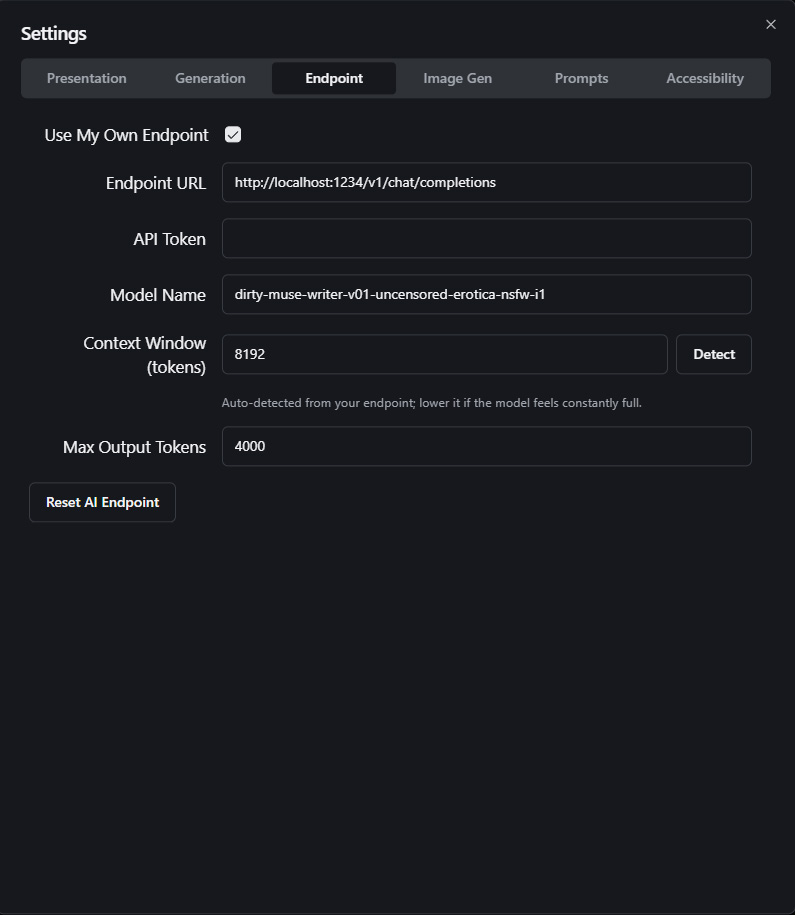
nope tried that and the app forced shut itself down doing that v2.5

Developer

okay

Viewing posts 81 to 99 of 99 · Previous page · First page