Hi! First of all, congratulations on the asset pack. The artwork is amazing and we're really enjoying working with it.
We're testing ERW Grassland 2.0 in Unity 6 using the recommended SuperTiled2Unity + Tiled workflow.
The TMX maps import correctly, but we're seeing an issue during rendering.
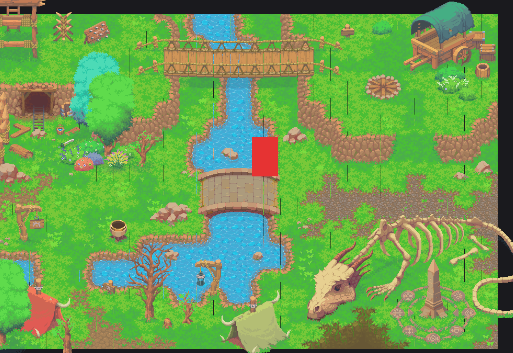
We occasionally get thin black vertical/horizontal lines across the map while changing the camera zoom (Orthographic Camera). The issue appears and disappears depending on the zoom level.
Some important observations:
- Fresh Unity project (clean project).
- SuperTiled2Unity 2.4.
- Tiled workflow.
- Filter Mode = Point.
- Compression = None.
- MipMaps = Off.
- Issue is reproducible even with the player completely stationary.
- Only changing the Orthographic Size is enough to make the lines appear or disappear.
- The artifacts look like thin black lines crossing the rendered tilemap.
Have you seen this issue before?
If so:
- Is there a recommended Unity configuration for your assets?
- Is it related to Tilemap rendering, Sprite Atlas, or camera settings?
- Do you recommend using Unity's Pixel Perfect Camera with your packs?
- Have other users reported the same behavior in recent Unity versions?
I've attached a screenshot of the issue.
Any guidance would be greatly appreciated.
Thank you!