
Indie game storeFree gamesFun gamesHorror games
Game developmentAssetsComics
SalesBundles
Jobs
TagsGame Engines

Decker Shortcuts Cheatsheet

A topic by Salty P. Slug created 12 days ago Views: 120 Replies: 5
Viewing posts 1 to 3
(3 edits) (+5)

Hi all. I’m a spreadsheet-oriented girly, so I felt the Decker reference was desperately missing a “shortcuts” cheatsheet. I made this for my own usage, but maybe it’ll help somebody else better visualize the shortcuts available for use in Decker and when to use them:
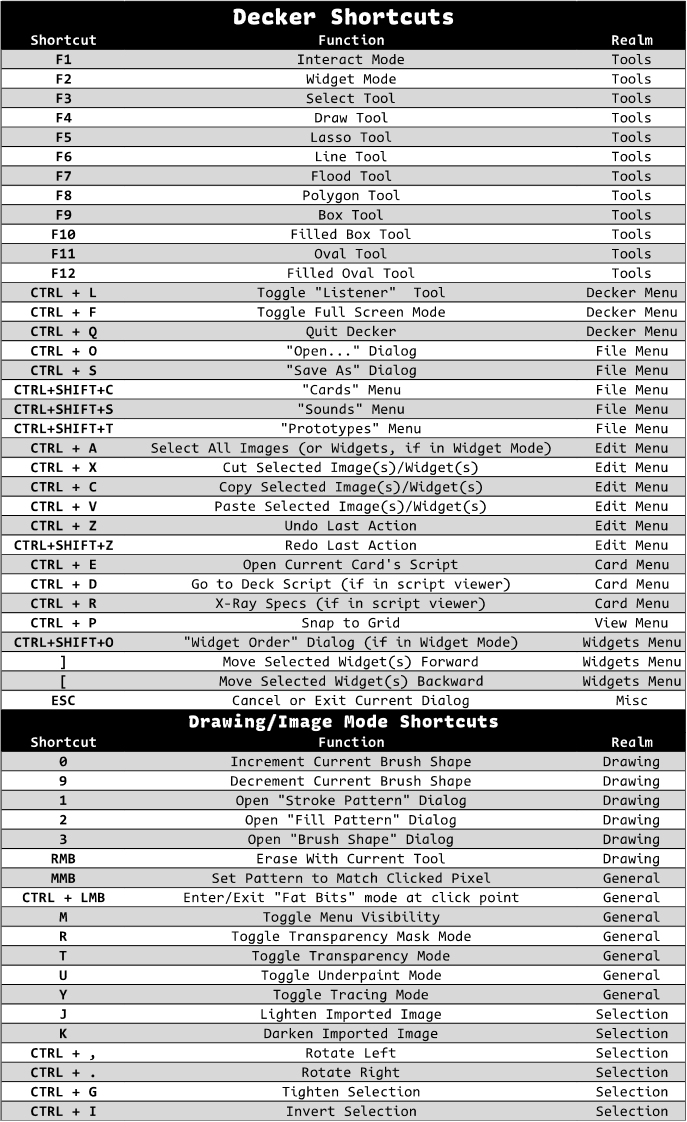
I’ve also exported a print-friendly .pdf version, which you can download here.

Cheers!

Developer(+2)

As a little secret, "ctrl + y" does the same thing as "ctrl + shift + z" (redo), since many people have that association in muscle-memory from other applications. For the same reason, ctrl and command always behave identically, so that folks used to mac shortcuts or windows/linux shortcuts can use what feels natural, and backspace/delete do the same thing outside the context of editing text: clearing selections, deleting widgets, etc.

Another set of undocumented shortcuts are that pressing the number keys 1, 2, or 3 while using a drawing tool will open the modals for choosing stroke pattern, fill pattern, or brush shape, respectively, if for some reason (screen real estate constraints?) you prefer those to the toolbars.

(1 edit) (+2)

Sweet! I’ve added these into the cheatsheet and updated this post.

(+1)

Hey IJ, sorry to bump this.. but is there a secret hidden shortcut for creating an outline around a selection?

Developer (1 edit) (+3)

No, "Edit -> Add Outline" doesn't presently have a keyboard shortcut in either version of Decker.

I generally don't try to keep this sort of thing secret. Unless there's something i've straight-up forgotten to document, I've already spilled all my secret beans.

(+2)

Oh hey! This is going to be useful!