

Is there anything at all you'd be able to release which would make understanding the engine any easier? I've been trying to make a mod for the game and have made decent progress with editing the Ruby scripts, but knowing how the graphics and objects work outside of that would be a huge help, especially because I wouldn't need to edit every graphic pixel-by-pixel in a hex editor anymore, lmao
38 days ago (+1)
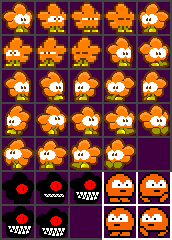
Save this image as "player.pcx" in the game's root folder (you will need an editor that can save in the ancient PCX format) Then any edits to the image should be reflected in the player sprites.
EDIT: wait maybe you'll need to rescale the image because it's the old version
Whoa, I didn't even know that was a thing! You're a lifesaver! I've been editing the .cha files directly this whole time, but I was totally stumped on how to replace the .zrs images, haha. Took some trial and error, but I found out the game seems to only repack title.pcx into title.zrs if the zrs file doesn't exist, which seems very unlike the behavior for .cha graphics. Either way, the logo's finally sporting the mod icon I made, which is very nice to finally see working ingame!
How can I do this for other .cha graphics, out of curiosity? I have the (HD version's) player sprite sheet thanks to you, but I wouldn't know how to arrange any other charsets. Someone made a sprite ripper for .cha files, but that just dumps a bunch of files labelled 0.png, 1.png, 2.png, and so on into a folder. I see that main.rb has a whole bunch of preloadCharsetImage function calls with 14 terrifying arguments, does it have something to do with that? I'd like to be able to create new tile graphics and/or arbitrary graphics to draw using the script, but I don't understand the purpose of most of the arguments, so I don't know the best approach.
If you could tell me what all (or at least some) of them do, it'd be a huge help! Obviously the first two are input/output files, and I'm guessing the ones that are set to "32,160" for claw.pcx determines the sprite size, since it's 16x16 for the player and 8x8 for the normal fonts. But that leaves 10 more arguments I can't guess the purpose of. Alternatively, you could send more of the pcx sheets and I'll see if I can manage to puzzle the rest out myself, lol. Anything helps!