
Indie game storeFree gamesFun gamesHorror games
Game developmentAssetsComics
SalesBundles
Jobs
TagsGame Engines
(2 edits) (+1)

Hey ahmwma,

I’m finally finishing up this project, but I’ve run into a slight problem with your scene viewer contraption. The first tab does show the appropriate named field’s contents, but I find that I’m unable to click the other tabs. Do you know why the tab buttons are unable to be toggled? I feel like maybe I’m just not understanding the purpose fully.

For reference, I’m trying to use the scene viewer to toggle between three sets of text. One field per tab:
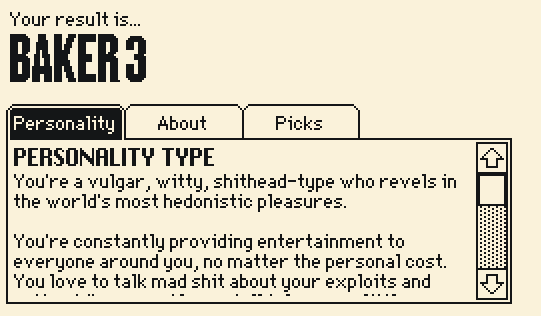
image.png

(+1)

Hey Salty!

I've been poking at the contraption and only managed to break it in the way you mentioned once. I think something may have happened to the 'on click pos do' event handler inside the contraption? This is the final event handler in the contraption's script, as it (probably) should be:

on click pos do
 v:get_options[]
 w:(.7*c.size[0])/count v
 set_value[v[floor(first pos)/w]]
end

If this event handler isn't there to do something with clicks, then clicking the tabs doesn't do anything.

So that would be the first thing I'd check. 🤔 But also, since your actual writing is safe in their own fields you could also remove the contraption and bring in a fresh copy. (Or take a working copy and give it a higher version number so it automatically replaces the old ones when you paste it in...? I think that's how that works. Save your deck first for safety!)

(And your project looks really neat!)
(+2)

I actually went through and triple-checked the properties of the contraption with the one in your deck. I couldn’t find any differences in scripting or properties.. I even re-imported it and purged the old ones. I am utterly confused! I will have to come back to this tomorrow and see if I can figure out what’s going wrong.

I appreciate your help, as always.