

Hi, i love this ...but im curious, could I use these dice for movements in a dungeon, roll a 3 move 3 ect?
Yes, absolutely! You can easily use this plugin for a board-game style movement system in a dungeon.
The core feature of this plugin is that it saves the final total of the dice roll into an RPG Maker Variable. Once that number is in a variable, you can use standard RPG Maker event commands to make the player move that exact amount of steps.
Because the plugin automatically pauses the event while the dice are rolling on the screen, the movement will wait perfectly until the player sees the result.
Here is a step-by-step guide on how to set this up using a standard Map Event:
Step 1: Roll the Dice
Create an event (like a button, or an autorun/parallel event that triggers on the player's turn) and use the Plugin Command to roll the dice.
- Plugin Command: Roll Dice (Map)
- Dice Notation: 1d6 (for a standard 6-sided die, or 1d4, etc.)
- Result Variable: Variable 0001 (or whichever variable you want to use, let's call it "Movement Steps").
Step 2: Create a Movement Loop
Right beneath the Plugin Command in your event, you will create a Loop that moves the player one step at a time, subtracting 1 from the variable until it hits 0.
Your event should look like this:
◆Plugin Command: Kadajah_DiceD20, Roll Dice (Map)
: :Dice Notation = 1d6
: :Result Variable = 0001: Movement Steps
◆Loop
◆If: Movement Steps > 0
◆Set Movement Route: Player (Wait)
: : ◇Move Forward
◆Control Variables: #0001 Movement Steps -= 1
◆Wait: 10 frames (Optional: adds a slight pause between steps)
◆Else
◆Break Loop
◆End
◆Repeat Above
If it turns out to be complex to implement in your game, I can add it as a plugin command to make things easier for you. Just let me know. I'm glad you're enjoying the plugin, and I appreciate all the support.
Here’s a tip for you: add the script call `$gamePlayer.moveForward();` to your list of steps.
This script moves the character forward regardless of the direction they are facing; if they are facing right, they move right; if facing left, they move left.
So, you can create a list of options: Up, Down, Left, and Right,
And when an option is selected, you call a script to turn the character in that direction.
The scripts are:
$gamePlayer.setDirection(8); "up"
$gamePlayer.setDirection(2); "donw"
$gamePlayer.setDirection(4); "left"
$gamePlayer.setDirection(6); "right"
You’ll notice that each of these numbers corresponds to a direction on the numeric keypad.
By combining the "Show Options" list with these scripts and the dice roll result, you’re all set: you can control the character's direction within each flow, while the dice determine how many spaces they move forward.
Let me know if you have any questions.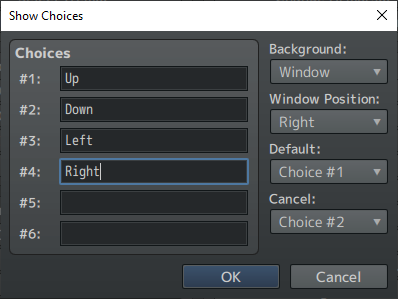
I hope I've helped.
so it works however what i really want to with it is this, unsure if you can help me, if you can that would be awesome if no i totaly understand
PROJECT SYSTEM:
Dungeon Dice Movement System
Purpose:
A tabletop-style dungeon crawler movement system.
Player:
1. Presses Enter to roll dice.
2. Dice result becomes movement points.
3. Player moves freely in four directions.
4. Each tile costs 1 movement point.
5. When movement reaches 0, the player rolls again.