

Hi! There are log files the game creates while playing, and I'd need to see them. They're here:
%localappdata%low\Ragtor Stone Games\Orc Bastion
If you copy/paste that text above into the file explorer, you'll get to Orc Bastion's save folder. Here, you'll see two .log files, and they're the ones I need:
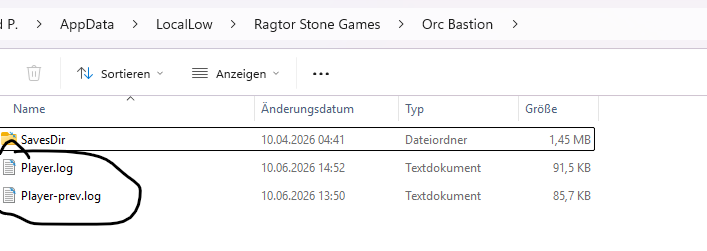
(On my computer, that path is C:\Users\ragtor\AppData\LocalLow\Ragtor Stone Games\Orc Bastion, for example, it's usually hidden by default.)
With those, I can figure out what's causing the bug and fix it.
You can quickly upload the log files here (no sign up needed) and paste the link here:
LimeWire: Share Files - Secure File Upload Platform
Do you still remember what made the game crash? An action you performed, menu stuff, or an enemy encounter? The more info I have, the more likely it is I can find the bug.
Thanks!