
Indie game storeFree gamesFun gamesHorror games
Game developmentAssetsComics
SalesBundles
Jobs
TagsGame Engines

Oh no, I'm sorry about that. We're trying to diagnose every issue but some still slip through! If it would be alright, could you please tell us your OS as well as computer specs? Also, have you tried deleting your settings.data file located within:

 C:\Users[USER]\AppData\LocalLow\Big Bun Studio
(+1)

No worries 😊
I'm using a Windows Laptop and there isn't a settings.data file when I go to  C:\Users[USER]\AppData\LocalLow\Big Bun Studio.

Specs:
13th Gen Intel(R) Core(TM) i7-1360P (2.20 GHz)
Intel(R) Iris(R) Xe Graphics (128 MB)
64-bit operating system, x64-based processor
16gb RAM

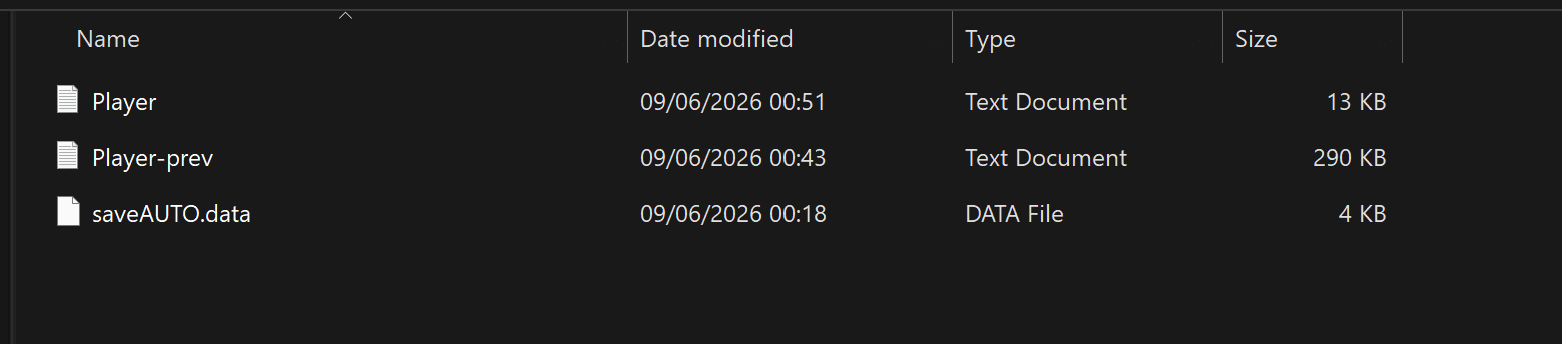
Ah thank you thank you! Just to double confirm, there is no settings.data file at all in the frankies folder? Apologies if this is a little too much but could you take a screencap of just the contents of the folder?

(+1)

Yeah, there is no settings.data file at all in the frankie's folder


(+1)

Thank you! Hmmm.... Perhaps you have an antivirus enabled? Failing that, maybe attempting to run the .exe as admin would generate the settings.data on start-up. Apologies for the long list of asks! You're helping us a ton!

(+1)

Just tried turning off my antivirus and running the game as admin and the settings.data file didn't generate 

(+1)

I see! One last thing to try, although this will also remove your save data as a heads-up! Try deleting the Frankie's Funhouse folder under the Big Bun Studios directory. If you'd rather not, its no worries, you've helped us a ton thus far!

(+1)

No worries, I've not been able to get past the helper.exe tutorial as I can't move and changing the key binding doesn't work.
I've tried deleting the folder and loading the game up, it still doesn't generate a settings.data file

(+1)

Thank you for your assistance, and I'm so terribly sorry. We'll look into this issue deeper and hopefully will have answers for you and others affected by this bug! By the way which Windows do you have?

(+1)

No problem, I have Windows 11 Home