
Indie game storeFree gamesFun gamesHorror games
Game developmentAssetsComics
SalesBundles
Jobs
TagsGame Engines

Hi,
It will be the same message from Youtube :D

I think I can give it a try.

To be honest, my shader development process is often more experimental than scientific. As I mention in the guide, a lot of features come from testing ideas and seeing what works rather than starting from a perfect technical solution. So I can't promise I'll find a good approach, but it's definitely an interesting challenge and I agree that the effect could add a lot to the overall look.

My first thought is that it might be possible to approximate it at the material level rather than through the lighting system itself. For example, by detecting the shadow transition region and applying a color shift there. That would probably require some material and texture-specific tuning, though, and it may not behave exactly like a physically-based colored penumbra.

Still, you've got me curious now. If I find a practical solution, I'll let you know!
Thank you a lot for the answer! I understand, that you're rather enthusiast (and so am I 😅), than perfect technical engineer. But I was amazed by the solutions like fake SSS, shadow catcher mesh and point light lighting the unlit shader! So I thought you're way smarter than I am! I'm very grateful for your reply and your work. This is a great contribution to NPR community 🥺💖

Hi,

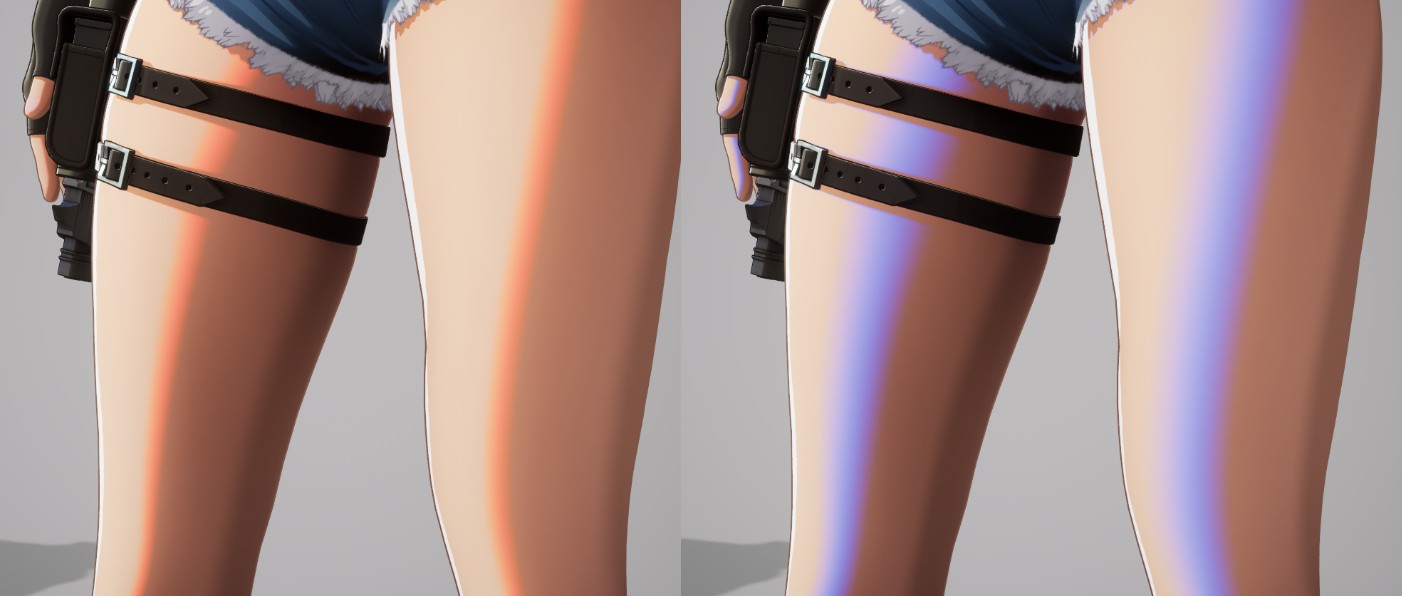
Just a quick update. I did a small test today and wanted to share the results.

I managed to create the effect directly in the material so that it appears along the edge of the first shadow layer. The color can be adjusted, and the thickness depends on how soft the shadow transition is. In other words, the more blurred the shadow edge is, the wider the effect becomes.

At the moment, I've only tested it in one area, but since it's working, the next step is to connect it to the rest of the shader parameters.