
Indie game storeFree gamesFun gamesHorror games
Game developmentAssetsComics
SalesBundles
Jobs
TagsGame Engines

i don't see side "got a bite" asset. at least there is no line for it.

If you're asking about the fishing rod, my example uses the 3rd and 4th row on the side view fishing effects sheet. This should be clear on the animation guide.

obviously but there is no line in 3rd and 4th rows.

my response clearly says "there is no line for it" it is pretty obvious what i meant.

(1 edit)

I have no idea what you're talking about...

The first column has lines, the second doesn't. Not everyone wants the pre-drawn line. Use the one that works for you.

Deleted 6 days ago

no first and second ROWS have lines, but THIRD and FOURTH do not

(1 edit)

hey don't post full sheets like that. i deleted it.

you said "side" (left/right) asset, but the one you just posted is the up/down asset. there was nothing obvious about your original comment and I'm still confused.

i actually said the wrong row for the side view sheet, it should be the 5th and 6th rows for "got a bite". which corresponds to the 5th and 6th frames in the animation guide. and also the 5th and 6th COLUMNS of the up/down sheet, because those needed to be orientated differently. if you just look at the animation guide, it's not hard to find the correct sprite for each frame. they're all in the same order as they are used in the animation guide, and there's only 8 frames.
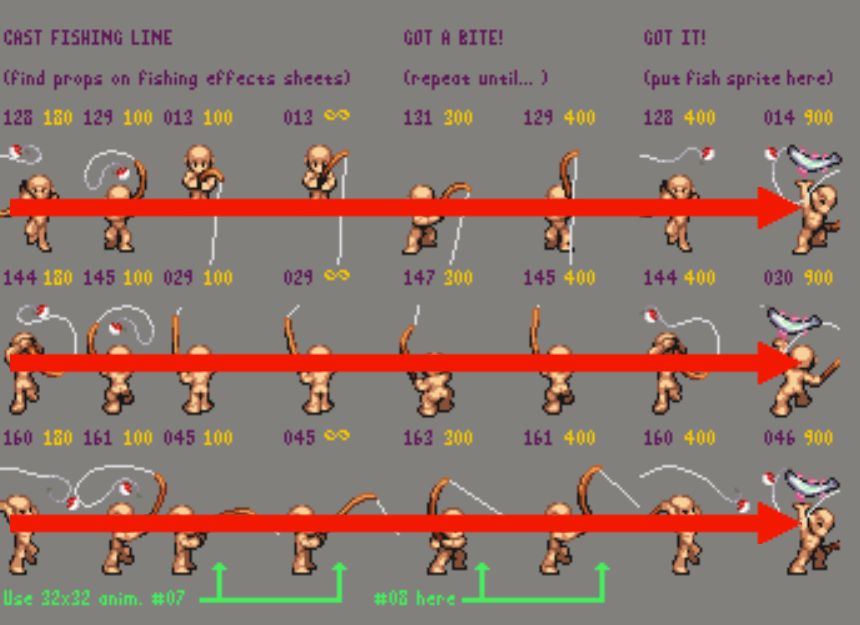
These rod sprites are setup in the exact same order on their respective effects sheets. Whether you're using left/right or up/down animations. Got a bite is frames 5 and 6. It's right there in the animation guide.

right! i just got confused, no need to express attitude pal