

Hi! Thanks so much for this resource, I'm using it right now but I've come across a hiccup. I'm able to follow your section on Buttons, but I can't seem to get the same Button to toggle "yes/no" on click. I'm able to have it toggle to "yes" on button click, but I'm unable to have the same button toggle "no" when I press it again.
on click do
thebox.value:1
end
88 days ago(+5)
Hmm! Yeah, my example in the book only goes one way... I'll have to think about adjusting it.
But for now I'll explain some other ways to write that script here!
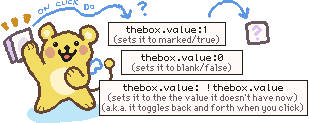
Because buttons can hold a binary value (0 or 1) you can set it to hold either of those values directly.
Or you can tell it to be "NOT the current value". This will toggle it between 0 and 1 depending on which value is currently stored.
"!" is the Lil operator for "NOT" so it could be written like this:
on click do
thebox.value: ! thebox.value
end
I hope this makes sense? And thank you very much for reading! I'm always happy to clarify things!
88 days ago(+3)
This is exactly what I needed, *thank* you! I really appreciate your breakdown with Phinxel to help illustrate the script! I'll continue referencing your Field Notes as I learn my way through such a neat tool :)