
Indie game storeFree gamesFun gamesHorror games
Game developmentAssetsComics
SalesBundles
Jobs
TagsGame Engines

Creating a cooldown button

A topic by Gabriel Cornish created Apr 16, 2024 Views: 369 Replies: 5
Viewing posts 1 to 3
(+1)

How would I approach creating a cooldown button in decker?

The idea is that someone could click a button and would have to wait a certain amount of time before being able to click it again.

Ideally the button doubles as a sort of progress bar so that you could visually see the bar draining before being able to click the button again.

For an example of this in action, please see: https://adarkroom.doublespeakgames.com/

Thanks in advance!
Developer

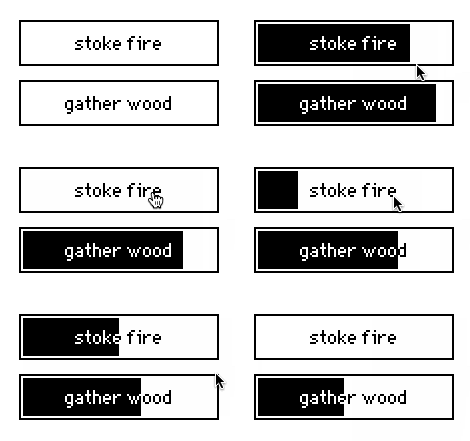
I made a simple version of this idea by creating a Contraption that consists of an invisible button layered on top of a "bar"-styled slider. When the button is clicked, it sets the slider to the maximum possible value and makes it "animated", so that it will tick down naturally. While the animation is in progress, the button is locked:

A paste-able version of this contraption is here:

%%WGT0{"w":[{"name":"cooldown1","type":"contraption","size":[100,25],"pos":[206,201],"def":"cooldown","widgets":{"s":{},"b":{},"l":{}}}],"d":{"cooldown":{"name":"cooldown","size":[100,25],"resizable":1,"margin":[5,5,5,5],"description":"a button which requires a configurable cooldown between clicks.","script":"on get_text   do l.text end\non set_text x do s.format:l.text:x end\non get_cooldown   do last s.interval end\non set_cooldown x do s.interval:0,1|x end\n\non view do\n s.font:card.font\n s.format:l.text\n if s.value\n  s.animated:1\n  s.value:s.value-1\n  b.locked:1\n else\n  s.animated:0\n  b.locked:0\n end\nend\n\non click do\n s.value:last s.interval\n card.event[\"click\"]\n view[]\nend","template":"on click do\n \nend","attributes":{"name":["text","cooldown"],"label":["Text","Cooldown"],"type":["string","number"]},"widgets":{"s":{"type":"slider","size":[100,25],"pos":[0,0],"locked":1,"interval":[0,100],"format":"","style":"bar"},"b":{"type":"button","size":[100,25],"pos":[0,0],"style":"invisible"},"l":{"type":"field","size":[100,20],"pos":[111,0],"show":"none"}}}}}

How's that?

As written, this example doesn't include a "disabled" mode for the cooldown buttons, which might be useful for some applications. It is resizable, and respects the .font attribute.  You could make a much fancier-looking version of this idea- possibly with color, etc- by using a canvas as the contraption's background and drawing the progress bar from scratch.

Hi I know this is an old post but was hoping for some insight- I'm playing around with the idea of a virtual pet in Decker, and something like this cooldown button would be a very good way of showing when a pet's needs are low or high. I'm trying to figure out how I can integrate actions of feeding and caring for the pet to reset the cooldown, eg. if the happiness meter (functioning like a cooldown slider) is starting to get slow, I could press a separate button like 'give pet a treat' which could make the pet happier and therefore when pushed it would trigger a reset of the slider to its original state. is there a fairly straightforward way to implement this? 

Developer

You could modify this contraption example to allow external events to reset the timer, but you really don't need a contraption at all to keep track of cooldowns; just an animated widget and some scripting. I recommend reading the sections of Phinxel's Phield Guide on Timing and Animated Widgets, as well as viewing the prototype script of the above example.

(+1)

Thank you! Just studied the contraption script and it all makes sense, thank you!

If I wanted to trigger a function after the cooldown period ends, would I trigger that from the "on view" when it switches back to "animated:0"?

Developer (2 edits)

Not quite; that will also fire whenever the contraption is first displayed.

You probably want to detect the moment the last decrement occurs.