

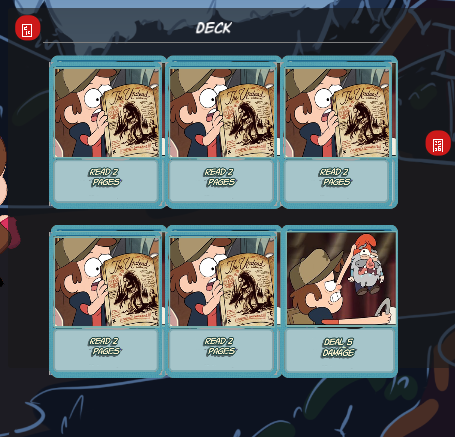
After the dialog cleared I clicked on the shaking icon at the bottom left, which brought up the "Deck". There were 2 places, top left corner and right side about 1/3 of the way down, that showed an icon for a missing character in the font being used. This often happens when you use a system font and do not include the font with the game. Based on the locations, and that they appear to be buttons, I'm guessing you used a symbolic font, such as Wingdings, which is Windows only. I am playing on Linux, so do not have native Windows only fonts. I would suggest using actual icons for buttons and symbols, or finding one of the many free symbol fonts that you can include with the game.
Nothing happened when I clicked on the static icon above it that showed what looked to be a quantity of 3, nor the other animated icon at the bottom right.
On the "Deck" screen most cards said "Read 2 pages". There was an effect when I hovered some, like there was a card being shown underneath, but it was hard to see much through the top card. Clicking did not seem to do anything.
In my second fight there was a bat with Evasion. Hovering on the word or the HP bat after they did an Evasion boost showed a popup/tooltip with info on Evasion. There was another missing character here. It also looked like it was trying to use BBCode for Bold, but the BBCode option was not enabled.
I got a card that dealt damage to all enemies. It also had a missing character drawn over it, with what looked like it might have been a countdown, though it was fast and I'm not certain.
I got to a boss? fight. There was an eye overhead that was counting down from 3, but hover text said it would flee in 9 turns. Based on the 9 turns I used 2 strength boosts before an attack. It fled after the attack.
I then gained a second person. It looks like I can now click on the bottom-right deck button to see "Discards". Maybe that was unlocked after an earlier fight, but I did not try it, and nothing indicated there was a change. I would suggest hiding icons/buttons you can't use until they become available. If not fully hiding, then the bottom right one should be static when not usable, and become animated once you can do something with it.
After my next fight I ended it with only 1 card in my hand. It popped up info about getting a refill when out. After that I was able to click on the signs to move to the next area, but there was no hover text about what to expect or distances.
In my next fight my hand was almost all "Gain 3 Strength" cards with 1 attack card.
I'm not familiar with Gravity Falls, so don't know any of the references, characters, or story. The basic gameplay is simple enough to pick up, but it would be nice to have a tutorial teach you how things work. There are certainly things I'm not sure on. What are the additional icons on the left side for? Can I do anything more in the Deck/Discards popups? Is there a way to discard/replace your hand when you start with a bad one?
I got to the boss 3 times. Each time the boss was at full health, and there was no way I would be able to do 50 damage in 3 turns. After the first fight I had a bit of distance for another fight, but then was close enough that each path lead to the boss. I'm guessing that maybe you need to do other fights and using the hook collect additional cards to build up, or perhaps there is story involved and you do the fight several times to advance it. My last fight also finally got one of the "Read 2 pages", which looked to go over to one of the left side icons changing the number on it, but I still could not interact with it. Right now it is a lot of repeating the same fights and no real direction. Perhaps if I knew the story I'd have a better idea of things. I'd suggest adding a bit more info for players to guide them how to progress and work with the UI.