Indie game storeFree gamesFun gamesHorror games
Game developmentAssetsComics
SalesBundles
Jobs
TagsGame Engines

📁 Discord Invite/Mods Outside Discord/Mod Installation – All in One Place Sticky

A topic by KlahTune created Jun 02, 2025 Views: 311,371 Replies: 611
Viewing posts 181 to 198 of 198 · Previous page · First page

Can I get a fresh link please?
You can use these invite links.
They do not expire and can be used infinitely:

If the link appears invalid for you, the issue is on your side, not the invite or the server.

can i get a link discord? :3

You can use these invite links.
They do not expire and can be used infinitely:

If the link appears invalid for you, the issue is on your side, not the invite or the server.

can i get a link discord?

You can use these invite links.
They do not expire and can be used infinitely:

If the link appears invalid for you, the issue is on your side, not the invite or the server.

(1 edit)

Could you please send me the updated Discord link? Thank you in advance for your attention ^^

You can use these invite links.
They do not expire and can be used infinitely:

If the link appears invalid for you, the issue is on your side, not the invite or the server.

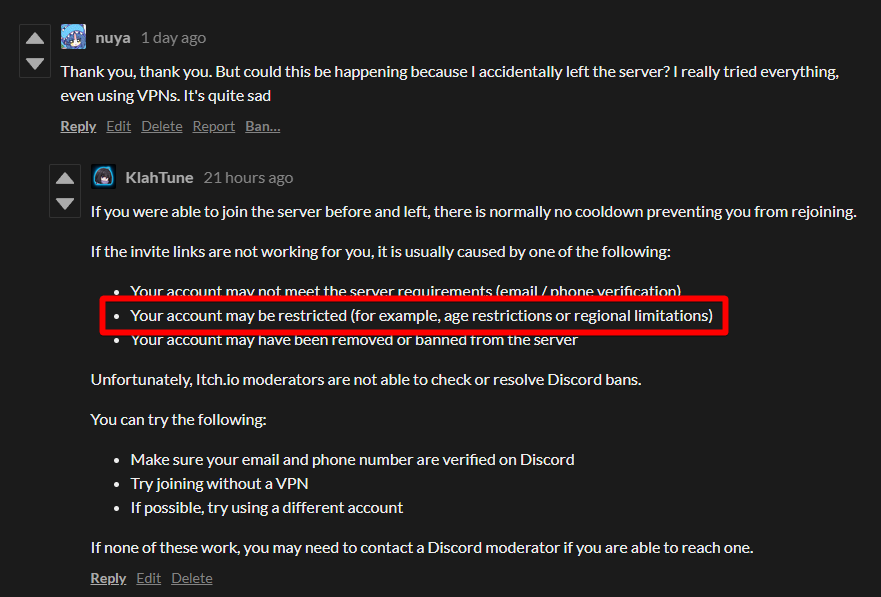
Thank you, thank you. But could this be happening because I accidentally left the server? I really tried everything, even using VPNs. It's quite sad

If you were able to join the server before and left, there is normally no cooldown preventing you from rejoining.

If the invite links are not working for you, it is usually caused by one of the following:

  • Your account may not meet the server requirements (email / phone verification)
  • Your account may be restricted (for example, age restrictions or regional limitations)
  • Your account may have been removed or banned from the server

Unfortunately, Itch.io moderators are not able to check or resolve Discord bans.

You can try the following:

  • Make sure your email and phone number are verified on Discord
  • Try joining without a VPN
  • If possible, try using a different account

If none of these work, you may need to contact a Discord moderator if you are able to reach one.

(1 edit)

I understand... but thank you very much for your help. If I can't log into Discord, is there still some kind of support I can get elsewhere? Like here on "ITCH.IO"? I really wish I could ask some questions and clear up some doubts 😕

Unfortunately, I am the only support you can get here on the Itch.io site.

What you could do is to wait a couple of days or maybe for a week before trying to join the server again.
Discord might flagged your account for joining and leaving the server too quickly.

Okay then, I'll try that, but if it doesn't work I'll try creating another account to see if the problem is with my account... but thank you very much for the support and for trying to help me.

Well, coming back to say that I managed to get in after some searching, and honestly, this Discord error that doesn't inform you that age verification is required is quite frustrating. Because it kind of forces the person to search and keep tinkering with the settings until they understand what's wrong. Since I had already joined the server once and didn't have this problem, I was kind of confused. In the end, it was just a Discord error.

Well, I just advise that if someone asks for a link like I did and I asked for support about it, ask them if they've done age verification. Because apparently... not everyone knows... I'm stupid, I think..

(3 edits)

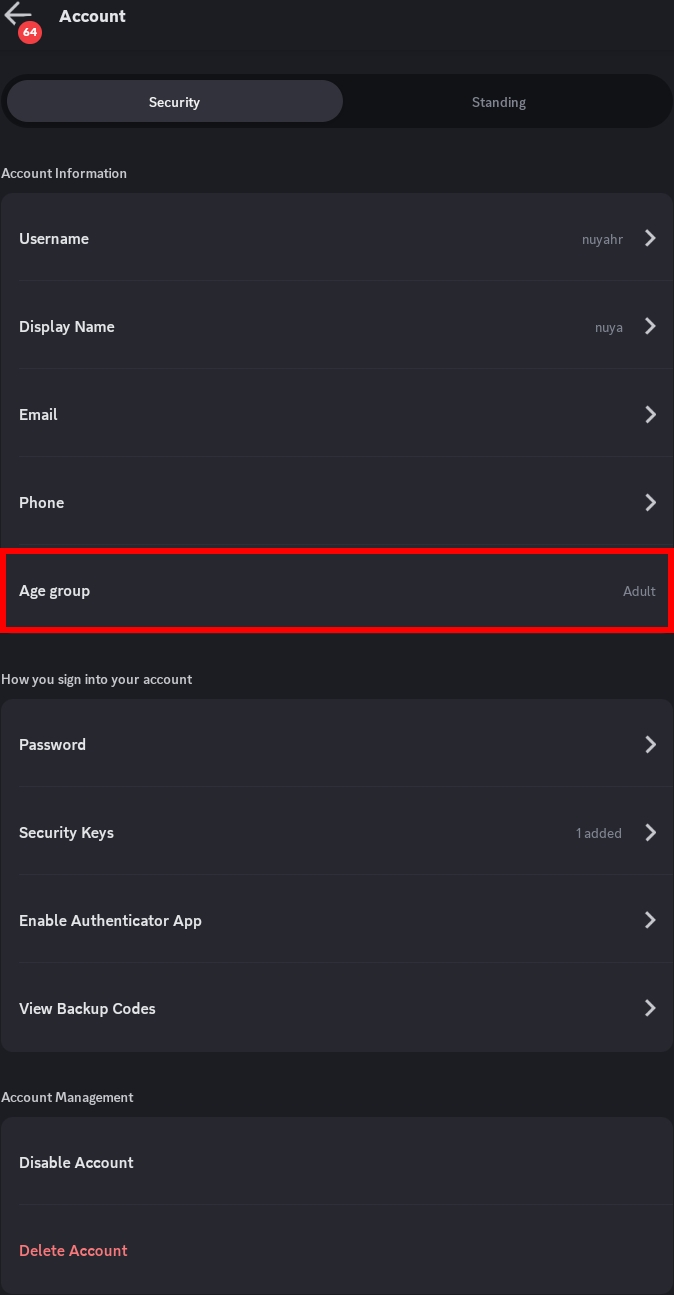
Is there an age verification on Discord?
I believe there is none, and you can only set your age only once when you're creating your Discord account, which is setting your Date of Birth.

(1 edit)

Yeah, I was confused by that too, because while I was messing around in the settings, I saw a confirmation option to check if I'm an adult or a child or something like that. So they would only ask for my ID or for me to take a selfie. I had my ID captured, and now I can log in normally...
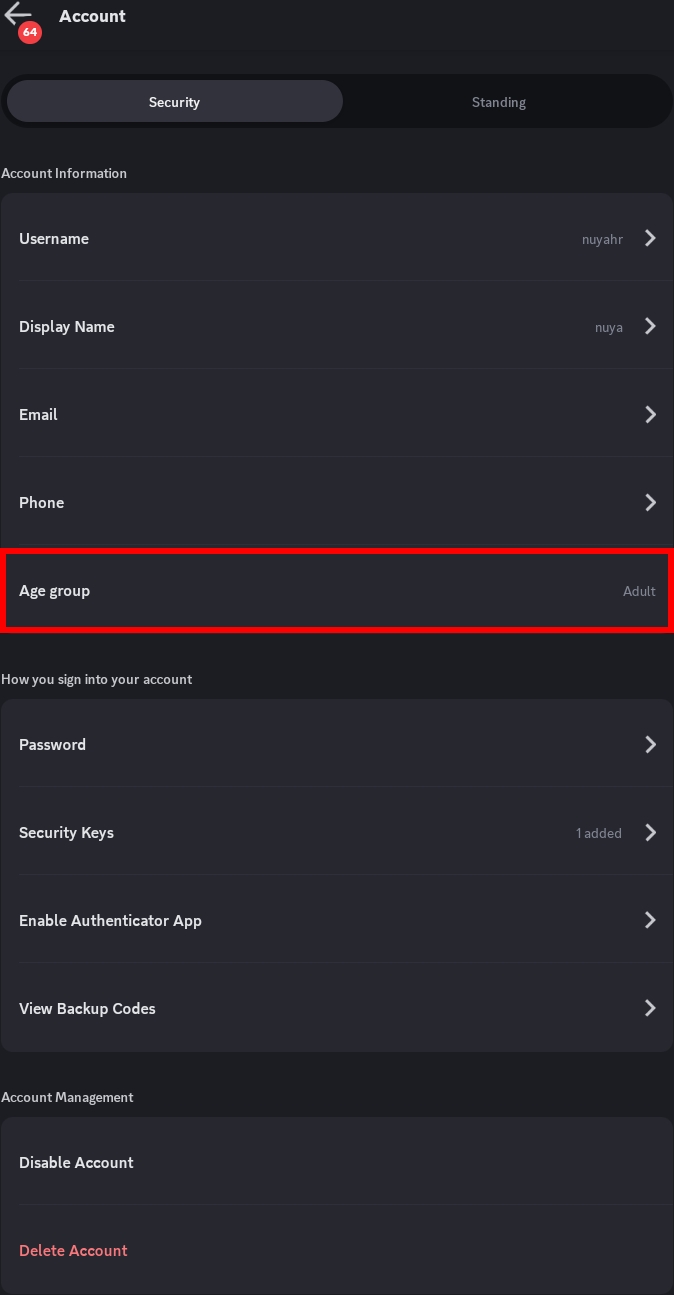
It's in the "Account" options. It is listed as "Age Group"Well, at least here in Brazil it's like that... I don't know about the rest of the world... Well, now it's marked on the side, as "Adult"

why people keep asking for a new link? you clearly said that the links are never expire, then why people keep asking?


(1 edit)

People often don't like to read...
So we often have to throw the text at their faces and tell them to read, unfortunately...


So, as you yourself said, people keep asking for new links even though they already have links that supposedly don't expire, and that's completely plausible, after all, I'm not the only one with the same problem. The links may be here and not expire, but that doesn't change the fact that the links are supposedly broken, since a good portion of them are asking for new links. So, to maybe get into the server, it doesn't hurt to ask for a new link to at least try to log in, even if it doesn't work, at least it's worth a try.  Yes, I read the entire page, including the comments, and from what I saw, the people who received the new links were able to log in

This is just an explanation of why this is happening, because honestly, it's quite frustrating not being able to log in, whether it's due to a broken link or a Discord error..

(1 edit)

No, the links that I provided are not broken.
I always tested all the links that I provided with my test account, and I never encountered any problem at all.
For those people whose links say "It's expired", they are usually people with either of these things.

  • Their accounts are Underage 🔞
  • They used those links on an iPhone
  • Their email isn't verified
  • They haven't even logged in on Discord
  • They don't even have a Discord account altogether

It's not a Discord error, but the problem is on their side, not the server or the invite links that I provided.

Well, it wasn't Link's mistake after all, but in my view, it was Discord's mistake not to mention that it's not possible to join the server because the account belongs to a minor, Either the age verification wasn't done or something like that, because honestly, I didn't know this existed until a few minutes ago... So I did my check, and everything is fine now

(1 edit)

It is true about the Discord error regarding the age-restriction.
I believe it will only show that "You are under minimum age" if you receive the invite link on the Discord App or the Discord Web Version.

But I did mention it multiple times.
So if you actually read everything like you claim you did, you shouldn't have missed it and just found out about it just now.
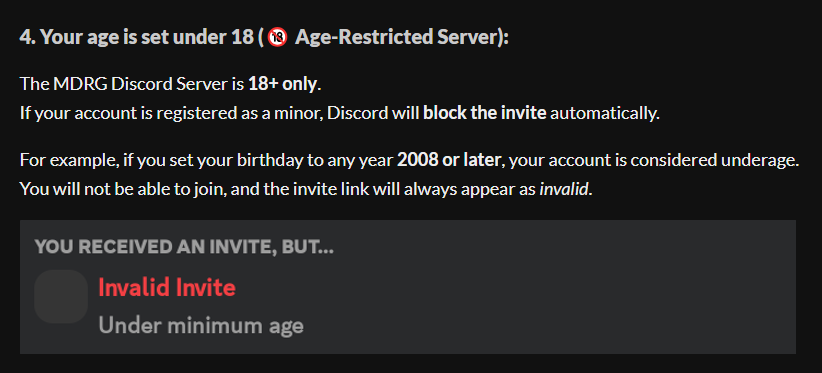
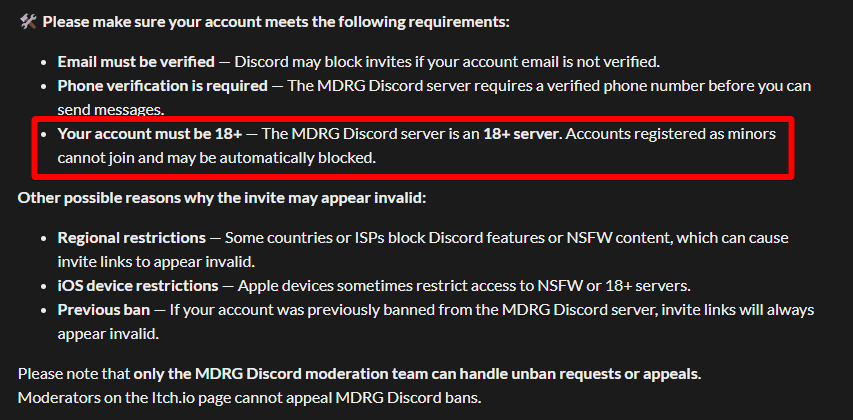
But I did read it, though I'm an idiot, because in my head it was just about email confirmation, etc., and not that I had to confirm whether I was an adult or not. So, to be honest, I was quite confused by that

(1 edit)

Hmm...
Seems like this appears to be only for some regions where you can verify your account as an adult user.

Thank you so much for this info~💜
I'll use this information to help people even further.


Can someone give me a fresh discord link?, all I found is expired ones😔

(5 edits)

You can use these invite links.

They do not expire and can be used infinitely:

If the link appears invalid for you, the issue is on your side, not the invite or the server.

━━━━━━━━━━━━━━━━━━━━━━━━━━━━━━━━

If the  link says "Expired or Invalid", it might be because of these things:

  • Your Discord account is Underage 🔞
    • You set your "Date of Birth" when you create your Discord account to be under 18.
    • In some regions, there is an "Adult Verification" in the settings, and you might not have verified yourself as an adult user in the settings yet.
  • You used those links on an iPhone
    • Apple OS, such as an iPhone, automatically blocks NSFW Server or any server with an 18+ tag.
  • Your email for your Discord account isn't verified
    • If your email is not verified, the link will not work and may say "Expired or Invalid".
  • You were not logged in on the Discord App
  • You do not have a Discord account

━━━━━━━━━━━━━━━━━━━━━━━━━━━━━━━━

All the links (and newly created invite links) are working correctly on my side.
If the links don't work for you.
It means the issue is most likely related to your account or device, not the server invite itself.
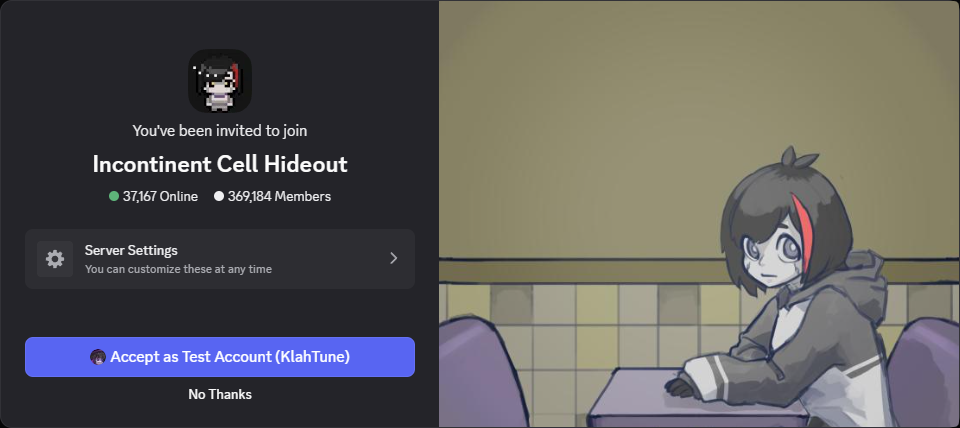
━━━━━━━━━━━━━━━━━━━━━━━━━━━━━━━━

🛠️ Please make sure your account meets the following requirements:

  • Email must be verified — Discord may block invites if your account email is not verified.
  • Phone verification is required — The MDRG Discord server requires a verified phone number before you can send messages.
  • Your account must be 18+ — The MDRG Discord server is an 18+ server. Accounts registered as minors cannot join and may be automatically blocked.

Other possible reasons why the invite may appear "Expired or Invalid":

  • Regional restrictions — Some countries or ISPs block Discord features or NSFW content, which can cause invite links to appear invalid.
  • iOS device restrictions — Apple devices sometimes restrict access to NSFW or 18+ servers.
  • Previous ban — If your account was previously banned from the MDRG Discord server, invite links will always appear invalid.

Please note that only the MDRG Discord moderation team can handle unban requests or appeals.
Moderators on the Itch.io page cannot appeal MDRG Discord bans.

(1 edit)

Hello, can you invite me for the Discord server too? Pls?

Could you send me an invite to the Discord server? All the invites have expired. Please?

(2 edits)

You can use these invite links.

They do not expire and can be used infinitely:

If the link appears invalid for you, the issue is on your side, not the invite or the server.

━━━━━━━━━━━━━━━━━━━━━━━━━━━━━━━━

If the  link says "Expired or Invalid", it might be because of these things:

  • Your Discord account is Underage 🔞
    • You set your "Date of Birth" when you create your Discord account to be under 18.
    • In some regions (such as in Brazil), there is an "Adult Verification" in the settings, and you might not have verified yourself as an adult user in the settings yet.
  • You used those links on an iPhone
    • Apple OS, such as an iPhone, automatically blocks NSFW Server or any server with an 18+ tag.
  • Your email for your Discord account isn't verified
    • If your email is not verified, the link will not work and may say "Expired or Invalid".
  • You were not logged in on the Discord App
  • You do not have a Discord account

━━━━━━━━━━━━━━━━━━━━━━━━━━━━━━━━

All the links (and newly created invite links) are working correctly on my side.
If the links don't work for you. It means the issue is most likely related to your account or device, not the server invite itself.

━━━━━━━━━━━━━━━━━━━━━━━━━━━━━━━━

🛠️ Please make sure your account meets the following requirements:

  • Email must be verified — Discord may block invites if your account email is not verified.
  • Phone verification is required — The MDRG Discord server requires a verified phone number before you can send messages.
  • Your account must be 18+ — The MDRG Discord server is an 18+ server. Accounts registered as minors cannot join and may be automatically blocked.

Other possible reasons why the invite may appear "Expired or Invalid":

  • Regional restrictions — Some countries or ISPs block Discord features or NSFW content, which can cause invite links to appear invalid.
  • iOS device restrictions — Apple devices sometimes restrict access to NSFW or 18+ servers.
  • Previous ban — If your account was previously banned from the MDRG Discord server, invite links will always appear invalid.

Please note that only the MDRG Discord moderation team can handle unban requests or appeals.
Moderators on the Itch.io page cannot appeal MDRG Discord bans.

The invite is expired, ple invite again

They do not expire and can be used infinitely:

If the link appears invalid for you, the issue is on your side, not the invite or the server.

All invites is expired, help

Please...
Just read...
I already included everything...


If the  link says "Expired or Invalid", it might be because of these things:

  • Your Discord account is Underage 🔞
    • You set your "Date of Birth" when you create your Discord account to be under 18.
    • In some regions, there is an "Adult Verification" in the settings, and you might not have verified yourself as an adult user in the settings yet.
  • You used those links on an iPhone
    • Apple OS, such as an iPhone, automatically blocks NSFW Server or any server with an 18+ tag.
  • Your email for your Discord account isn't verified
    • If your email is not verified, the link will not work and may say "Expired or Invalid".
  • You were not logged in on the Discord App
  • You do not have a Discord account

━━━━━━━━━━━━━━━━━━━━━━━━━━━━━━━━

All the links (and newly created invite links) are working correctly on my side.
If the links don't work for you. It means the issue is most likely related to your account or device, not the server invite itself.

━━━━━━━━━━━━━━━━━━━━━━━━━━━━━━━━

🛠️ Please make sure your account meets the following requirements:

  • Email must be verified — Discord may block invites if your account email is not verified.
  • Phone verification is required — The MDRG Discord server requires a verified phone number before you can send messages.
  • Your account must be 18+ — The MDRG Discord server is an 18+ server. Accounts registered as minors cannot join and may be automatically blocked.

Other possible reasons why the invite may appear "Expired or Invalid":

  • Regional restrictions — Some countries or ISPs block Discord features or NSFW content, which can cause invite links to appear invalid.
  • iOS device restrictions — Apple devices sometimes restrict access to NSFW or 18+ servers.
  • Previous ban — If your account was previously banned from the MDRG Discord server, invite links will always appear invalid.

Please note that only the MDRG Discord moderation team can handle unban requests or appeals.
Moderators on the Itch.io page cannot appeal MDRG Discord bans.

Ok, I'm sorry

(2 edits)

Hi KlahTune, I'd like to ask you to add the information you shared a while ago here on "Itch.io" or in your Discord description, or something similar.

Here in Brazil, there's a law that prohibits games with "loot box" systems, "apps that may contain +18 content," etc. They require identity verification, even if the person registered their birthdate as +18.

I just wanted to help. I don't know if this exists in other countries, but unfortunately it does here in Brazil. And unfortunately, people are lazy and don't bother to read things

(Please excuse my English, my English is terrible...)

(1 edit)

Amigo brasileiro me ajuda, não consigo entrar de jeito nenhum nesse discord, sou maior de idade já fiz tudo o possível mas ainda assim não deu certo 🥺🙏 ajuda e

Translation:
Brazilian friend, help me… I can’t join this Discord at all.
I’m already an adult and I’ve done everything possible, but it still didn’t work 😢🙏 please help
(2 edits)

outro que se não se dá o trabalho de ler, em fim

não mano, você não fez tudo. vai nas configurações de conta do seu Discord e vai ter a opção "Grupo Etário", e identifique seu RG pra dar como uma faixa etária "Adulto(a)"

depois vem aqui e vê se deu certo, já ajudei uma pessoa ae e ele disse que deu certo pra ele. só tenta ler as coisas e buscar antes, as pessoas estão ficando preguiçosas e não lêem mais, além de qualquer aplicativo já ter esse função hoje por conta da lei do ECA (Felca). em fim, boa sorte, qualquer coisa comenta se não der certo, mas impossível não dá, só se for menor de idade

Translation:
Another one who doesn’t even bother to read… anyway.

No man, you didn’t do everything. Go to your Discord account settings and you’ll find the "Age Group" option.
Verify your ID so it recognizes you as an "Adult".

Then come back here and check if it worked. I already helped someone else and they said it worked for them.
Just try to read and search first — people are getting lazy and don’t read anymore.
Also, nowadays almost every app has this because of the ECA law (Felca).
Anyway, good luck. If it doesn’t work, comment here again — but it should work unless you’re underage
(2 edits)

Me pueden pasar el link no me sirven los links de discord

Translation:
Can you send me the link? The Discord links aren’t working for me.

You can use these invite links.

They do not expire and can be used infinitely:

If the link appears invalid for you, the issue is on your side, not the invite or the server.

━━━━━━━━━━━━━━━━━━━━━━━━━━━━━━━━

If the  link says "Expired or Invalid", it might be because of these things:

  • Your Discord account is Underage 🔞
    • You set your "Date of Birth" when you create your Discord account to be under 18.
    • In some regions (such as in Brazil), there is an "Adult Verification" in the settings, and you might not have verified yourself as an adult user in the settings yet.
  • You used those links on an iPhone
    • Apple OS, such as an iPhone, automatically blocks NSFW Server or any server with an 18+ tag.
  • Your email for your Discord account isn't verified
    • If your email is not verified, the link will not work and may say "Expired or Invalid".
  • You were not logged in on the Discord App
  • You do not have a Discord account

━━━━━━━━━━━━━━━━━━━━━━━━━━━━━━━━

All the links (and newly created invite links) are working correctly on my side. If the links don't work for you. It means the issue is most likely related to your account or device, not the server invite itself.

━━━━━━━━━━━━━━━━━━━━━━━━━━━━━━━━

🛠️ Please make sure your account meets the following requirements:

  • Email must be verified — Discord may block invites if your account email is not verified.
  • Phone verification is required — The MDRG Discord server requires a verified phone number before you can send messages.
  • Your account must be 18+ — The MDRG Discord server is an 18+ server. Accounts registered as minors cannot join and may be automatically blocked.

Other possible reasons why the invite may appear "Expired or Invalid":

  • Regional restrictions — Some countries or ISPs block Discord features or NSFW content, which can cause invite links to appear invalid.
  • iOS device restrictions — Apple devices sometimes restrict access to NSFW or 18+ servers.
  • Previous ban — If your account was previously banned from the MDRG Discord server, invite links will always appear invalid.

Please note that only the MDRG Discord moderation team can handle unban requests or appeals.
Moderators on the Itch.io page cannot appeal MDRG Discord bans.

Translation:
Puedes usar estos enlaces de invitación.
No expiran y pueden usarse indefinidamente:Si el enlace te aparece como inválido, el problema está de tu lado, no en la invitación ni en el servidor.
Si el enlace dice "Expirado o Inválido", puede deberse a las siguientes razones:
  • Tu cuenta de Discord está registrada como menor de edad 🔞
    • Configuraste tu fecha de nacimiento como menor de 18 años al crear la cuenta
    • En algunas regiones (como Brasil), existe una opción de verificación de adulto en la configuración, y puede que no hayas verificado tu edad como adulto
  • Estás usando un iPhone
    • El sistema de Apple puede bloquear automáticamente servidores NSFW o con etiqueta 18+
  • Tu correo electrónico de Discord no está verificado
    • Si tu correo no está verificado, el enlace puede no funcionar y aparecer como inválido
  • No has iniciado sesión en la aplicación de Discord
  • No tienes una cuenta de Discord
Todos los enlaces (incluyendo los nuevos enlaces creados) funcionan correctamente de mi lado. Si los enlaces no te funcionan, significa que el problema probablemente está relacionado con tu cuenta o tu dispositivo, no con la invitación del servidor.

🛠️ Asegúrate de que tu cuenta cumpla con los siguientes requisitos:
  • El correo debe estar verificado — Discord puede bloquear invitaciones si el correo no está verificado
  • Se requiere verificación por teléfono — el servidor MDRG requiere un número de teléfono verificado antes de poder enviar mensajes
  • Tu cuenta debe ser 18+ — el servidor MDRG es un servidor para mayores de 18 años. Las cuentas registradas como menores no pueden unirse y pueden ser bloqueadas automáticamente
Otras posibles razones:
  • Restricciones regionales — algunos países o proveedores de internet pueden bloquear funciones de Discord o contenido NSFW
  • Restricciones en dispositivos iOS — los dispositivos Apple pueden limitar el acceso a servidores 18+
  • Baneo previo — si tu cuenta fue previamente baneada del servidor MDRG, los enlaces siempre aparecerán como inválidos
Ten en cuenta que solo el equipo de moderación del Discord de MDRG puede gestionar solicitudes de desbaneo o apelaciones.
Los moderadores de Itch.io no pueden gestionar apelaciones de baneos del Discord de MDRG.
(1 edit)

Poderia mandar o link do Discord novamente pls

Translation:
Could you send the Discord link again, please?
(1 edit)

You can use these invite links.

They do not expire and can be used infinitely:

If the link appears invalid for you, the issue is on your side, not the invite or the server.

━━━━━━━━━━━━━━━━━━━━━━━━━━━━━━━━

If the  link says "Expired or Invalid", it might be because of these things:

  • Your Discord account is Underage 🔞
    • You set your "Date of Birth" when you create your Discord account to be under 18.
    • In some regions (such as in Brazil), there is an "Adult Verification" in the settings, and you might not have verified yourself as an adult user in the settings yet.
  • You used those links on an iPhone
    • Apple OS, such as an iPhone, automatically blocks NSFW Server or any server with an 18+ tag.
  • Your email for your Discord account isn't verified
    • If your email is not verified, the link will not work and may say "Expired or Invalid".
  • You were not logged in on the Discord App
  • You do not have a Discord account

━━━━━━━━━━━━━━━━━━━━━━━━━━━━━━━━

All the links (and newly created invite links) are working correctly on my side. If the links don't work for you. It means the issue is most likely related to your account or device, not the server invite itself.

━━━━━━━━━━━━━━━━━━━━━━━━━━━━━━━━

🛠️ Please make sure your account meets the following requirements:

  • Email must be verified — Discord may block invites if your account email is not verified.
  • Phone verification is required — The MDRG Discord server requires a verified phone number before you can send messages.
  • Your account must be 18+ — The MDRG Discord server is an 18+ server. Accounts registered as minors cannot join and may be automatically blocked.

Other possible reasons why the invite may appear "Expired or Invalid":

  • Regional restrictions — Some countries or ISPs block Discord features or NSFW content, which can cause invite links to appear invalid.
  • iOS device restrictions — Apple devices sometimes restrict access to NSFW or 18+ servers.
  • Previous ban — If your account was previously banned from the MDRG Discord server, invite links will always appear invalid.

Please note that only the MDRG Discord moderation team can handle unban requests or appeals.
Moderators on the Itch.io page cannot appeal MDRG Discord bans.

Translation:
Você pode usar estes links de convite.
Eles não expiram e podem ser usados infinitamente:Se o link aparecer como inválido para você, o problema está do seu lado, não no convite ou no servidor.
Se o link disser "Expirado ou Inválido", pode ser por causa destas razões:
  • Sua conta do Discord está como menor de idade 🔞
    • Você definiu sua data de nascimento como menor de 18 anos ao criar a conta
    • Em algumas regiões (como o Brasil), existe uma opção de verificação de adulto nas configurações, e você pode não ter verificado sua idade como adulto ainda
  • Você está usando iPhone
    • O sistema da Apple pode bloquear automaticamente servidores NSFW ou com classificação 18+
  • Seu e-mail do Discord não está verificado
    • Se o e-mail não estiver verificado, o link pode não funcionar e aparecer como inválido
  • Você não está logado no aplicativo do Discord
  • Você não tem uma conta no Discord
Todos os links (incluindo novos links criados) estão funcionando corretamente do meu lado. Se os links não funcionarem para você, isso significa que o problema provavelmente está relacionado à sua conta ou ao seu dispositivo, não ao convite do servidor.

🛠️ Certifique-se de que sua conta atende aos seguintes requisitos:
  • O e-mail deve estar verificado — o Discord pode bloquear convites se o e-mail não estiver verificado
  • Verificação por telefone é necessária — o servidor MDRG exige um número de telefone verificado antes de enviar mensagens
  • Sua conta deve ser 18+ — o servidor MDRG é um servidor para maiores de 18 anos. Contas registradas como menores não podem entrar e podem ser bloqueadas automaticamente
Outros possíveis motivos:
  • Restrições regionais — alguns países ou provedores podem bloquear recursos do Discord ou conteúdo NSFW
  • Restrições em dispositivos iOS — dispositivos Apple podem limitar o acesso a servidores 18+
  • Banimento anterior — se sua conta já foi banida do servidor MDRG, os links sempre aparecerão como inválidos
Observe que apenas a equipe de moderação do Discord MDRG pode lidar com pedidos de desbanimento ou recursos.
Moderadores no Itch.io não podem recorrer de banimentos do Discord.

Could you send me the link to DC? Please.

(2 edits)

You can use these invite links.

They do not expire and can be used infinitely:

If the link appears invalid for you, the issue is on your side, not the invite or the server.

━━━━━━━━━━━━━━━━━━━━━━━━━━━━━━━━

🔗 If the  link says "Expired or Invalid", it might be because of these things:

  • Your Discord account is Underage 🔞
    • You set your "Date of Birth" when you create your Discord account to be under 18.
    • In some regions (such as in Brazil), there is an "Adult Verification" in the settings, and you might not have verified yourself as an adult user in the settings yet.
  • You used those links on an iPhone
    • Apple OS, such as an iPhone, automatically blocks NSFW Server or any server with an 18+ tag.
  • Your email for your Discord account isn't verified
    • If your email is not verified, the link will not work and may say "Expired or Invalid".
  • You were not logged in on the Discord App
  • You do not have a Discord account

━━━━━━━━━━━━━━━━━━━━━━━━━━━━━━━━

All the links (and newly created invite links) are working correctly on my side.
If the links don't work for you. It means the issue is most likely related to your account or device, not the server invite itself.

━━━━━━━━━━━━━━━━━━━━━━━━━━━━━━━━

🛠️ Please make sure your account meets the following requirements:

  • Email must be verified — Discord may block invites if your account email is not verified.
  • Phone verification is required — The MDRG Discord server requires a verified phone number before you can send messages.
  • Your account must be 18+ — The MDRG Discord server is an 18+ server. Accounts registered as minors cannot join and may be automatically blocked.

Other possible reasons why the invite may appear "Expired or Invalid":

  • Regional restrictions — Some countries or ISPs block Discord features or NSFW content, which can cause invite links to appear invalid.
  • iOS device restrictions — Apple devices sometimes restrict access to NSFW or 18+ servers.
  • Previous ban — If your account was previously banned from the MDRG Discord server, invite links will always appear invalid.

Please note that only the MDRG Discord moderation team can handle unban requests or appeals.
Moderators on the Itch.io page cannot appeal MDRG Discord bans.

(1 edit) (+2)

Hello,

I am a user who used to participate in the MDRG server and share fan art there.
Unfortunately, my account was hacked, and because of that situation, I understand that I was banned from the server.

I did not mean to cause any problems, and I feel truly upset and sad that this happened because my account was compromised.
I really care about MDRG, and being in the server, sharing fan art, and seeing other users’ fan art meant a lot to me.

If possible, I would sincerely like the chance to return to the server and continue participating in the fan art community.
I also deeply miss being able to see the artwork that other users have shared there.

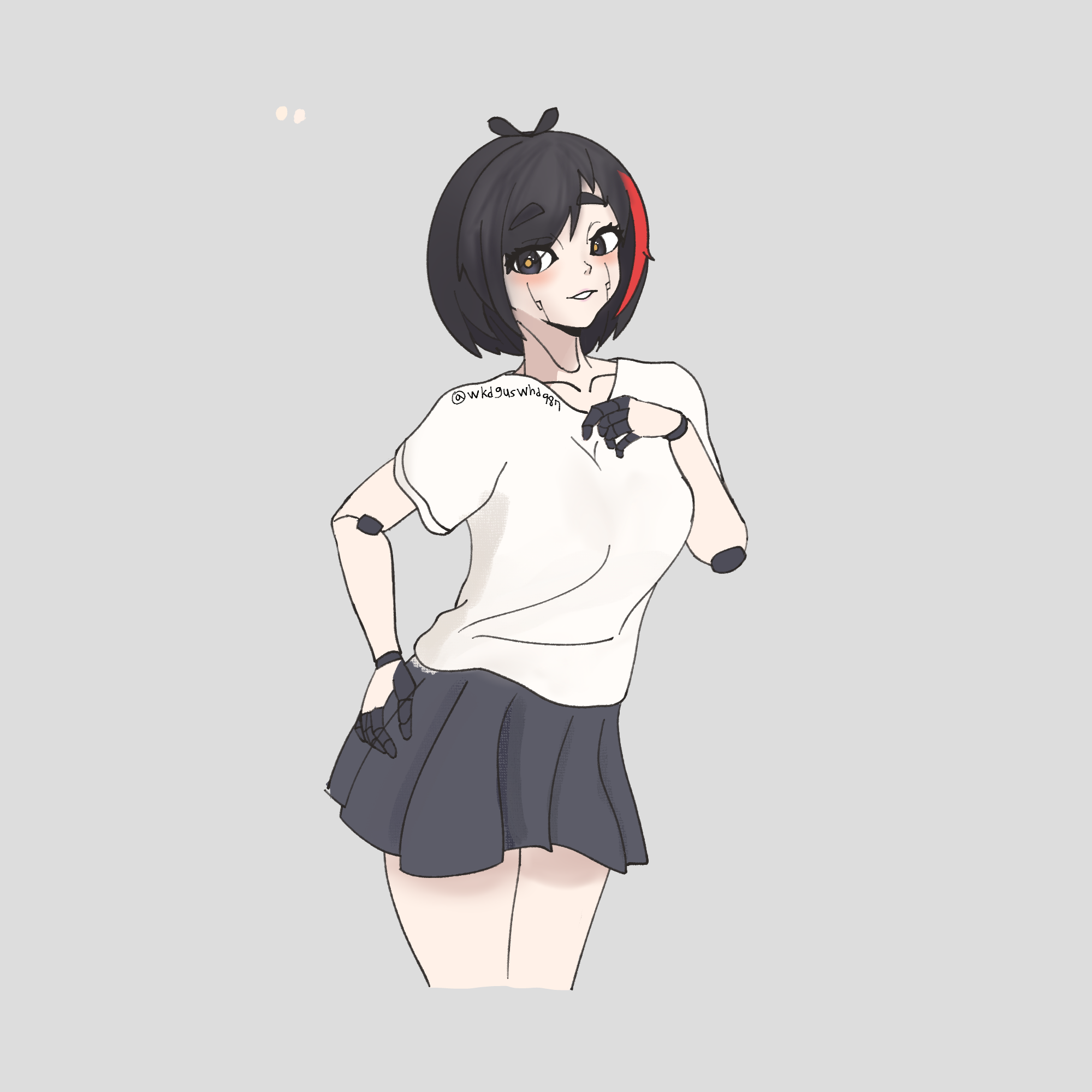
The image attached below is fan art that I personally drew before. I hope it can show how genuine my feelings are.

If possible, I would be very grateful if you could kindly review my situation once more and consider unbanning me so I may rejoin the server.

Thank you very much for your time and understanding.

Discord name : pen_jongi
(2 edits)

Please note that only the MDRG Discord moderation team can handle unban requests or appeals.
I cannot appeal MDRG Discord bans.

If you want to rejoin the server again, you can do these 2 things:

  • Create a New Discord Account, then join the server again.
  • Or contact the moderator or the devs on Discord.

But please keep in mind that they might ignore you completely and might not unban you.

If you wanna appeal, you can add me on Discord, and I'll try my best to help.

Discrod Username:

klahtune
Deleted 11 days ago
(1 edit)

🔗 If the link says "Expired or Invalid", it might be because of these things:

  • Your Discord account is Underage 🔞
    • You set your "Date of Birth" when you create your Discord account to be under 18.
    • In some regions (such as in Brazil), there is an "Adult Verification" in the settings, and you might not have verified yourself as an adult user in the settings yet.
  • You used those links on an iPhone
    • Apple OS, such as an iPhone, automatically blocks NSFW Server or any server with an 18+ tag.
  • Your email for your Discord account isn't verified
    • If your email is not verified, the link will not work and may say "Expired or Invalid".
  • You were not logged in on the Discord App
  • You do not have a Discord account

You speak Portuguese.
So I believe that you live in Brazil.

Go to your Discord Settings, then verify yourself as an adult user first.
Then I will share with you the invite link.
(1 edit)

O meu e-mail já está verificado e minha faixa etária é de maior, mas mesmo assim não consigo entrar e os links contam como expirados

Translation (Portuguese to English)
My email is already verified and I am of legal age, but I still can't log in and the links are showing as expired.
(1 edit)

Go to your Discord Settings, then verify yourself as an adult user first.
Then I will share you the invite link.

Hi, can I have the Discord link?

You can use these invite links.

They do not expire and can be used infinitely:

If the link appears invalid for you, the issue is on your side, not the invite or the server.

━━━━━━━━━━━━━━━━━━━━━━━━━━━━━━━━

🔗 If the  link says "Expired or Invalid", it might be because of these things:

  • Your Discord account is Underage 🔞
    • You set your "Date of Birth" when you create your Discord account to be under 18.
    • In some regions (such as in Brazil), there is an "Adult Verification" in the settings, and you might not have verified yourself as an adult user in the settings yet.
  • You used those links on an iPhone
    • Apple OS, such as an iPhone, automatically blocks NSFW Server or any server with an 18+ tag.
  • Your email for your Discord account isn't verified
    • If your email is not verified, the link will not work and may say "Expired or Invalid".
  • You were not logged in on the Discord App
  • You do not have a Discord account

━━━━━━━━━━━━━━━━━━━━━━━━━━━━━━━━

All the links (and newly created invite links) are working correctly on my side.
If the links don't work for you. It means the issue is most likely related to your account or device, not the server invite itself.

━━━━━━━━━━━━━━━━━━━━━━━━━━━━━━━━

🛠️ Please make sure your account meets the following requirements:

  • Email must be verified — Discord may block invites if your account email is not verified.
  • Phone verification is required — The MDRG Discord server requires a verified phone number before you can send messages.
  • Your account must be 18+ — The MDRG Discord server is an 18+ server. Accounts registered as minors cannot join and may be automatically blocked.

Other possible reasons why the invite may appear "Expired or Invalid":

  • Regional restrictions — Some countries or ISPs block Discord features or NSFW content, which can cause invite links to appear invalid.
  • iOS device restrictions — Apple devices sometimes restrict access to NSFW or 18+ servers.
  • Previous ban — If your account was previously banned from the MDRG Discord server, invite links will always appear invalid.

Please note that only the MDRG Discord moderation team can handle unban requests or appeals.
Moderators on the Itch.io page cannot appeal MDRG Discord bans.

(1 edit)

me envie por favor um link válido 

Translation (From Portuguese → English):
Please send me a valid link.

(1 edit)

🔗 If the link says "Expired or Invalid", it might be because of these things:

  • Your Discord account is Underage 🔞
    • You set your "Date of Birth" when you create your Discord account to be under 18.
    • In some regions (such as in Brazil), there is an "Adult Verification" in the settings, and you might not have verified yourself as an adult user in the settings yet.
  • You used those links on an iPhone
    • Apple OS, such as an iPhone, automatically blocks NSFW Server or any server with an 18+ tag.
  • Your email for your Discord account isn't verified
    • If your email is not verified, the link will not work and may say "Expired or Invalid".
  • You were not logged in on the Discord App
  • You do not have a Discord account

You speak Portuguese.
So I believe that you live in Brazil.

Go to your Discord Settings, then verify yourself as an adult user first.
Then I will share you the invite link.

(2 edits)

Hello uhm, so I am very confused. How do I download mods from the Google drive mods folder? I can only view them but can't download them. The only thing I can download is the texts, images

So I have a question I asked earlier but I think it got deleted, but I am VERY CONFUSED. Like how do I download mods from the googl drive mods folder, Welp I can only view them not DOWNLOAD them. The only thing I can download is the text and images. Can you show me how or teach me how?

You have time to ask here, but have no time to search this on Google or even YouTube?


📱 How to Download Files from Google Drive (Mobile):

  1. Open the Google Drive app
  2. Find the .zip file of the mod you want to download
  3. Tap the 3 dots (⋮) next to the file
  4. Tap Download

💡  Important Notes:

  • Files will be saved to your Downloads folder
  • On some phones, you may need a File Manager app to find them
  • Do NOT extract the mod .zip file

⚠️ If Download button is missing:

  • Tap “Open with” → then choose Download / Save
  • Or open Drive in your browser (Chrome) and download from there
Viewing posts 181 to 198 of 198 · Previous page · First page