
Indie game storeFree gamesFun gamesHorror games
Game developmentAssetsComics
SalesBundles
Jobs
TagsGame Engines

You can use these invite links.
They do not expire and can be used infinitely:

If the link appears invalid for you, the issue is on your side, not the invite or the server.
Thank you, thank you. But could this be happening because I accidentally left the server? I really tried everything, even using VPNs. It's quite sad

If you were able to join the server before and left, there is normally no cooldown preventing you from rejoining.

If the invite links are not working for you, it is usually caused by one of the following:

  • Your account may not meet the server requirements (email / phone verification)
  • Your account may be restricted (for example, age restrictions or regional limitations)
  • Your account may have been removed or banned from the server

Unfortunately, Itch.io moderators are not able to check or resolve Discord bans.

You can try the following:

  • Make sure your email and phone number are verified on Discord
  • Try joining without a VPN
  • If possible, try using a different account

If none of these work, you may need to contact a Discord moderator if you are able to reach one.

(1 edit)

I understand... but thank you very much for your help. If I can't log into Discord, is there still some kind of support I can get elsewhere? Like here on "ITCH.IO"? I really wish I could ask some questions and clear up some doubts ๐Ÿ˜•

Unfortunately, I am the only support you can get here on the Itch.io site.

What you could do is to wait a couple of days or maybe for a week before trying to join the server again.
Discord might flagged your account for joining and leaving the server too quickly.

Okay then, I'll try that, but if it doesn't work I'll try creating another account to see if the problem is with my account... but thank you very much for the support and for trying to help me.

Well, coming back to say that I managed to get in after some searching, and honestly, this Discord error that doesn't inform you that age verification is required is quite frustrating. Because it kind of forces the person to search and keep tinkering with the settings until they understand what's wrong. Since I had already joined the server once and didn't have this problem, I was kind of confused. In the end, it was just a Discord error.

Well, I just advise that if someone asks for a link like I did and I asked for support about it, ask them if they've done age verification. Because apparently... not everyone knows... I'm stupid, I think..

(3 edits)

Is there an age verification on Discord?
I believe there is none, and you can only set your age only once when you're creating your Discord account, which is setting your Date of Birth.

(1 edit)

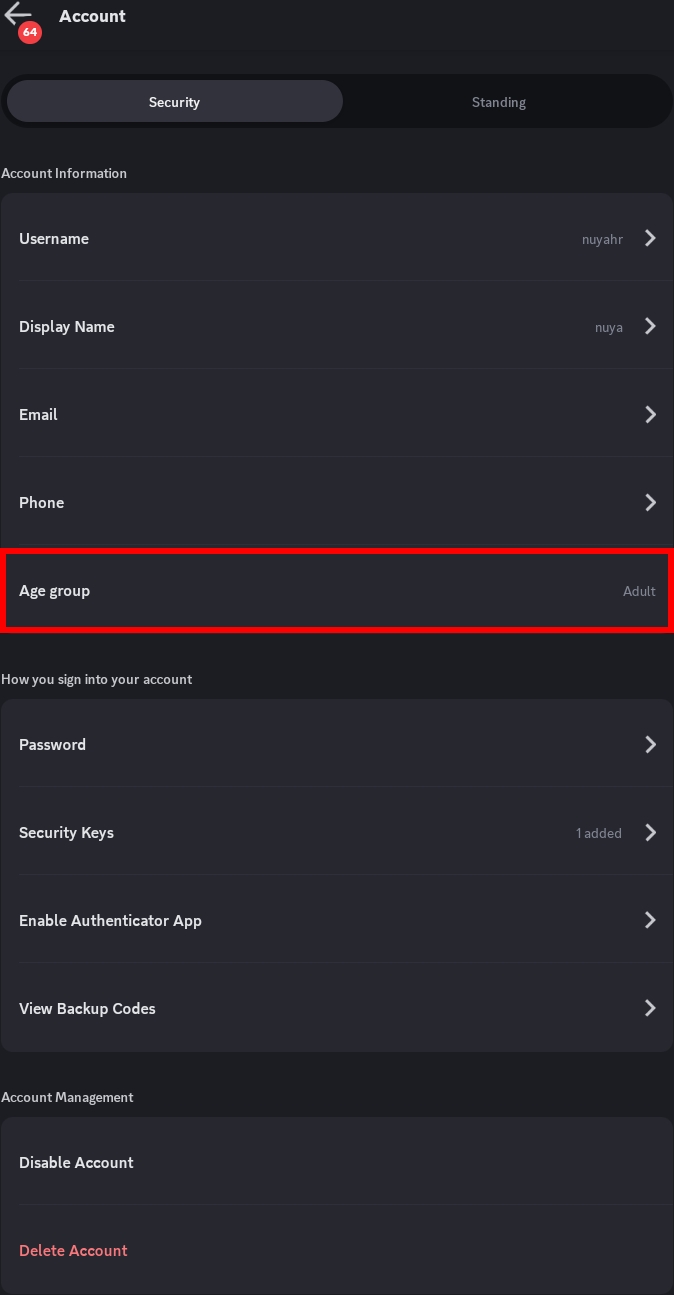
Yeah, I was confused by that too, because while I was messing around in the settings, I saw a confirmation option to check if I'm an adult or a child or something like that. So they would only ask for my ID or for me to take a selfie. I had my ID captured, and now I can log in normally...

It's in the "Account" options. It is listed as "Age Group"Well, at least here in Brazil it's like that... I don't know about the rest of the world... Well, now it's marked on the side, as "Adult"

(1 edit)

Hmm...
Seems like this appears to be only for some regions where you can verify your account as an adult user.

Thank you so much for this info~๐Ÿ’œ
I'll use this information to help people even further.