

When trying to use this asset for the Unity version of the model, everything seems misaligned, the mask and zipper is too high, and the nulge is too low, even at default scaling. Alongside that, the UVs for the masks' textures seemed misaligned, they don't match the model. This isn't a problem I've had with other mask assets before, so it seems strange.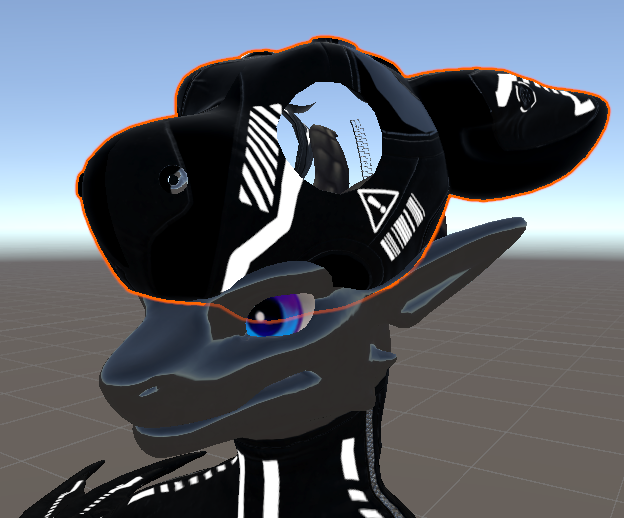
Viewing post in Tokyozilla Welpling Latex Outfit & Hoods comments
Looking into the Blender file, the hood has multiple UV-channels. While this hasn't been an issue for me in Blender nor Resonite, it looks like Unity bawls up about it. If Unity doesn't have an option to specify which UV to use, you could try and open the blender file with the hoods in it and remove the irrelevant UV maps from the hood, only leaving the one named UVMap. Then Export that to Unity.
As for why the hood is floating like that is a bit of a mystery, did you assign the model and the hood to use the same armature in Blender before exporting? - The zipper is floating intentionally, it's something the end-user (you) will have to place into position yourself. Some odd bug in Blender I got shown on occasion deletes Vertex Groups if parenting two Armatures that get exported, thus I stopped doing it for the customer, alas.