

[Devlog #050] Syncing audio to ATL animations in RenPy 🎵
Posted on: 2025-08-10
Hello everyone! 😊
Hope you had a great week! 😄
(If you don't care about the game and found/clicked this devlog because the title sounded interesting, feel free to scroll down to the section labeled "Syncing audio to ATL animations in RenPy" 😉)

My week was pretty good!
I bought some blue cheese and made a simple blue cheese sauce (3 parts creme fraiche, heat it, and mix in 2 parts blue cheese) and it tasted amazing! Kinda wish they'd sell that stuff in bottles in my country 😅
Progress last week
As mentioned last week, I worked some more on the third and last H scene, but I actually postponed the completion for later and focused on some other parts.
Among others, I worked on some additional images to improve upon certain parts of the dialogue, and also worked on the audio for the scenes that are completed, since that's something I will need to do anyway, sooner or later.
As you know, Orange Smash has couple of scenes where there's a repeated, rhythmic shaking happening on the screen, accompanied by clapping sounds...😏
I've tried syncing those in the recent updates, but the solution so far was flawed and cumbersome, so I searched and found a better way to do it, which I will describe in the next section.
Since this is something that might also be interesting for people who don't care about Orange Smash, so tried to write it in a more neutral matter, so don't be surprised 😉
Syncing audio to ATL animations in RenPy
Animations in RenPy are usually done using its ATL scripting system. This also allows for continuous animation that keeps happening in the background while the dialogue is progressing. But, this ATL system does not allow the RenPy commands for playing audio, so syncing audio to your animation isn't that straightforward.
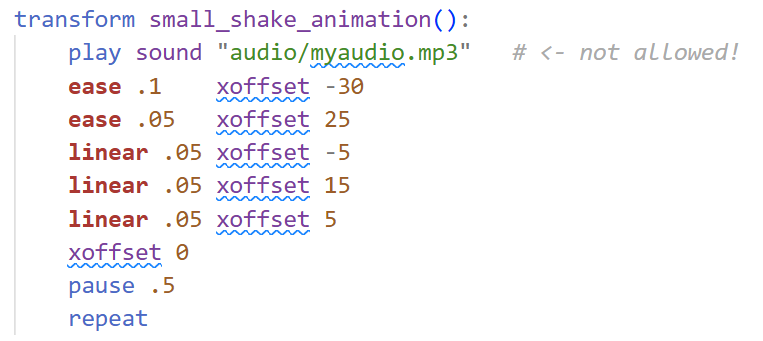
A naive approach to sync audio would be to play the audio file in a loop, where every loop is exactly as long as one iteration of your animation, like this:

In this example, the animation takes 0.8 seconds, and the audio file is 0.3 seconds long, so we pad it out with 0.5 seconds of silence.
In theory, this works (and that's what I've used in the past), but in practice, the audio can quickly go out of sync, for example, when the game (and audio) is paused, or when changes are applied to the image that is being animated.
So I searched for a better solution this week and found this:
There is the keyword "function" that allows you to execute a Python function in the ATL animation, meaning you can manually call the Python version of RenPy's audio play command to trigger audio inside an animation!
Annoyingly, the Python version of the audio play command works a bit different than the easier-to-use RenPy script version, so ultimately, for my case, it became this:
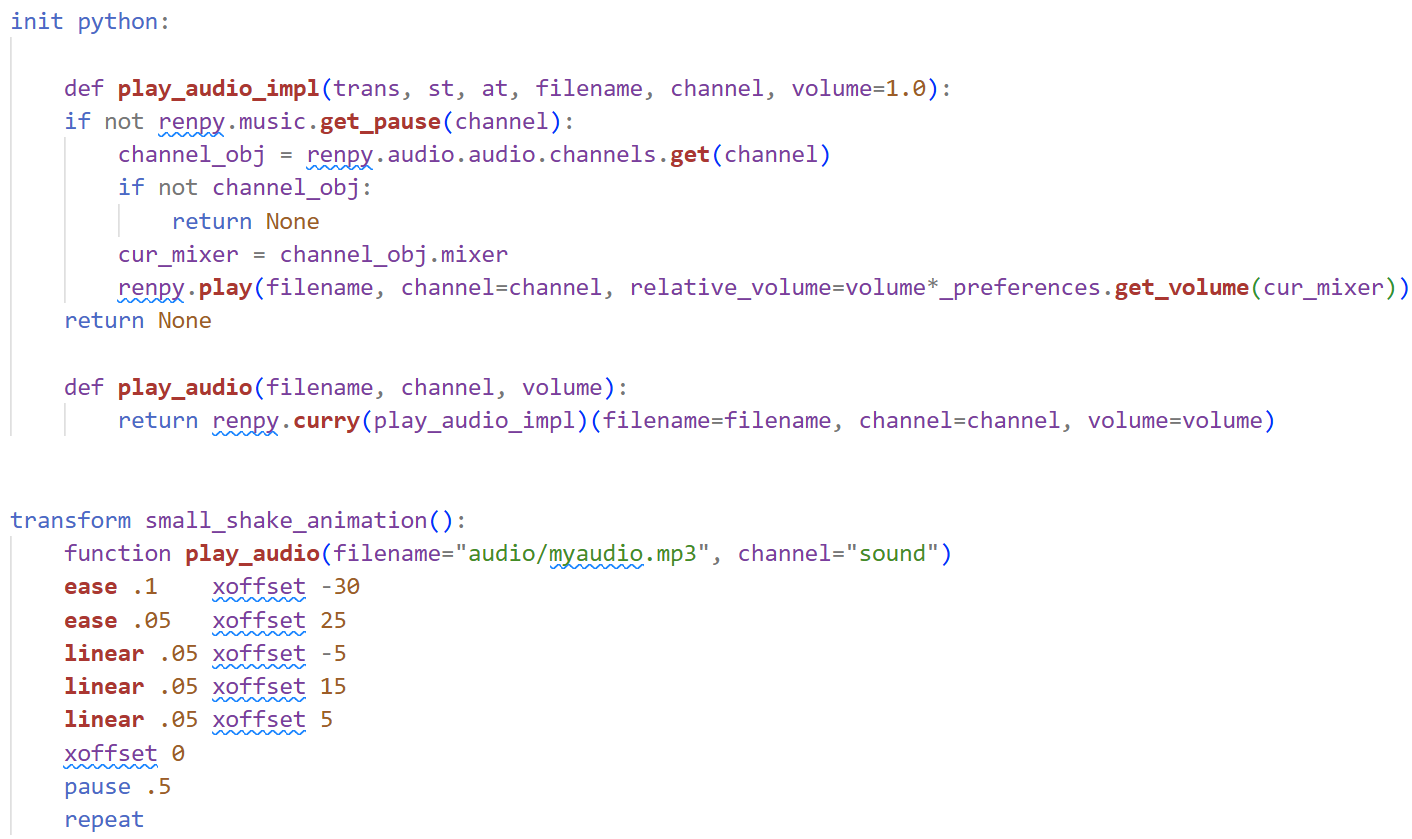
There are two python functions defined here:
One is play_audio_impl, which actually plays the audio file. It first checks if the audio channel is paused or not, then gets the corresponding mixer of the audio channel (in RenPy, mixers control the volume, and there can be multiple audio channels associated to each mixer), and then plays the audio with the correct volume. The correct volume in this case is the set volume for the audio file times the current volume of the used mixer. With RenPy version, you don't have to deal with these things: It handles them automatically. That's why I said the python version is different.
Also, this volume formula isn't even complete: In the full version, there are two more factors, one to account for fading in and out the audio file, and one called "secondary volume", which is for lowering the volume of other sounds when a voice is being played. In my case, I don't need those features for my use case of audio synced animations, so I didn't include them.
The other function is play_audio, which basically just binds the other function with the given parameters (using renpy.curry) so that it becomes a function with three arguments, because the "function" statement in the animation section will only accept those kind of functions. It is similar to what std::bind does in C++ or lambda in Python, I believe.
When you have a repeating animation with a sound, it makes sense to vary the sound: Otherwise, people will easily pick up that the same sound is repeated, which comes off as unnatural and not very pleasant (this is also very relevant in music production for programmed drums!).
So, ultimately, I ended up with this code for the python functions:
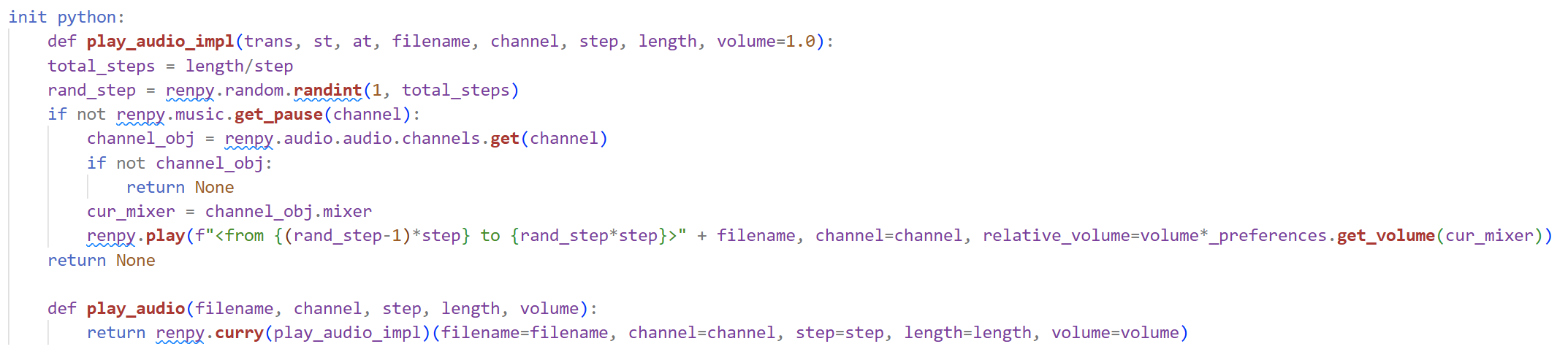
Here, the assumption is that the audio file contains variations of your sound in equidistant steps, meaning, if your sound variations are 0.3 seconds each, and you have 10 variations, then your file is 0.3*10 = 3 seconds long, with a different variation happening at every 0.3 second step. You can construct a file like that using Audacity or FL Studio (or any DAW), for example.
You then give those two values to the function (step length, and total audio length), and then it randomly selects one sound variation and plays it!
This isn't perfect, since if you're unlucky, the same sound can occur two or more times in a row, but for my use case, this is enough. For a better solution, you could create a class with a variable that keeps track of the last played sound variation, so that repetitions can be completely avoided.
Anyways... this solution seems to work, but I will definitely need to test it some more. I might edit this write-up in future if I find flaws with what I wrote here.
Plans for next week
I'll continue working on the audio, and after that, I will have to make some final decision for some scenes before I start proof-reading the dialogue.
That's all from me for this week!
Hope the write-up about the code didn't bore you too much 😅
Have a great week and see you all next Sunday! 👋😊