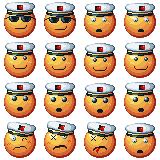
if y you're on android you can't yet due to an issue unless you know what in the xml of the APK file to edit. if you aren't on mobile you can press the import button and choose a spritesheet, and see the format of the spritesheet by pressing the ? button next to the load out button. to actually choose the custom loadout press the blank tile next to the custom sweeper label
here is an example of a sprite sheet I made. it can be any size above 4x4 as long as it is a square: