
Indie game storeFree gamesFun gamesHorror games
Game developmentAssetsComics
SalesBundles
Jobs
TagsGame Engines

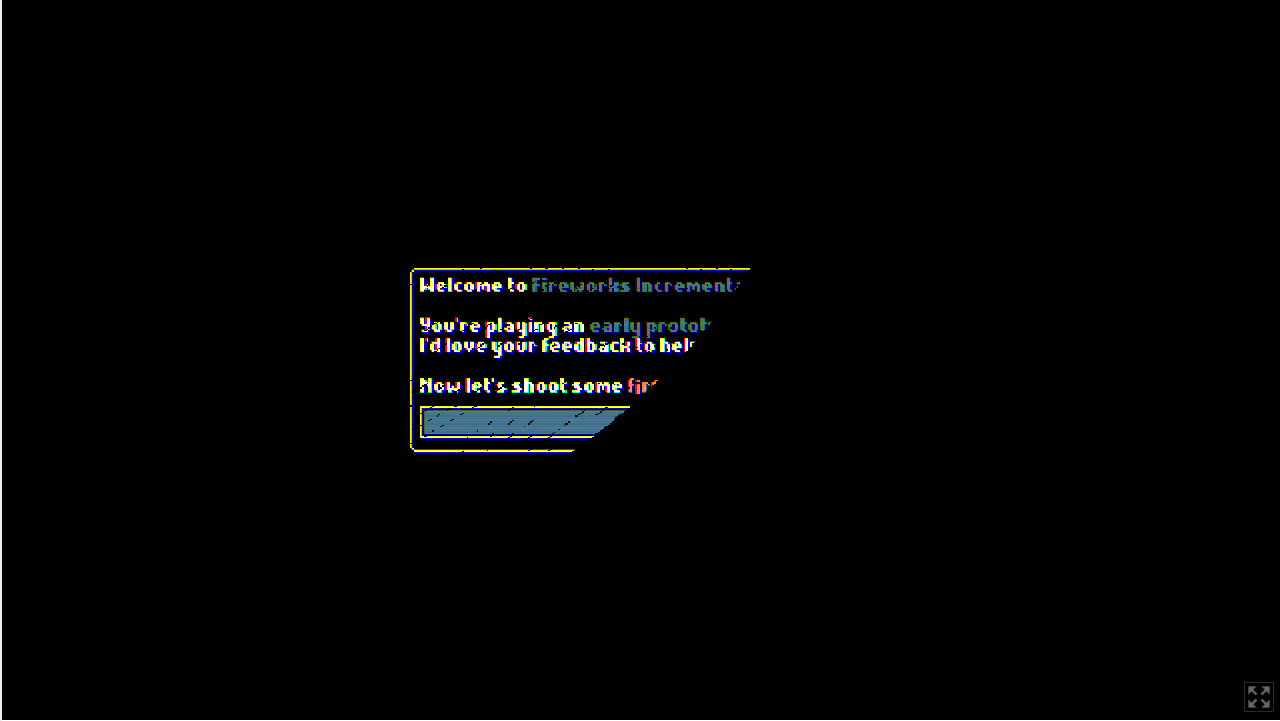
Oh wow, that looks awful. Sorry about that. Never encountered this during development or testing.

Would you mind sharing what browser you're using, which OS? Was it always like that or did it happen after switching the CRT effect on or off? Were you playing in full screen, on a 2nd monitor, anything special? Did you resize the browser window at any point and did it affect the bug in any way? You're not playing in full screen, right?

Thank you so much for sharing this, I'd love to get to the bottom of this.
(+1)

It was like that with the crt filter on, it was fine after disabling it. It showed up both with and without fullscreen. I'm using Brave browser on Tuxedo OS. I did not try resizing the window.  The game started with this, I was a bit confused at first but enough of the screen was showing I could toggle the setting off.

(+1)

Oh this is quite peculiar. I never head of Tuxedo OS before.

Thank you for the detailed description, it was very helpful. I think the issue could be related to how the CRT shader handles output screen sizes and how/when it checks for it. I just released an update that should fix that. I'd love to hear if it fixed it for you.

I don't have access to any linux machines, but I just tested the game on Brave browser on macOS and I didn't encounter any issues.

(+1)

Looks about the same

Damn :/ Not sure how to proceed with that. I downloaded Ubuntu and Virtualbox and I'll try setting up a Linux environment on my older machine so that I can test it on an environment similar to yours. I could also try installing TuxedoOS. I'm sorry you encountered these issues, they never occurred to me when testing or developing the game and I don't know what could cause them.

I'll try to get to the bottom of this.