

How do I fix this problem? I did everything according to the installation process.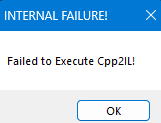
Viewing post in ❤️🔥 Moaning Mod - Moaning and Expressions for Jun by @IkariDev
That error ("Failed to Execute Cpp2IL") usually means MelonLoader failed during the IL2CPP setup process.
This is commonly caused by one of the following:
- Incompatible MelonLoader version
- Missing or corrupted files
- Antivirus blocking the process
- Incorrect installation path
You can try the following:
- Make sure you are using a compatible version of MelonLoader (for 0.95.16, 0.7.2 or specific 0.7.3 nightly builds are recommended)
- Reinstall MelonLoader cleanly
- Delete leftover folders such as
MelonLoader,Mods, andUserDatabefore reinstalling - Make sure you selected the correct game
.exeduring installation - Temporarily disable antivirus or add the game folder as an exception
- Run the game once after installation and wait — first launch may take longer
If you are not on Windows, this error can also happen due to lack of native support.
If the issue still persists, please provide your:
- Game version
- MelonLoader version
- Operating system