

Disabling HDR didn't really have an impact. I never specifically enabled it, so I'm not sure if it would have been visible regardless...? I messed around a little more with what you gave me, and I think I figured out what works though:
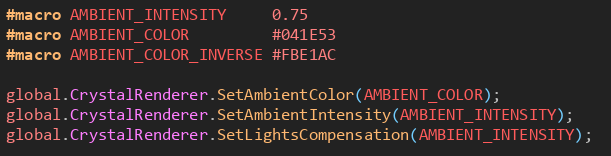
or alternatively:

Basically, as long as you force the actual lights to be the exact inverse of the ambient color like this:
...it will perfectly punch out a hole in the ambient color, hitting the ambience with the exact inverse of itself at the exact same intensity to cancel it out. (The default black/white of the ambience and lights respectively works fine for this, of course.)
Like the comment in the second screenshot says, I think what mixed me up a bit is that the default light compensation is 3, but the jsdoc says it's 1. I was just getting a little confused trying to get here lol
Thank you for offering your time! I'm really excited to dive deeper into Crystal.