
Indie game storeFree gamesFun gamesHorror games
Game developmentAssetsComics
SalesBundles
Jobs
TagsGame Engines

Hey, and thanks for the great game!

I usually play on mobile in portrait and I find that the automatic scrolling sometimes gets in the way. Here is a concrete example:
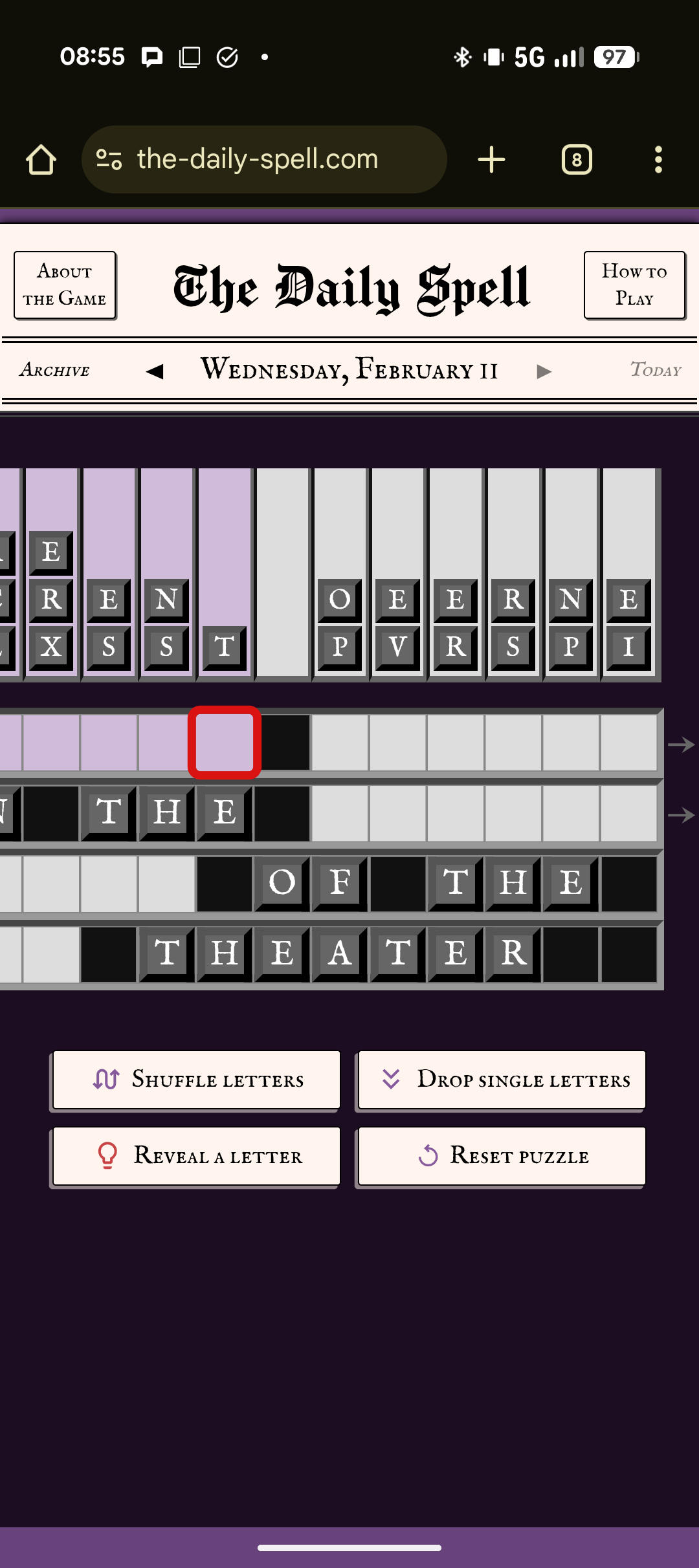
Here I'm looking at the words on the right but noticed the lone T, so I want to click on the red square to just drop the T. But clicking on it unexpectedly scrolls to the left and then I misclick the T because it moved away.

Maybe the automatic scroll should only activate if we are filling a word from the beginning? (i.e. if all cells in the current word that are before the current cell are already filled) Or something similar. 

Thanks for the input! It’s definitely a tricky one since I’ve heard that auto scrolling is convenient, so I don’t want to get rid of it, but adding more complex logic around it could make it seem more unexpected. It helps to hear people’s feedback, thanks.

One thing for this particular case is you could tap the T first, then the spot to put it in, since picking the letter first doesn’t activate the auto scroll. Do you think that would work as a solution to this type of situation?

And the Drop Single Letters button is also there, I hope people make good use of that since I find it pretty convenient when solving.

> since picking the letter first doesn’t activate the auto scroll

Ah, I didn't know that, maybe that's enough. But then I find it a bit unexpected that the behavior is different between picking the letter or the spot first.

> the Drop Single Letters button is also there

Yes, I use it sometimes, but sometimes it feels more satisfying to place all the letters myself somehow.