
Indie game storeFree gamesFun gamesHorror games
Game developmentAssetsComics
SalesBundles
Jobs
TagsGame Engines

problems with images and tags :(

A topic by SALVATOR F. created Jan 20, 2026 Views: 115 Replies: 3
Viewing posts 1 to 4
(2 edits)

not sure whats up with it but ive been using strawberry starter and its been working great, except my images dont show up (i made sure they're in the local assets folder and everything!) and my site just does not show tags, even though i've used them in the markdown files.

here's my blog for reference https://strangerheadsprevail.com/blog/

EDIT: ok i realised the tags weren't showing up because i misspelled the word in the md files, lol, but now it's showing a tutorial post i deleted from my files (the advanced features one....) and so it's showing empty tags as well… and the images still don't work. is this because i renamed the _site folder to "blog" perhaps?

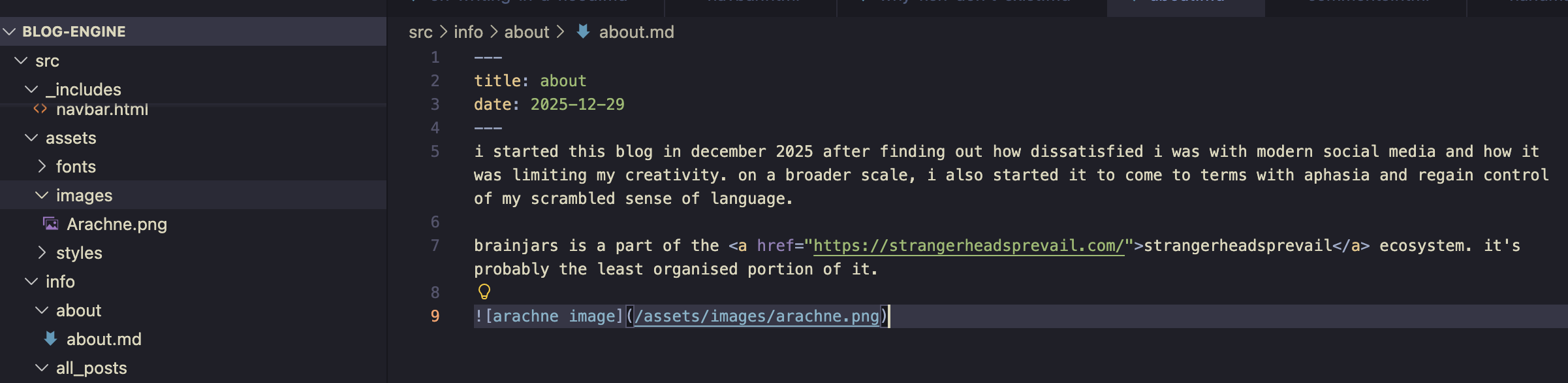
also, this is the path for the image that's supposed to show up on the "about" page. it works in the node preview but not the actual deployed site. no clue why.

Developer

Huh... not sure why that would happen. When you say you've renamed the _site folder, have you renamed it in eleventy_config.js?

What kind of hosting provider are you using?

i didn't catch the eleventy_config file! changed things in the return command (which i think is the only instance of _site?) and that seemed to clear up the stray blog posts, but my images still aren't working. maybe because it's in the about instead of a blog post? but even the absolute file path in-browser doesn't make it show up 🤔

i'm using nekoweb which afaik works roughly the same as neocities. i also use cloudflare for the domain which has caused some cache problems in the past, which is what i thought the problem was at first, but those usually clear up within a day + if i clear the cache manually which i've done for the site multiple times

OK NEVERMIND I FIGURED IT OUT I THINK! within the blog folder and only that images are case sensitive within the html? so i had to just capitalise things. i've never encountered that before haha