
Indie game storeFree gamesFun gamesHorror games
Game developmentAssetsComics
SalesBundles
Jobs
TagsGame Engines

Where is the mask marker in wigglypaint?

A topic by Mrpencilruler created 27 days ago Views: 70 Replies: 2
Viewing posts 1 to 2
(+1)

Hello, it's my first time using decker and above all wigglypaint. I'd like to know where I can find or activate the mask marker as the transparency mask mentions it. Some tiktok videos show it under the color markers and I'm wondering if it's a custom deck or the users enabled it themselves.
(+1)

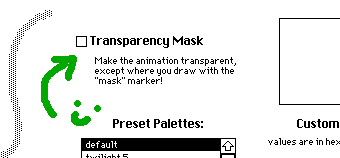
Click 'options' (above the crop button) on the drawing screen and enable 'Transparency Mask' by clicking this checkbox. 

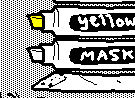
The mask marker will be available on the drawing screen (under the color markers) when you go back to it.


---

A little more explanation, for the curious: the mask marker is always on the drawing screen, it's just hidden. The checkbox in the options menu changes the mask marker's visibility from "none" to "transparent" and changes the wiggly drawing canvas from "solid" to "transparent" which reveals the pattern on the card underneath it. So now you can tell the difference between the the transparent areas and the opaque white of the mask marker when you're drawing. :)

(+2)

Thank you for answering Ahmwma! I didn't think of checking the transparency mask option before making this post. This program is really incredible and I hope I can learn more of it!