

Hi there!
I really do not get notified when someone rates my plugin. So thanks for reaching out! Any problem you have, you can talk to me through here ^^. Now, let's fix your problem!
Works perfectly when I use one bitmap font, but it breaks apart when I decide to setup two or more.
- What breaks? You mean an error pops up on the screen? Or something is showing on the console log? Or the plugin just stop working at all?
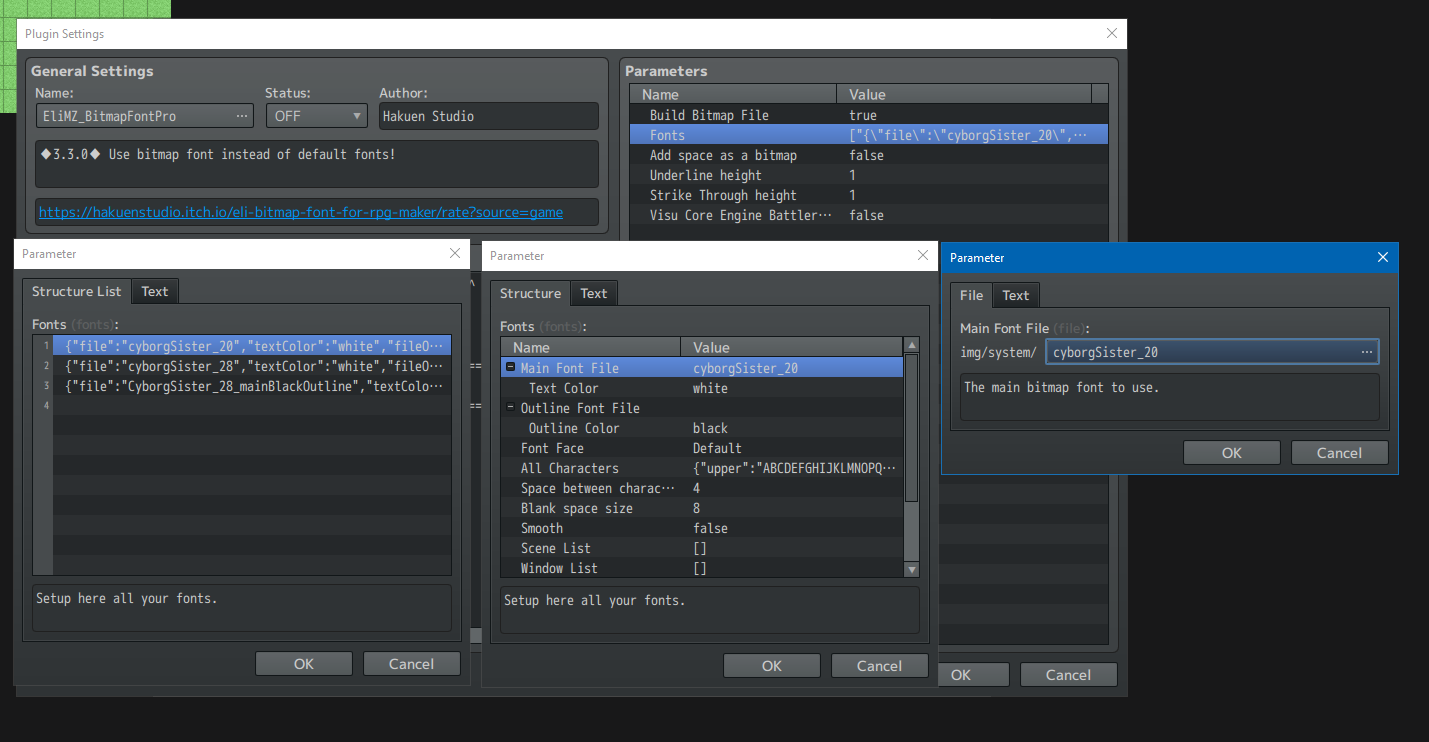
All of them tell you "The main bitmap font to use" so how do I choose a main font to use?
- "The main bitmap font to use" means that is the main bitmap font for that font configuration you are creating. Because there is another bitmap font on that same configuration, which is "Outline font file" in case you want to add an outline to that font. I think you misunderstood what "main" means on the plugin context. It does not mean default. Because each font configuration entry has it's own Main font and Outline Font.
How am I supposed to use more than one font if there's no option to set a default bitmap font?
- Each entry on the "Fonts" parameter is a new font that will be available to use. On the screenshot above, you can see that are 3 entries. Means that are 3 available fonts to use inside the game. You just need to create more entries on the "Fonts". You can create as many as you want.
I need more than one font for two reasons. One, is to change the default font to another one when entering a different world, like a different section of my game. Changing all of the font from the menu, and text boxes, and so on. Except from the title screen of course.
- This should be an easy task, but seems I removed the way to change the Default font in-game, and forgot to add it again. Currently, the default font is the first entry on the "Fonts" plugin parameter. The only way to make everything changes the font they are using, inside the game, is to using the plugin command and manually set each Window, Scene or Sprite that will use that font. That is a tedious work. I will add a new feature/plugin command to change the default font for everything in game on the fly! Sorry about that.
Though, because all of the fonts I have setup are interpreted as the "main bitmap font to use", nothing works, and no bitmap font is used at all because it doesn't know which to use, and I haven't found any way to choose one to use as default
- About choosing the default font, I already answered you that on the answer above. The way the plugin understand what font to use and where to use it, is if the user manually tells that to the plugin, through the plugin parameter while setup the font. There is nothing to do on "the plugin does not know which default font to use". The default font is always the first entry.
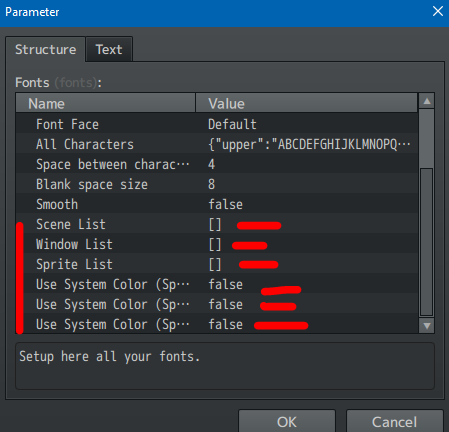
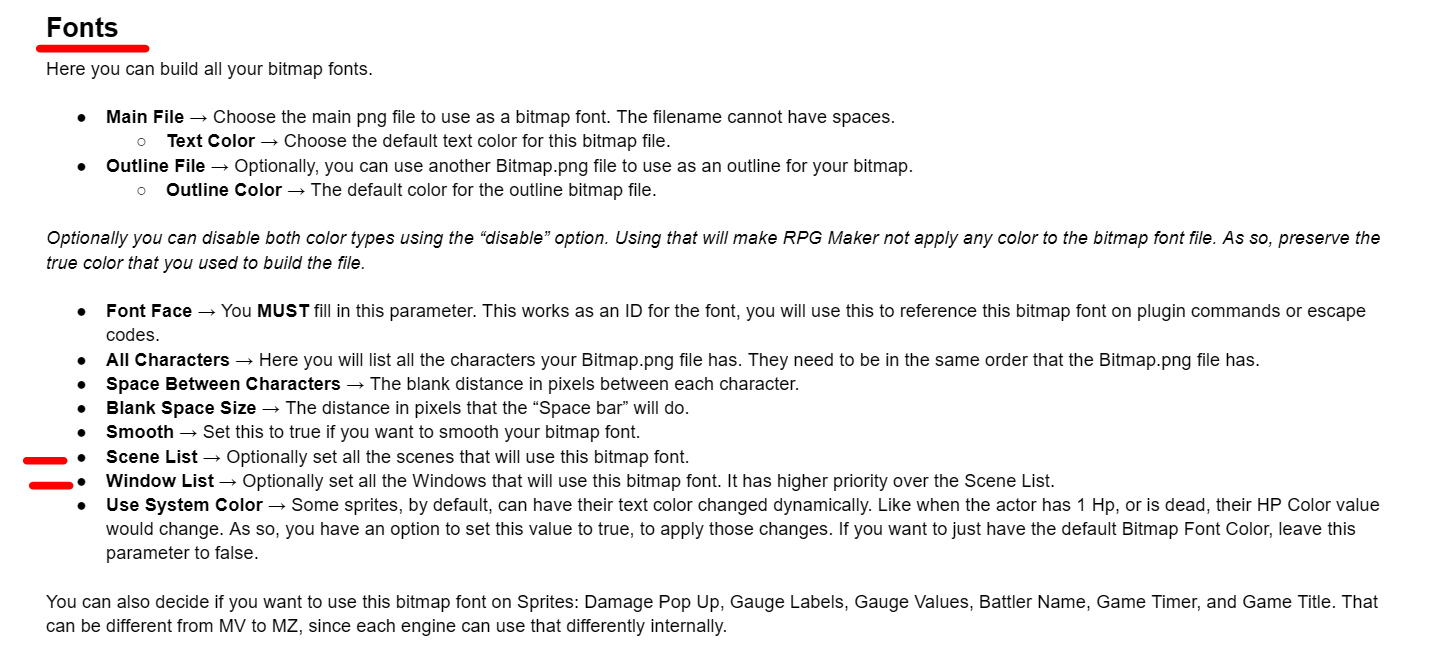
Second, is to make different characters, have different fonts for their text boxes. For that, I just write the Face Font of their font in the Show Text Command, right? Also doesn't work since basically the system doesn't know what bitmap font to use since both are interpreted as the main, so it just uses the default normal non-bitmap one.
- No, not right. Where did you see that you just need to write their Face Font in the Show text command? And how did you write that on the Show Text Command? Can you show a screenshot of this? As I said above, the plugin has no problem knowing what is the default font. If your RPG Maker is using the default normal non-bitmap one and you are sure that the plugin is set to ON inside the plugin manager, means that some plugin parameter is set wrongly and the game is throwing a silent error. If that happens again, press F12, a browser window will open. Go to the CONSOLE tab and send a screenshot of what is in there.
----------------------------------------
I think I answered all your questions. Please, next time will be nice if you just jump some lines instead of writting a wall of text. It is better for reading for me and for anyone else who wants to jump in and help you. Now let me ask you some questions:
1 - Are you using the core plugin EliMZ_Book.js somewhere above all other Eli plugins?
2 - Did you read the help file? there is a link both on the plugin page and on the plugin help inside the editor plugin manager:

3 - Besides the help file, there is also a Sample Project with the plugin already configured and working to also help you understand how to use it. Did you took a look on the sample project? The link is also on the plugin page.
4 - Will be nice, instead of just telling me what you did, if you could show it to me. Screenshots of the plugin configurations and etc.
5 - I guess, my humble opinion, is everytime you wish to give a bad rate to something, in this case to a plugin, you should always contact the author first to see what is going on. I can see you are having difficult to use it, and I'm here to help you. After the help, if you still willing to give a bad rate, then go for it. If you do not like it at all, you can also ask for a refund on itch io. They will send me an e-mail to authorize and I will.
Hope we can figure things out. Keep in mind though that using plugins in general, is for advanced users. If you are just starting with RPG Maker, is better if you keep away from them for now. Learn the engine first.