

heya, even with a 5070ti it seems to take a very long time, upwards to several minutes, to load responses with mistral small 3.2. Is this to be expected? Or could something be wrong on my end?
Ah no, I have a desktop computer running on windows 11. When I checked through taskbar, it was using nearly or 100% of my VRAM. I've tried running it from scratch or running it as administrator just to see, but nothing changed strangely enough. I'm not super well versed in all this, so I can't really make heads or tails of it.
Open a command prompt in Silverpine_Data\StreamingAssets\KoboldCPP like this:
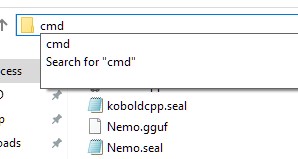
Then run this command:
koboldcpp.exe --model "Mistral-Small-3.2.gguf" --usecublas --gpulayers 999 --quiet --multiuser 100 --contextsize 4096 --skiplauncher
Then post this part of the output:
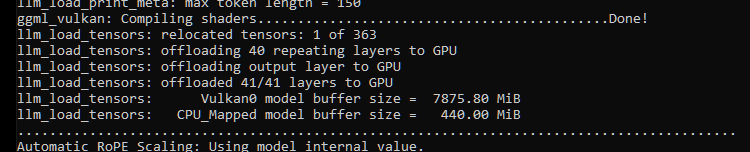
Then run this command in a separate command prompt:
curl -X POST "http://localhost:5001/api/v1/generate" -H "accept: application/json" -H "Content-Type: application/json" -d "{\"max_context_length\": 4096,\"max_length\": 100,\"prompt\": \"Lorem ipsum dolor sit amet, consectetur adipiscing elit. Mauris laoreet nunc non vehicula accumsan. Etiam lacus nulla, malesuada nec ullamcorper vitae, malesuada eget elit. Cras vehicula tortor mauris, vitae vulputate est fringilla ac. Aenean urna libero, egestas eget tristique eget, tincidunt sit amet turpis. Pellentesque vitae nulla vitae metus mattis pulvinar. Suspendisse eu gravida magna. Nam metus diam, fermentum mattis pretium vestibulum, mollis non sem. Etiam hendrerit pharetra risus, vitae fermentum felis hendrerit at. \",\"quiet\": false,\"rep_pen\": 1.1,\"rep_pen_range\": 256,\"rep_pen_slope\": 1,\"temperature\": 0.5,\"tfs\": 1,\"top_a\": 0,\"top_k\": 100,\"top_p\": 0.9,\"typical\": 1}"
After a while something like this should pop up in the first command prompt:

Please post it too. I should be able to figure out the issue then.
Thank you for the help- I've done as you said but for some reason today I can't seem to connect to the localhost port 5001- at least I think that's what's going on. It feels like a different issue altogether since before I could actually connect, though it was terribly slow still.
Here's the first output, though it looks a little different, it was the closest thing I could find.
This is the second output- though it seems to fail for some reason.
Here's me failing to connect inside the game itself.
I checked and everything is allowed through the firewall, including kobold. Should I just try another time?
If the curl command fails, the issue of connecting to localhost is related to something else on your system, not the game itself. Perhaps there's another program already running on port 5001.
As for the slowness, the game is correctly offloading all layers to the GPU. I can't fully gauge the performance from the two successful API calls you posted since they have very few input/output tokens, but I've uploaded a new version that makes 5000 series RTX GPUs use a special backend setting, which when not selected, resulted in much slower (though not minutes long) processing during my testing.