
Indie game storeFree gamesFun gamesHorror games
Game developmentAssetsComics
SalesBundles
Jobs
TagsGame Engines

TaleClip Studio

Build scenes like you would edit a video. · By NuggetMayanz

Background proportions

A topic by goliard created Dec 04, 2025 Views: 82 Replies: 3
Viewing posts 1 to 3

Hi,

Trying to work with VN Gen -- can't seem to get past the background! 
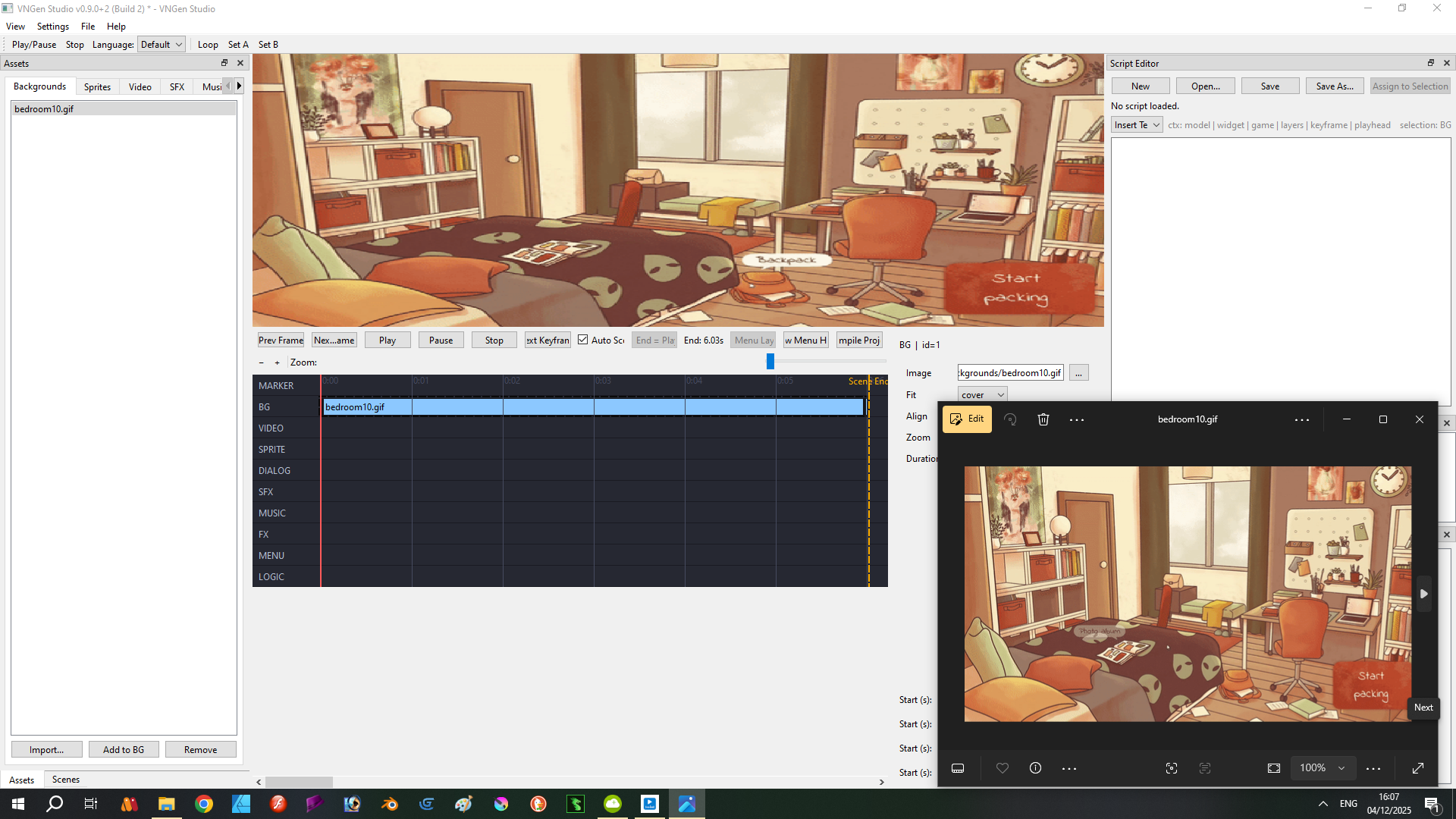
This is a screen grab of the problem. The picture in the black inset at bottom right is the correct proportion; at top is how it appears in the program. Despite 'handles' appearing at the edges of the separate regions of the image, it is not rescaleable (incidentally, this is true of all panes). So I'm kind of stuck.

J

Developer (1 edit)

Hi J,

Thanks for the screenshot. It makes the issue very clear.

What you are seeing is VNGEN Studio's current Fit Mode behavior for backgrounds. Right now, backgrounds scale automatically based on the selected mode (Cover, Contain, or Stretch). Because “Cover” zooms to fill the entire stage, it can crop or distort images with different aspect ratios. That is what is happening in your screenshot.

To get the correct proportions right now:

  1. Select the BG track item.

  2. In the right-side panel, change Fit from Cover to Contain (keeps proper proportions) or Stretch (fills the canvas).

The resize handles you are seeing are for panning, not manual scaling, and I agree it is not as intuitive as it should be.

I am currently adding new scaling controls so backgrounds and other layers will behave more predictably and allow proper manual adjustments. This will be included in an upcoming update.

Also, a small heads-up: VNGEN Studio is being renamed to TaleClip Studio soon. Same tool, just a name that better reflects its direction.

Thanks again for the feedback. Let me know if anything else feels off!

No, that doesn't work. Setting that field to "contain" does not change the proportions of the background image, and when I try to resize it the image jumps erratically. Like I said before, I really like the concept, but I'm sorry to say that the program is not usable in its present form, in my opinion.

Developer

Hi J,

I wanted to follow up now that I have worked directly on the scaling issue you reported.

I have pushed several changes to improve background handling and to make the Fit controls behave more predictably. The fixes are partially in place, and they already improve scaling, but the system is not fully polished yet. Some edge cases still behave a little rough while I continue refining the underlying layout logic.

You should see more accurate proportions than before, although the behavior is still in progress and may change again as I improve it further.

Thank you again for pointing this out early. Your report helped me focus on an area of the engine that needed more attention.

As mentioned earlier, the transition to the new name, TaleClip Studio, is underway, so future builds will use the updated branding.

If anything feels off with the revised behavior, I am glad to take another look.